
The Tool Desk
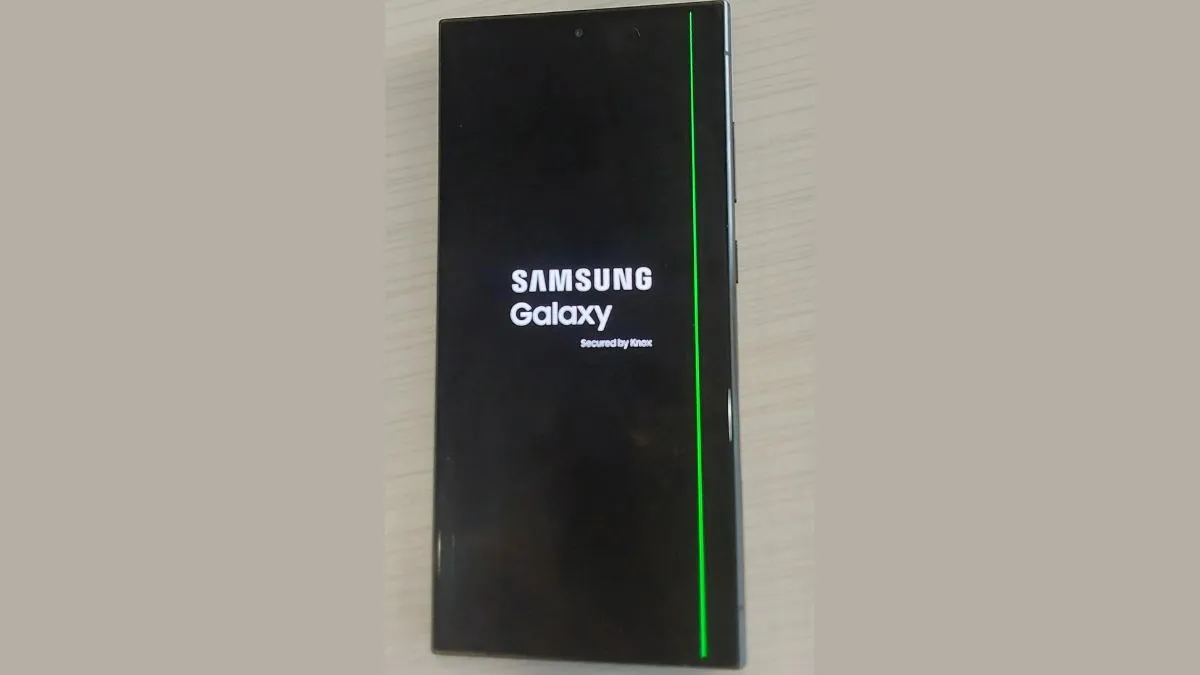
Outbyte PC Repair FREEClear out junk files and repair common Windows errorsFree Scan →Outbyte Driver Updater FREEScan for outdated or missing drivers - takes under a minuteDriver Scan →In recent developments, a number of Samsung Galaxy S24 Ultra users have reported encountering a peculiar issue with their device’s display—a thin green line appearing on the screen. This glitch has sparked widespread concern among the community, prompting discussions on various platforms about its cause and potential solutions.
Key Highlights:
- Numerous Galaxy S24 Ultra owners report seeing a thin green line on their device’s display.
- The issue seems to be appearing irrespective of the phone’s physical condition, suggesting a software or hardware anomaly.
- Samsung has yet to officially address the complaints or propose a fix.
The Galaxy S24 Ultra, Samsung’s latest flagship device, has been under scrutiny due to reports from users experiencing a thin green line on their screens. This unexpected display glitch has raised questions about the device’s quality assurance processes and left many users seeking answers and solutions.
Understanding the Issue
Users have described the appearance of a vertical green line across the screen, which remains persistent across different apps and screen contents. This issue seems to manifest randomly, with no clear trigger related to device mishandling or physical damage. Some reports also mention a white horizontal line accompanying the green line, adding to the complexity of the glitch.
User Experiences and Responses
The Samsung community forums and social media platforms have been abuzz with discussions about this issue, as affected users seek to understand the nature of the problem. Many have shared their frustrations, especially considering the premium price tag of the Galaxy S24 Ultra, which is marketed as a top-tier smartphone with cutting-edge display technology.
Do these 3 things before closing this tab:
1Repair Windows errors before they cause bigger problems2Scan for outdated or missing drivers - takes under a minute3Clear out junk files and repair common Windows errorsShopping ad

- 6.8″ Dynamic AMOLED 2X QHD+ display with a 1–120 Hz adaptive refresh rate and up to ~2600 nits peak brightness — delivering a bright, sharp screen with smooth scrolling and great outdoor visibility.
Samsung’s Silence and Speculation
As of now, Samsung has not issued a formal statement regarding the green line display issue. This lack of communication has led to speculation and uncertainty among users, some of whom are considering warranty claims or seeking independent repairs.
Possible Causes and Solutions
Tech experts and users alike have theorized possible causes for the green line issue, ranging from software bugs to hardware failures in the display panel. Some suggest that a firmware update could resolve the issue if it is software-related. However, hardware issues may require more drastic measures, such as screen replacement.
Shopping ad

- 6.8″ Dynamic AMOLED 2X QHD+ display with a 1–120 Hz adaptive refresh rate and up to ~2600 nits peak brightness — delivering a bright, sharp screen with smooth scrolling and great outdoor visibility.
Looking Ahead
The green line issue on the Galaxy S24 Ultra poses a significant concern for both current and potential users. It highlights the importance of robust quality control measures and responsive customer service. Users are eagerly awaiting an official response from Samsung, hoping for a solution that will rectify this unwelcome glitch.
Conclusion
Galaxy S24 Ultra’s green line screen issue has put a spotlight on the challenges of maintaining quality in cutting-edge tech devices. As discussions continue and users seek resolutions, the tech community remains hopeful that Samsung will address the problem with the urgency and seriousness it deserves. This situation underscores the dynamic nature of technology and the continuous need for innovation and improvement in the pursuit of perfection.
Quick Recap
Shopping ad

- 6.8″ Dynamic AMOLED 2X QHD+ display with a 1–120 Hz adaptive refresh rate and up to ~2600 nits peak brightness — delivering a bright, sharp screen with smooth scrolling and great outdoor visibility.
Shopping ad

- 6.8″ Dynamic AMOLED 2X QHD+ display with a 1–120 Hz adaptive refresh rate and up to ~2600 nits peak brightness — delivering a bright, sharp screen with smooth scrolling and great outdoor visibility.
Shopping ad

- 6.8″ Dynamic AMOLED 2X QHD+ display with a 1–120 Hz adaptive refresh rate and up to ~2600 nits peak brightness — delivering a bright, sharp screen with smooth scrolling and great outdoor visibility.
Product prices and availability are accurate as of the date/time indicated and are subject to change. Any price and availability information displayed on Amazon at the time of purchase will apply.
Independent reader supportYour contribution helps us test, update, and keep practical guides available for everyone.
