AccioPix Photo Culling
acciopix.com · checked 15 Oct 2026
A browser culler that separates shoot frames into picks, keepers, duplicates, and rejects.
How it plugs in
Signal on AI Photo Culling Software6.6#4 of 29
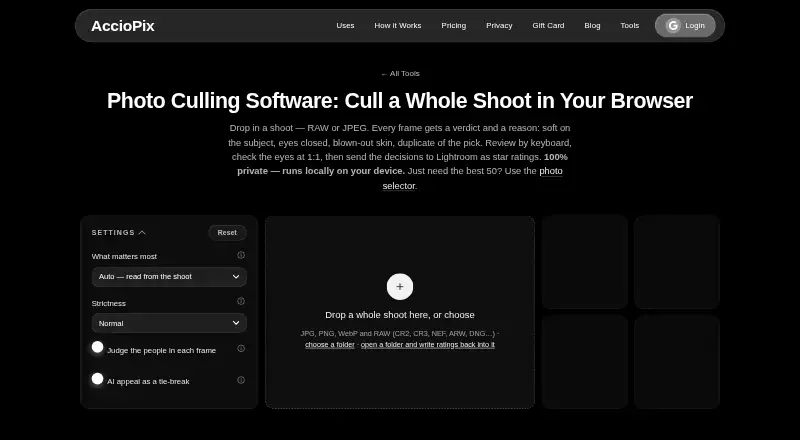
AccioPix Photo Culling runs in a browser and reviews JPG, PNG, WebP, and many RAW files. It groups bursts, finds technical problems, and explains each decision. Optional face and appeal analysis add more checks. Keyboard review lets you revise decisions and export Lightroom ratings, a keepers list, and a CSV.
Review
In a line
AccioPix Photo Culling sorts full photo shoots in the browser. Frames receive labels such as picks, keepers, duplicates, or rejects, along with a reason for each choice.
What it does
The tool groups nearby frames into bursts and puts near-identical losers behind the selected frame. It can flag soft subjects, closed eyes, blown highlights, black or detail-free frames, and other exposure problems.
An optional people check looks at face sharpness, eye closure, expression, head position, and skin exposure. An optional NIMA appeal score considers composition, subject, and light only to break technical ties.
Arrow navigation and shortcuts move through the results; a 1:1 view lets you inspect eyes, and any pick, keep, or reject can be changed. RAW files use their embedded JPEG preview, so conversion is not required.
How it connects
The accepted inputs are JPG, PNG, WebP, and RAW formats such as CR2, CR3, NEF, ARW, and DNG. Measurements run in your browser on your device, and the page says photos are not uploaded.
For RAW images, it creates XMP star ratings and also provides a keepers list plus a CSV explaining each frame's result. Chrome and Edge can write XMP sidecars into the selected folder. Lightroom does not read sidecars next to JPEGs, so JPEG decisions come from the keepers list and CSV.
The service is available through web, macOS, Windows, and an API. It is not open source. The optional face model downloads once at about 15 MB and the appeal model once at about 13 MB, then stays cached.
Good fit
This suits photographers who want to narrow a whole shoot before delivery, especially when bursts, duplicates, blur, blinking, or exposure failures make manual review slow.
It also fits Lightroom workflows that use RAW star ratings and separate lists for JPEG decisions. The page states that the computer's capacity is the only photo-limit constraint.
Watch for
JPEG sidecars are not read by Lightroom, so JPEG work needs the supplied list and CSV. The appeal score is only a tie-breaker; it does not replace the technical checks.
Face and appeal analysis are optional downloads. Check that your computer can hold the shoot and the downloaded models before starting.
Pricing
The photo-culling tool is free, with no sign-up or subscription and no stated photo limit beyond your computer's capacity. There is no free trial because the culling plan itself is free.
AccioPix's separate event-delivery service costs ₹0.20 per photo processed. The first 100 photos for a new event account are free; albums are hosted for one year by default.
Verdict
Choose AccioPix if you want browser-based sorting with clear reject reasons, burst grouping, optional face checks, and Lightroom-oriented exports without paying for the culling tool.
Look elsewhere if you need Lightroom to apply JPEG sidecars directly, an open-source product, or a culler that does not depend on your computer's available storage and processing capacity.
Our take
AccioPix is a sensible no-cost option for photographers who want to reduce a large shoot before delivery. Its strongest points are local browser analysis, broad RAW support, burst stacking, and exports that map RAW choices to Lightroom stars. Manual overrides and detailed reject reasons help keep control in the photographer's hands. JPEG workflows need extra care because Lightroom ignores those sidecars. Optional face and appeal models require downloads, and available computer capacity sets the tool's practical limit instead of a published photo quota.
- Free culling with no sign-up or subscription
- Runs measurements in the browser without uploading photos
- Supports many RAW formats and embedded previews
- Burst grouping and reasons for technical rejects
- Exports RAW XMP ratings, keepers, and CSV explanations
- Lightroom ignores XMP sidecars beside JPEG files
- Optional models require downloads of about 15 MB and 13 MB
- The computer determines how many photos can be handled
- Not open source
- Pick it ifPhotographers culling full shoots before delivery; Lightroom users working mainly with RAW files; People wanting local, browser-based review
- Skip it ifYou need Lightroom to read JPEG sidecars automatically; You require open-source code; Your computer cannot hold the shoot and model downloads
Pricing
Photo culling is free with no sign-up, subscription, or stated photo limit beyond computer capacity. Separate event delivery is ₹0.20 per photo, with the first 100 photos free for new event accounts.
- Free photo culling toolFree; no sign-up · No photo limit beyond your computer’s capacityFree
- Photo Culling free toolNo sign-up or subscription · No stated photo limit beyond computer capacity · JPG, PNG, WebP and RAWFree
- AccioPix event deliveryPer photo processed; credits do not expire · Up to 20,000 photos per event · First 100 photos free · Album hosting for 1 year₹0.20 one-time
As acciopix.com lists them, checked 2 Oct 2026.
Questions
Is AccioPix Photo Culling free?
Yes. The culling tool is free, requires no sign-up or subscription, and has no stated photo limit beyond what your computer can hold.
Does it upload my photos?
The page says photo measurements run in your browser on your device and that photos are not uploaded.
Which file types can it read?
Supported inputs include JPG, PNG, WebP, and RAW formats such as CR2, CR3, NEF, ARW, and DNG. RAW files use their embedded JPEG preview.
Can it export to Lightroom?
RAW images receive XMP star ratings, and the tool also supplies a keepers list and CSV. Lightroom does not read sidecars beside JPEGs, so JPEG decisions use the list and CSV.
What problems can it detect?
It can identify soft subjects, closed eyes, blown highlights, black or detail-free frames, poor exposure, and near-duplicate frames. Optional face analysis adds expression, head-pose, and skin checks.
Does it have an API or desktop support?
The listed platforms are web, macOS, Windows, and API.
What does event delivery cost?
The separate event-delivery service costs ₹0.20 per photo processed. New event accounts get the first 100 photos free.