Action! Review: Windows Game Recording and Streaming
mirillis.com · checked 17 Nov 2026
Windows game recorder with instant replay, console capture, streaming, webcam overlays, and up to 4K video.
How it plugs in
Signal on Game recording software6.5#18 of 30
Action! is paid recording software for Windows. It captures gameplay, console video, screenshots, webcam footage, and separate audio tracks. It supports instant replay, GPU encoding, live streaming, benchmarking, and overlays. Home and commercial licenses are one-time purchases, while a 30-day trial adds a watermark to recordings.
Review
In a line
Action! is Windows software for recording gameplay, consoles, and webcams, with live broadcasting. It includes instant replay and supports video capture up to 4K Ultra HD.
What it does
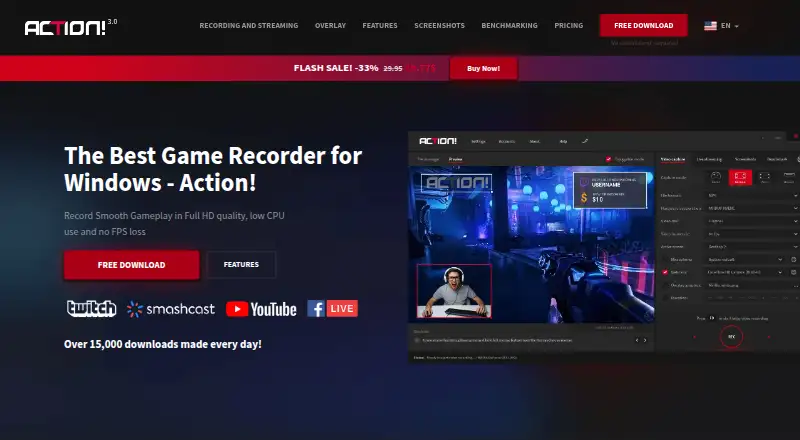
The recorder supports multi-mode recording. It can record smooth Full HD gameplay with low CPU use and no frame-rate loss, and it can capture 4K Ultra HD video without a time limit.
You can save screenshots as BMP, JPG, or PNG files. Webcam footage can be added, cropped, resized, moved, or shown through a green-screen overlay.
Action! can record microphone and system sound separately, mix them, or save audio from another device. Its benchmarking tool checks in-game frame rates, compares titles, and saves results as an HTML bar graph.
How it connects
For live broadcasts, Action! connects to YouTube, Facebook, Twitch, Smashcast, Ustream, and other services. It supports Streamlabs and up to six modular URL overlay graphics.
Device recording works with Xbox and PlayStation consoles at up to 4K. Capture-card support includes Elgato, Avermedia, and Hauppauge.
A free Android app can remotely control recording status. The software runs on Windows.
Good fit
Action! suits Windows players who want gameplay recording, instant replay, webcam overlays, or live streaming in one program. It also fits people capturing console footage through supported cards.
Its separate audio tracks, screenshot formats, GPU encoding, and benchmarking can help users who need more control over recordings.
Watch for
Action! is available for Windows only. Console capture requires compatible hardware, and the listed capture-card support covers Elgato, Avermedia, and Hauppauge.
The trial lasts 30 days and places a watermark in the top-middle of recorded videos. The facts list 8K capture, but the stated maximum video quality is 4K Ultra HD, so check the exact mode you need.
Pricing
Action! has no free plan, but it offers a 30-day trial with no credit card required. Trial recordings include a watermark, and no trial price is listed.
Home use costs $19.77 one-time. This is a lifetime license for non-commercial use with free updates forever.
Commercial use costs $32.95 one-time. It is a lifetime commercial license for earning money from recorded videos and includes free updates forever.
Verdict
Choose Action! if you use Windows and want a single paid tool for game recording, streaming, console capture, webcam overlays, and instant replay. Its lifetime licenses and ongoing updates avoid recurring payments.
Look elsewhere if you need macOS or another platform, a free plan, or a trial without a watermark. Console users should also confirm that their capture card is supported before buying.
Our take
Action! makes sense for Windows users who want recording, streaming, webcam layers, and console capture under one lifetime license. The commercial edition covers people who earn money from their videos, while the home edition is for non-commercial use. The 30-day trial lets you check the workflow, but its watermark affects recorded output. Buyers should verify their console hardware and decide whether the stated 4K maximum meets their needs, especially because the facts also mention 8K capture.
- Lifetime home and commercial licenses
- Instant replay and GPU encoding
- Console capture up to 4K
- Separate microphone and system audio tracks
- Free updates forever
- Windows only
- No free plan
- Trial videos carry a watermark
- Console capture needs compatible hardware
- Stated capture limits include conflicting 8K and 4K details
- Pick it ifWindows gamers recording or streaming gameplay; Creators needing webcam and separate audio tracks; Users capturing Xbox or PlayStation video
- Skip it ifYou need software for macOS or another platform; You require a free plan or watermark-free trial output; Your capture card is outside the listed supported brands
Pricing
There is no free plan. A 30-day trial is available with no listed price, but it adds a watermark. Paid licenses are one-time: $19.77 for home use and $32.95 for commercial use, both with lifetime validity and free updates.
- Home useLifetime license · Free updates · Non-commercial use$19.77 one-time
- Commercial useLifetime license · Free updates · Commercial use$32.95 one-time
- Action! Digital Versionlifetime license; free updates$19.77 one-time
- Trial VersionOn request
As mirillis.com lists them, checked 28 Sept 2026.
Questions
Does Action! work on Mac?
No. The listed supported platform is Windows.
Is there a free version of Action!?
There is no free plan. A 30-day trial is available without a credit card, but trial recordings have a watermark.
What video quality does Action! support?
The detailed specification says up to 4K Ultra HD. The facts also list 8K capture, so check the exact mode before buying.
Can Action! record Xbox and PlayStation?
Yes. Device recording supports Xbox and PlayStation at up to 4K, using supported capture hardware.
Which streaming services work with Action!?
It can broadcast to YouTube, Facebook, Twitch, Smashcast, Ustream, and more.
What does the home license allow?
The $19.77 one-time home license is lifetime, includes free updates, and is for non-commercial use.
What does the commercial license cover?
The $32.95 one-time commercial license is lifetime, includes free updates, and covers earning money from recorded videos.