AdLock for Desktop, Mobile, and Android TV
adlock.com · checked 27 Sept 2026
AdLock filters advertising, trackers, malware, and cookie prompts on computers and mobile devices.
How it plugs in
Signal on Ad Blocking Software6.7#2 of 29
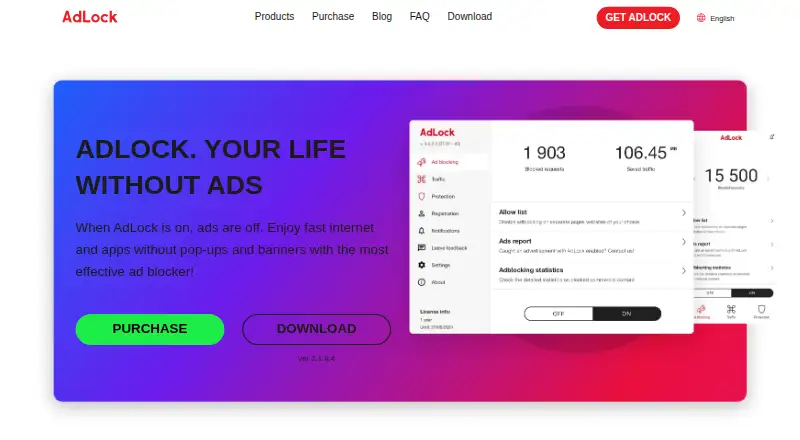
Across Windows, macOS, iOS, Android, and Android TV, AdLock filters advertising, tracking scripts, malware, malicious requests, redirects, and cookie pop-ups. Users can allow ads on chosen sites or apps and add custom filter lists. A free plan and browser extensions are available; paid plans cover five devices.
Review
In a line
AdLock provides ad blocking for desktop and mobile hardware. It also filters trackers, malware, malicious requests, redirects, and cookie pop-ups.
What it does
AdLock blocks all types of ads by default and does not use an acceptable-ads program. You can permit ads on specific websites or apps when needed.
It filters HTTP and HTTPS connections, which can reduce page work and mobile data use. AdLock says it uses few device resources and can help extend battery life.
Custom filter lists let you add your own blocking rules.
How it connects
The service operates on Windows, macOS, iOS, Android, and Android TV. Chrome, Safari, and Firefox are supported, and free extensions are offered for popular browsers.
The service lists support or setup guides for YouTube, Twitch, Discord, Brave, and Android TV. You can use it across up to five devices on paid plans.
For more options, compare ad blockers and ad blocking software.
Good fit
AdLock suits people who want one blocker for computers, phones, and Android TV. It is useful for blocking ads and cookie prompts while also filtering trackers and harmful requests.
It may fit households that need coverage on several devices, with paid plans supporting five devices. People who want adjustable rules can use site and app exceptions or custom lists.
Watch for
Paid plans cover five devices, so larger device groups may need another option. Browser support named in the facts is Chrome, Safari, and Firefox.
Choosing the monthly option means $9.95 each month, or $119.40 over a year if billed monthly. Check the billing term before choosing it.
AdLock offers free browser extensions, but no price is listed for those extensions.
Pricing
AdLock has a free plan, free browser extensions, and seven-day trials for standalone apps on major operating systems.
Paid subscriptions protect five devices and come with a 30-day money-back guarantee. The one-month term is $9.95 per month, the one-year term is $39.50 per year, and the five-year term is $15.99 per year billed every five years.
Payment methods listed are Visa, Mastercard, Apple Pay, PayPal, iDEAL, and Amex.
Verdict
AdLock fits users seeking ad, tracker, malware, and cookie-pop-up filtering on Windows, macOS, iOS, Android, or Android TV. Its exceptions and custom lists add control, while the free plan lets you start without paying.
Check device limits and billing carefully.
Our take
AdLock offers broad filtering for computers and mobile devices, including Android TV. The free plan and seven-day standalone-app trials make it easy to try. Paid subscriptions support five devices and include a 30-day money-back period. The monthly option becomes expensive over a year, while longer terms lower the yearly rate. Check that your browsers and device count fit the stated support before paying.
- Available on Windows, macOS, iOS, Android, and Android TV
- Filters ads, trackers, malware, redirects, and cookie pop-ups
- Custom filter lists and per-site or per-app exceptions
- Paid plans cover five devices
- Free plan, browser extensions, and seven-day app trials
- Paid plans are limited to five devices
- Named browser support is Chrome, Safari, and Firefox
- Billed monthly, the one-month option totals $119.40 over a year
- Pick it ifPeople blocking ads across desktop, mobile, and Android TV; Households needing up to five covered devices; Users who want custom lists and blocking exceptions
- Skip it ifYou need coverage for more than five devices on one paid plan; You require a browser outside the named Chrome, Safari, and Firefox support
Pricing
A free plan and free browser extensions are available. Paid options cost $9.95 monthly, $39.50 yearly, or $15.99 per year on a five-year billing term; paid plans cover five devices and include a 30-day money-back guarantee.
- 1 month$119.40/year if billed monthly · 5 devices$9.95/mo
- 1 yearbilled yearly · 5 devices$39.50/yr
- 5 yearsbilled every 5 years · 5 devices$15.99/yr
- Free browser extensionsOn request
As adlock.com lists them, checked 27 Sept 2026.
Questions
What devices does AdLock support?
Windows, macOS, iOS, Android, and Android TV are listed as supported platforms.
Which browsers work with AdLock?
The listed browser support includes Chrome, Safari, and Firefox. Free extensions are available for popular browsers.
Does AdLock have a free version?
Yes. AdLock offers a free plan, free browser extensions, and seven-day trials for standalone apps on major operating systems.
How many devices can a paid plan cover?
Paid plans cover five devices.
Can I allow ads on a website or app?
Yes. Specific websites or apps can be permitted to display ads.
What does AdLock block besides ads?
Beyond advertising, it filters tracking scripts, malware, malicious requests, redirects, and cookie pop-ups.
What is the cheapest paid AdLock plan?
The five-year term costs $15.99 per year and is billed every five years. Paid plans include a 30-day money-back guarantee.