AI Face Swap review
aiface-swap.com · checked 14 Oct 2026
Swap faces in web-based photos, videos and GIFs, with an extension and API available.
How it plugs in
Signal on AI Face Swap Tools6.3#9 of 57
The service uses AI to put one face onto another in photos, videos and GIFs. You can begin without creating an account, upload files or enter a YouTube link, and work with several common video formats. Free photo results do not carry a watermark. Video and GIF use on the free tier has duration, file-size, usage and watermark restrictions. Commercial use is reserved for paid subscribers.
Review
In a line
AI Face Swap is a web tool that detects faces and substitutes them in photos, videos and GIFs. Alongside the website, it comes as a browser add-on and an API.
What it does
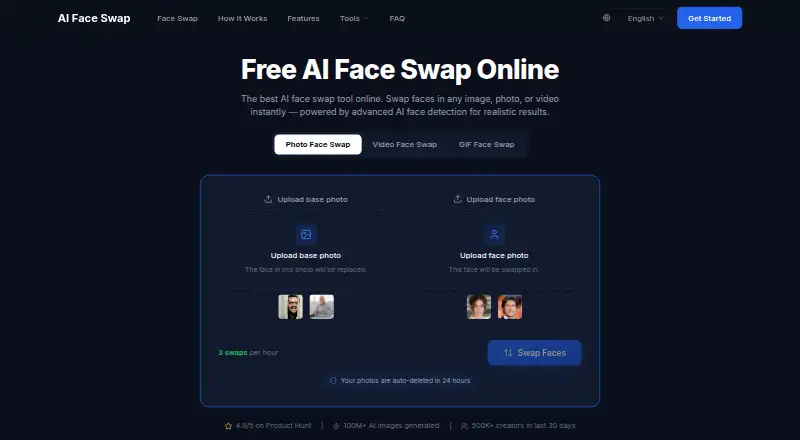
For a photo, upload a target image and a face image to receive a generated swap. Faces in video are handled one frame at a time, while the GIF tool works through the animation's frames. A YouTube URL can also supply the source video.
A dashboard Multi Face Swap feature can map several faces in one video. Other advertised tools include celebrity-image swaps, 4K face-swap images, automatic alignment and blending, and more than ten variants from the same source assets.
The maker says a typical 30-second video completes in under a minute, while a short GIF generally takes 10–30 seconds. Clear, front-facing, well-lit, high-resolution faces tend to produce better results.
How it connects
Access is available through the website, a browser extension, or a scalable API intended for high-volume work. You can begin swapping without registering an account.
Uploads may be your own files or a YouTube URL. The listed video formats include MP4, MOV, AVI, WebM, MKV and FLV. GIFs can come from uploaded files or direct GIF URLs.
According to the extension listing, processing takes place in the browser, with batch processing and sharing tools included.
Good fit
It suits people who need quick face swaps for photos, short videos, GIFs or social content, especially when they want to begin without signing up.
The dashboard's multi-face video option fits projects with several people. The API is aimed at high-volume use, while the extension offers browser-based processing and batch work.
Watch for
On the free tier, video clips may run for up to one minute and uploads may be 500 MB; GIF files are limited to 50 MB. Pro is described as allowing videos as long as ten minutes and GIFs up to 200 MB.
Free photo results are presented as watermark-free, whereas video and GIF results on that tier show a watermark. Non-paying users may use results only personally and not commercially; commercial rights are available to paid subscribers.
The maker says uploaded and generated files are removed within 24 hours, are not shared or used for model training, and are encrypted both in transit and at rest. Poorly visible or obscured faces may lower the quality.
Pricing
AI Face Swap follows a freemium model and includes a Free plan. The plan permits three swaps per hour; its FAQ also gives daily quotas of five photo swaps, five head swaps, three video swaps and three GIF swaps.
Free video use covers clips up to one minute and files up to 500 MB, while free video and GIF results display a watermark. Commercial output requires a paid subscription.
Verdict
Choose AI Face Swap if you want a no-sign-up web tool for quick image, video or GIF replacements, or need an extension or API for larger workflows. Its free access is useful for trying photo swaps, but video and GIF users must accept watermarks and tight limits.
Check the input quality, usage allowance and commercial-rights rules before adopting it for regular work. A paid plan is needed for commercial output, while multi-person video work requires the dashboard feature rather than the single-face standard plan.
Our take
AI Face Swap works well for casual face replacement and short social clips, with website, extension and API options. Starting without an account and getting unwatermarked photos makes the free tier easy to test. Free video and GIF work, however, faces duration, file-size, daily-use and watermark constraints. Anyone producing paid or client material should budget for a subscription because free output is personal-use only. Consistent results also depend on clear, front-facing source faces.
- Can be used before creating an account
- Free photo results are watermark-free
- Handles photos, videos, GIFs and YouTube video URLs
- Website, browser extension and scalable API options
- States that files are deleted within 24 hours
- Free video runs for no more than one minute and accepts up to 500 MB
- Free GIF uploads can be at most 50 MB
- Video and GIF results on the free tier show a watermark
- Commercial use is unavailable to free users
- Dark, hidden or otherwise poor faces may hurt results
- Pick it ifFast face replacement in photos, videos and GIFs; People who need browser or API connectivity; Personal projects using clear face images
- Skip it ifYou require free video or GIF files without a watermark; You want commercial rights without a subscription; Your source faces are dark, obscured or low resolution
Pricing
The Free plan has hourly and daily swap quotas, and its video and GIF results are watermarked for personal use. Paid subscribers receive commercial-use rights; Pro is described with longer video and larger GIF allowances.
- Free3 swaps per hour; FAQ lists 5 photo, 5 head, 3 video and 3 GIF swaps daily · video/GIF watermark on free tier · personal, non-commercial useFree
As aiface-swap.com lists them, checked 14 Oct 2026.
Questions
Is an account required before using AI Face Swap?
No. Swapping can begin without signing up.
What kinds of media are supported?
Photos, videos and GIFs are supported. Files can be uploaded, and a YouTube URL can provide a video source.
Do free outputs show watermarks?
Photo results are advertised without watermarks, but free video and GIF results carry one.
How much video can the free tier handle?
Free uploads may be up to 500 MB, and each free clip may last up to one minute.
Are commercial uses allowed?
Paid subscribers can use outputs commercially; users who do not pay are restricted to personal, non-commercial use.
How are uploaded files handled?
Uploaded media and generated outputs are said to be automatically deleted within 24 hours, and the content is not shared or used for AI training.
Near it
All alternatives →- VAVidwud AI Face Swap#8 on this board
- FO
 FaceSwap Offline: AI Editor#10 on this board
- M
 Morface#7 on this board
- FFaceHub#11 on this board
- AEAI Ease#6 on this board
- FA
 FaceSwapper.ai#12 on this board
- SSwapFace#5 on this board
- IiSamurai#13 on this board
- YYouInMeme#4 on this board
- PA
 PixNova AI Face Swap#14 on this board