AirMore: Wireless Phone Transfers Through a Browser
airmore.com · checked 14 Oct 2026
Wireless phone-to-PC file transfer and device management in a web browser.
How it plugs in
Signal on Phone Transfer Software6.7#1 of 44
AirMore links an Android or iOS phone to a computer over Wi-Fi. From its browser workspace, users can work with photos, music, videos, files, and documents. Android support adds contact and message management, call-history and notification display, app tools, screenshots, and screen mirroring. No computer-side client or plugin is needed, and both free and paid plans are offered.
Review
In a line
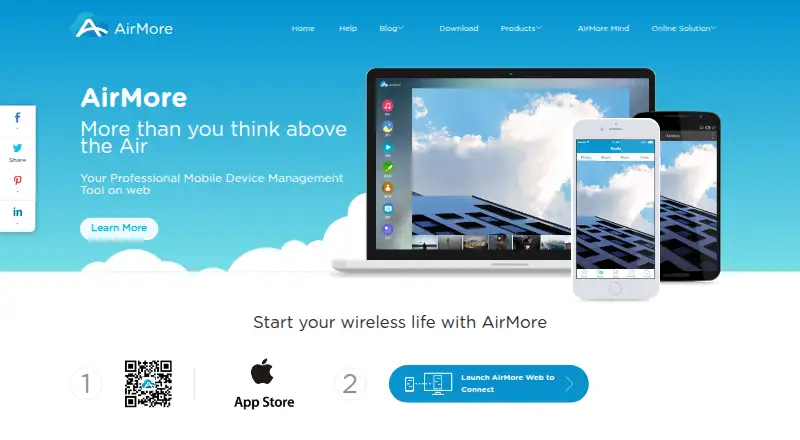
AirMore lets a mobile phone connect wirelessly to a computer through a browser. Phone data can then be transferred and managed from that computer.
What it does
A phone and computer can exchange music, videos, photos, folders, and documents such as text, Word, Excel, EPUB, and PDF files. The browser also plays music and videos, presents photos as a slideshow, and lets you create, move, or delete files and folders.
On Android, AirMore provides contact and message management, displays call logs and notifications, and supports installing, removing, backing up, and sharing apps. It can capture screenshots and mirror the Android screen on the computer. The official feature page labels Backup & Restore as under construction.
How it connects
In the current connection mode, the phone and computer connect through a shared Wi-Fi network. AirMore says files moved locally stay on that network rather than on its servers, while transfers support HTTPS. Access to the phone requires your permission.
A computer accesses AirMore through a browser, with no client or plugin installation. The service covers Android and iOS, and its listed platforms include Android, iOS, Linux, macOS, the web, and Windows. Safari, Chrome, and Firefox are named as supported browsers. Official pages do not publish a public API or SDK, open-source code, or a self-hosting package.
Good fit
AirMore is aimed at people who want to move phone data without a cable or desktop client. It is useful for organizing media and documents from a larger computer screen.
Android owners who need browser access to contacts, texts, call history, apps, screenshots, or screen mirroring get the broadest set of controls. iPhone and iPad users can use the transfer features, subject to the listed system requirements.
Watch for
The phone and computer have to use the same Wi-Fi network. AirMore's browser connection is not presented as a public API, open-source project, or self-hosted service.
Backup & Restore is still labeled under construction. The iOS listing requires iOS 10 or later, iPadOS 10 or later, and macOS 11 or later on an Apple M1-or-newer Mac.
Pricing
A free AirMore option is available. The AirMore plan costs nothing for wireless phone-to-PC use, and the Free plan is billed Free for core wireless transfer with in-app purchases available.
Paid options are AirMore Monthly VIP at $3.99 a month (billed Monthly), AirMore Quarterly VIP at $9.99 a month (billed Quarterly), and AirMore Yearly VIP at $40.99 a year (billed Yearly). These provide premium version access.
Verdict
Choose AirMore if you want browser-based phone transfers and, on Android, extra controls for messages, contacts, apps, and the phone screen. Its free tier covers the basic wireless connection, so it can fit occasional transfers.
Consider another service if you need a desktop application, a public developer interface, self-hosting, or a finished backup feature. Also check the same-network requirement and your device's operating-system version before paying for premium access.
Our take
AirMore gives you browser-based phone transfers without requiring a PC program. Android users get more than file transfer, including browser controls for messages, contacts, call history, apps, screenshots, and screen display. Free options cover core wireless use, while VIP plans add premium access. The main checks are whether both devices can share Wi-Fi, whether your browser and operating system meet the requirements, and whether the unfinished Backup & Restore feature matters to you. It is not suited to buyers seeking an API, self-hosted deployment, or open-source software.
- Wireless transfers work from a PC browser
- Supports photos, music, videos, folders, and common documents
- Android tools include messages, contacts, call logs, and apps
- No PC client or plugin installation
- Free plan available
- The current connection works only when phone and PC share Wi-Fi
- Backup & Restore is marked under construction
- No public API, SDK, open-source code, or self-hosting package
- Some management features are Android-only
- Pick it ifPeople moving phone files from a computer browser; Android users wanting browser-based device controls; Users who prefer a free wireless transfer option
- Skip it ifYou need a desktop client, public API, or self-hosted deployment; You require a completed backup and restore feature; Your devices cannot share the same Wi-Fi network
Pricing
Core wireless transfer is free. Premium access is $3.99 a month, $9.99 a month billed quarterly, or $40.99 a year billed yearly; in-app purchases are available on the Free plan.
- AirMoreFree to use · wireless connection between mobile device and PCFree
- FreeFree · Core wireless transfer · in-app purchases availableFree
- AirMore Monthly VIPMonthly · Premium version access$3.99/mo
- AirMore Quarterly VIPQuarterly · Premium version access$9.99/mo
- AirMore Yearly VIPYearly · Premium version access$40.99/yr
As airmore.com lists them, checked 11 Oct 2026.
Questions
Does AirMore work with both Android and iPhone?
Yes. AirMore supports Android and iOS devices. Android adds contact and message management, call-log and notification display, app tools, screenshots, and screen mirroring.
Do I need to install a program on my computer?
No. The computer uses AirMore in a browser, without a PC client or plugin.
Must my phone and computer use the same Wi-Fi?
Yes. For the current local connection, both devices need to be connected to one Wi-Fi network.
Are transferred files stored on AirMore's servers?
AirMore says files transferred in local connection mode remain on your network and are not stored on its servers. Transfers support HTTPS.
What can AirMore transfer?
Photos, music, videos, folders, and text, Word, Excel, EPUB, and PDF documents can be transferred. Media can also be played or viewed in the browser.
Does AirMore offer a public API?
Its official pages explain browser and mobile-app use but do not publish a public API or SDK.
Is AirMore free?
Yes. Core wireless transfer is available on free plans. VIP options are $3.99 a month, $9.99 a month billed quarterly, or $40.99 a year billed yearly.
Near it
All alternatives →- SMSyncios Manager#2 on this board
- VEvivo EasyShare#3 on this board
- HD
 HONOR Device Clone#4 on this board
- WMWondershare MobileTrans#5 on this board
- ASAndroid Switch#6 on this board
- A
 ApowerManager#7 on this board
- FFoneTool#8 on this board
- DIDearMob iPhone Manager#9 on this board
- CM
 CopyTrans Manager#10 on this board
- EMEaseUS MobiMover#11 on this board