Altitask: AI Workspace for Study and Meeting Planning
altitask.com · checked 15 Oct 2026
Workspace for turning lectures and meetings into transcripts, plans, tasks, projects and calendar entries.
How it plugs in
Signal on Study Planner Apps6.3#11 of 38
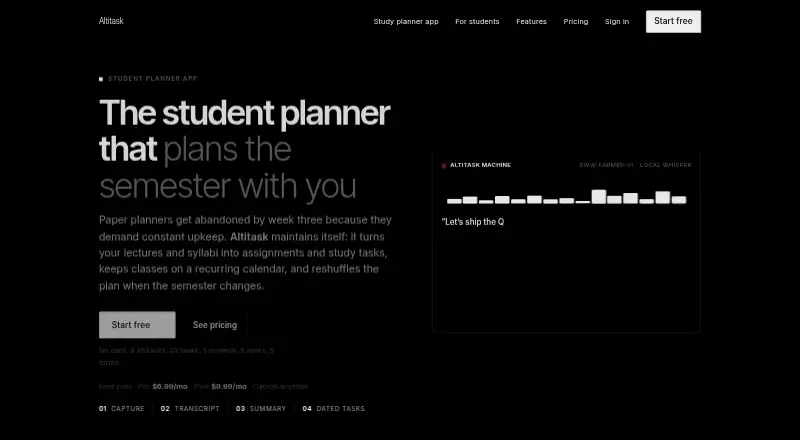
Altitask combines transcription, summaries, task creation and planning in one workspace. Students can import calendars, extract assignments from syllabi and schedule study work. Meeting users can connect paid Zoom, Teams or Google Meet accounts or upload recordings. The service is available through a browser extension and the web, with free and paid monthly options.
Review
In a line
Altitask brings meeting and lecture capture into a web and browser-extension workspace for organizing follow-up work. It moves from a recording or uploaded file to a transcript, summary, tasks, projects and calendar entries.
What it does
Students can use Altitask to keep recurring classes, assignment deadlines and planned study sessions together. A pasted or uploaded .txt or .docx syllabus is turned into dated assignment tasks, and university calendars can be brought in through ICS.
Recorded .mp3, .wav, .m4a and .mp4 files up to 200 MB are processed into transcripts and summaries.
Detected follow-ups become owned tasks with priorities and due dates. Tasks appear in synchronized list, kanban and calendar views, and the assistant can reschedule work in plain English. Alongside those features are projects, TipTap rich-text notes, forms with public submission links and booking pages on paid plans.
How it connects
Zoom, Microsoft Teams and Google Meet connections are available on paid plans. Free users can use the manual upload process; live meeting bots and the browser recorder are paid features. Slack offers no live bot, so users need to upload a recording or paste chat text.
Calendars support ICS import and recurring events. Uploads use the listed audio and video formats, with a 200 MB limit. Altitask says its servers use faster-whisper for transcription, while its self-hosted dww-farmer-v1 model handles summaries, task generation and assistant actions. The company says audio and notes are not sent to OpenAI, Anthropic or Groq.
Good fit
Altitask suits students who need assignment tracking, exam planning, revision scheduling and recurring study sessions. It also fits people who want meeting recordings turned into dated follow-up work.
Tasks, projects, notes, forms and calendars are combined in the same workspace. The paid assistant offers about 37 tools across those areas, and paid plans support sharing by email with alerts.
Watch for
Live Zoom, Teams and Meet bots, plus the browser recorder, require a paid plan. Forms have no file-upload field, and response triage, task routing and team sharing are paid features.
Paid plans allow note sharing, but simultaneous multi-user editing with live cursors has not yet been completed. Altitask says it is not suited to Slack bots, live call-coaching scores, relational-database wikis or enterprise single sign-on.
Pricing
On Free, users get 3 Altitasks, 25 tasks, 5 projects, 5 notes and 5 forms, while calendar events remain unlimited. An Extra workspace costs $3.99 a month, billed monthly for each additional owned workspace.
Pro costs $6.99 a month, billed monthly, and adds unlimited notes, tasks, projects, forms and Altitasks, plus AI chat, themes and sharing. Plus costs $9.99 a month and adds extra AI compute to the Pro features. Paid subscriptions are bought through Stripe after email verification.
Verdict
Choose Altitask if you want recordings, school materials or meetings to become scheduled work without moving between separate planning tools. Its free tier supports a small personal setup, while Pro removes the main item limits and adds sharing and live meeting connections.
Look elsewhere if you need live Slack automation, enterprise sign-on, a relational wiki or fully live collaborative editing. Check the paid requirements before relying on meeting bots or the browser recorder.
Our take
Altitask is a practical match for students and individuals who want transcripts to flow into assignments, study sessions and calendar dates. The free plan lets you try that workflow with modest caps, and paid tiers expand workspace limits and meeting connections. Its boundaries matter for larger teams: live collaboration is unfinished, several capture options are paid, forms cannot accept files, and the product does not target enterprise sign-on or Slack bots. Pick it for planning from recordings and course material, not as a full enterprise collaboration suite.
- Turns recordings and syllabi into dated tasks
- Imports ICS calendars and supports recurring events
- Calendar events are unlimited on the Free plan
- Paid plans connect Zoom, Teams and Google Meet
- Audio and notes remain on the processing stack Altitask describes
- Live meeting bots and browser recording require paid plans
- Forms cannot accept file uploads
- Synchronous editing with live cursors is not finished
- Free plan limits tasks, projects, notes, forms and Altitasks
- Not suited to enterprise SSO or Slack bots
- Pick it ifStudents planning assignments, exams and study sessions; Individuals turning meeting recordings into follow-up tasks; Small workspaces needing tasks, notes, forms and calendars
- Skip it ifYou need enterprise single sign-on or a relational-database wiki; You require live Slack bots or call-coaching scores; Your team needs finished real-time co-editing with live cursors
Pricing
The Free tier provides 3 Altitasks, 25 tasks, 5 projects, 5 notes and 5 forms, with calendar events unrestricted. Pro is $6.99 a month and Plus is $9.99 a month; an extra workspace costs $3.99 a month. Paid plans are billed monthly, and a seven-day Pro trial may require a card.
- Free5 notes · 25 tasks · 5 projects · unlimited calendar events · 5 forms · 3 AltitasksFree
- Extra workspacemonthly per additional workspace · additional owned workspace$3.99/mo
- Promonthly; cancel anytime · unlimited notes, tasks, projects, forms and Altitasks · AI chat · themes · sharing$6.99/mo
- Plusmonthly; cancel anytime · everything in Pro · extra AI compute$9.99/mo
As altitask.com lists them, checked 15 Oct 2026.
Questions
What is Altitask?
Altitask is available on the web and as a browser extension, processing meeting and lecture recordings into transcripts, summaries, tasks, projects, study plans and calendar events.
Can students import a syllabus?
Yes. Uploading or pasting a .txt or .docx syllabus creates dated assignment tasks. University calendars can also be imported through ICS.
Which meeting services connect to Altitask?
Zoom, Microsoft Teams and Google Meet are available through paid plans. Slack has no live bot; users must upload a recording or paste chat text.
What does the free plan include?
The Free tier offers 3 Altitasks, 25 tasks, 5 projects, 5 notes and 5 forms, along with unlimited calendar events.
What recording files can I upload?
Altitask accepts .mp3, .wav, .m4a and .mp4 recordings up to 200 MB.
Does Altitask send audio to OpenAI?
Altitask states that its own stack processes audio and notes, without sending them to OpenAI, Anthropic or Groq.