
Amaka Review: Ecommerce and POS Transaction Sync
amaka.com · checked 14 Oct 2026
Cloud service that transfers ecommerce and POS activity into accounting software.
How it plugs in
Signal on Ecommerce Accounting Software6.3#1 of 27
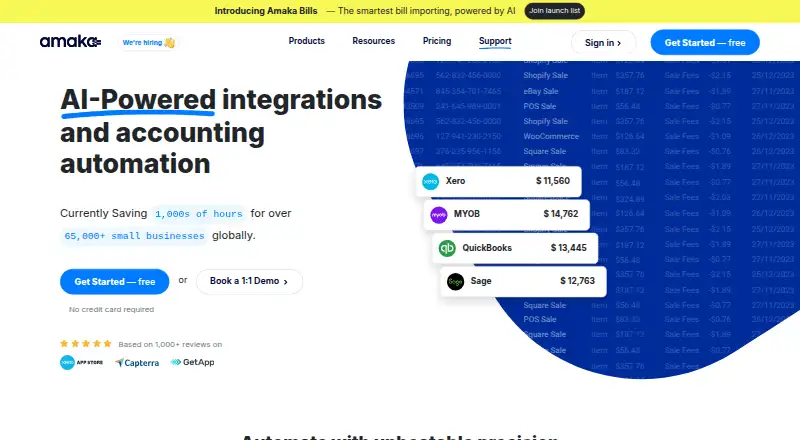
Amaka links online stores and point-of-sale tools to Xero, QuickBooks Online, Sage, and MYOB. It moves sales, payment, and selected inventory or cost information, with historical imports and account-mapping options. Plans start with a free tier, while paid subscriptions begin at $18 per month and include a seven-day trial.
Review
In a line
Amaka is a cloud platform for connecting business apps to accounting software. It is aimed at businesses, accountants, and bookkeepers.
What it does
Amaka sends sales, payment, and other transaction data from ecommerce and POS services into accounting systems. It can turn daily totals into accounting invoices or record each sale separately.
Invoice output may be condensed or broken down by category, product, or location. Depending on the selected app and subscription, the service can transfer cost-of-goods-sold and inventory journals, record payment details such as tips and fees, and bring in earlier transactions.
How it connects
Amaka works with Xero, QuickBooks Online, Sage, and MYOB as accounting destinations. Its listed connectors cover Shopify, Square, Etsy, eBay, WooCommerce, Squarespace, Loyverse, Revel, Impos, DocuSign, Foodbomb, TrackTik, Wix, and Yoco; Amazon and Stripe are marked as coming soon.
Configuration offers Express defaults and automatic mapping, Advanced customization, or a Guided session with an integration expert. Amaka provides a web service, and its integrations use authorization tokens to reach connected systems. The software is proprietary, and the reviewed pages do not show a public Amaka API catalogue or self-hosting package.
Amaka provides managed reconciliation in which integration specialists and AI agents monitor and reconcile transactions sent through its accounting connections. See related tools in Ecommerce Accounting Software.
Good fit
Amaka is intended for small businesses, business owners, professional accountants, and bookkeepers that need store or POS transactions delivered to accounting software.
It is useful when you need several invoice layouts, tailored account mapping, historical back-syncing, marketplace connections, multi-currency accounting, or bank feeds. A free one-to-one Zoom meeting with an integration expert covers setup, demonstrations, technical questions, and synchronization issues.
Watch for
Every subscription imposes a transaction allowance. Once the account reaches the full allowance, synchronization stops until the next billing period or a plan upgrade; back-synced records also count.
Availability of cost-of-goods-sold, inventory journals, detailed formats, advanced mapping, and location counts varies by connector and plan. Initial configuration can be confusing without guided assistance, so review mapping and support options beforehand.
Amaka is licensed proprietary software rather than open source. Its privacy policy refers to Australia's Privacy Act 1988 and GDPR-related rights, and says sensitive information is protected with SSL.
Pricing
Amaka uses a freemium model, with subscriptions beginning at $18 monthly. The Free tier covers as many as 60 orders or transactions each month, one integration, one store or location, and one day of back-syncing.
The monthly Premium subscription is $18. It raises the allowance to 500 orders or transactions, supports two integrations and two locations or stores, permits up to 90 days of back-syncing, and offers a seven-day trial.
Premium+ is priced at $49 per month. It removes limits on orders or transactions, integrations, and locations or stores, allows up to 365 days of back-syncing, and includes a seven-day trial.
Verdict
Amaka is worth considering when sales channels or POS tools must send records to Xero, QuickBooks Online, Sage, or MYOB without manual entry. The free tier handles modest volumes, while the larger plans increase transaction, connection, location, and history allowances.
Confirm connector coverage and plan-specific functions first, particularly for inventory, cost data, invoice detail, and account mapping. Organizations seeking open-source code, self-hosting, or a documented public API should consider alternatives.
Our take
Amaka is a practical option for businesses and accounting professionals that need ecommerce or POS activity transferred into established accounting systems. Its free tier supports a small operation, while Premium and Premium+ raise volume and connection limits and allow longer historical imports. The main buying checks are connector coverage, transaction caps, and whether your chosen app includes inventory, cost, mapping, or location features. It is less suitable if you require open-source software, self-hosting, or a public API catalogue.
- Links a broad range of ecommerce and POS tools with four accounting platforms
- Free tier handles up to 60 monthly transactions
- Paid subscriptions come with seven-day trials
- Offers historical back-syncing and configurable account mapping
- Managed reconciliation is available
- Free tier is limited to one integration and one location
- Synchronization stops when the plan's transaction allowance is exhausted
- Inventory and cost functions vary by connector and subscription
- No public API catalogue or self-hosting package is shown
- Pick it ifSmall businesses connecting stores or POS tools to accounting software; Accountants and bookkeepers managing transaction syncs
- Skip it ifYou need open-source software or self-hosting; You require a public API catalogue or connectors not listed
Pricing
The free tier covers up to 60 transactions monthly. Premium is $18 per month and Premium+ is $49 per month, with seven-day trials on both paid options.
- Freeup to 60 orders/transactions per month · 1 integration · 1 location/store · up to 1 day backsyncFree
- Premiumper month · up to 500 orders/transactions per month · 2 integrations · 2 locations/stores · up to 90 days backsync · 7-day free trial$18/mo
- Premium+per month · unlimited orders/transactions · unlimited integrations · unlimited locations/stores · up to 365 days backsync · 7-day free trial$49/mo
As amaka.com lists them, checked 14 Oct 2026.
Questions
Which accounting systems does Amaka support?
Its listed accounting destinations are Xero, QuickBooks Online, Sage, and MYOB.
What can Amaka sync?
The platform transfers sales, payment, and other transactions. For selected connectors and plans, it can also handle cost-of-goods-sold, inventory journals, detailed invoice formats, and historical back-syncing.
Does Amaka have a free plan?
Yes. The Free tier permits up to 60 orders or transactions per month, one integration, one store or location, and one day of back-syncing.
What are Amaka's paid prices?
Premium is $18 monthly, while Premium+ is $49 monthly. Each paid plan includes a seven-day trial.
What happens when I reach my transaction limit?
Synchronization pauses after the plan allowance is fully used and restarts in the next billing cycle or following an upgrade. Back-synced records are included in the count.
Is Amaka open source or self-hosted?
No. Amaka is proprietary licensed software, and the reviewed pages do not provide a public API catalogue or self-hosting package.
Can Amaka help with setup?
Setup can follow Express defaults and automatic mapping, Advanced customization, or a Guided session. Amaka also provides a free one-to-one remote Zoom appointment with an integration expert.