
Anifusion: AI Manga and Comic Studio Review
anifusion.ai · checked 15 Oct 2026
An online AI studio for turning stories into editable manga and comic pages.
How it plugs in
Signal on AI Comic Generators6.3#5 of 27
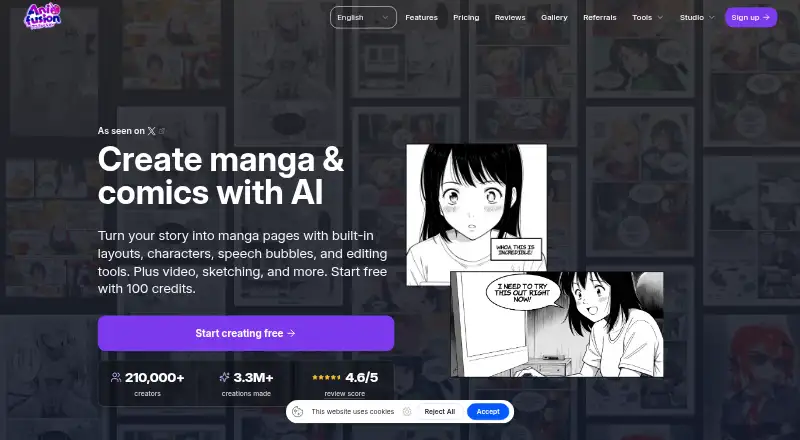
Anifusion is a browser-based manga and comics studio that turns written stories into editable pages. It provides AI panel generation, layouts, characters, speech bubbles, image and video tools, and print-ready exports. A REST API and hosted MCP endpoint are available on paid plans. The service runs on desktop devices, stores online work, and offers free and paid credit plans.
Review
In a line
Anifusion is an online studio for making manga and comic pages from written stories. Its canvas editor lets you adjust layouts, characters, speech bubbles and other page elements.
What it does
The comic creator can generate complete pages, keep character references, apply panel layouts and templates, add speech bubbles and text, and export files for printing. An expanding canvas supports zooming, panning, layers and project organization.
Separate tools create images from text in more than 50 anime and manga styles, generate batches of images, and animate images or panels into HD video. Sketch-to-art turns rough drawings into anime artwork, while character sheets provide reusable poses, views and expressions.
Subscribers can train custom LoRA models for recurring characters or styles. The service also includes a prompt library, gallery and asset management, reusable presets, and an infinite canvas workspace.
How it connects
Anifusion runs on the web and offers a REST API for models, estimates, generations, operations, comic projects and usage. A hosted MCP connection works with Claude, ChatGPT/Codex, Cursor and VS Code through OAuth. API and MCP access require an active Creator or Pro plan and use the same account credits.
The service is hosted rather than open source, and its documentation does not describe self-hosting. Export options include PNG, JPEG, WebP, PSD, PDF and ZIP. API traffic is limited to 120 reads and 20 writes per rolling minute, with concurrency limits that can return HTTP 429.
Good fit
Anifusion suits people who want to turn stories or sketches into editable manga pages without installing a desktop application. It can help comic makers keep character references, build page layouts, create supporting artwork and prepare print-ready files.
Teams with higher volume or special licensing needs can ask about tailored enterprise plans. Paid plans include commercial use subject to Anifusion's terms, model-provider terms and the user's rights to submitted material.
Watch for
The service supports desktop devices only and has no mobile version. It is an online service, so prompts, uploads, drafts and outputs may be processed by CodeConda and authorized AI or infrastructure providers. Provider logging, retention and model-training practices can vary.
Unpublished work is not shown on public profiles or community feeds, but it is stored and processed online. CodeConda says operation is not guaranteed to be uninterrupted, error-free or fully secure, and its content policy requires users to be at least 18 and bans several categories of sexual, hateful, violent or infringing material.
Publishing to the gallery keeps your ownership but gives Anifusion a worldwide, royalty-free licence to host and organically promote the public post. Custom LoRA training costs 500–3,000 credits, while image generation uses 5–100 credits depending on the model.
Pricing
A Free plan costs nothing, is billed monthly, and includes 100 credits and one workspace. A free trial is available. Creator costs $9 a month, billed monthly, with 2,000 credits each month, subscriber models, high-resolution exports, commercial use, gallery publishing, unused credits that never expire, and REST API/MCP access.
Pro costs $24 a month, billed monthly, and includes 10,000 monthly credits, priority newest models, maximum resolution, commercial use, gallery publishing, priority support, credits that never expire, and REST API/MCP access. Paid Creator and Pro plans include support from the Anifusion team.
Subscribers can also buy one-time credit packs: 2,000 credits for $15, 5,000 for $30, or 12,000 for $60. Packs and subscription credits do not expire.
Verdict
Choose Anifusion if you need a desktop web workspace that combines story-to-page generation, comic editing, image creation and optional video animation. Creator is the entry point for API or MCP connections and commercial projects; Pro is aimed at heavier monthly use and priority access.
Look elsewhere if you need a phone app, self-hosting, or a service that does not process creative files through online providers. Review the content policy, gallery licence and model-provider terms before publishing or using generated work commercially.
Our take
Anifusion is a fit for desktop users who want one online place to turn stories, prompts or sketches into editable manga pages. Its page layouts, character references, exports, image tools and optional video generation cover a broad creative workflow. Paid plans add commercial use, support and API or MCP access, while unused credits carry over. The trade-offs are desktop-only access, online processing, provider-dependent data handling, credit-based generation and rules around gallery publishing and content. Choose it when those conditions match your project; avoid it when you require mobile use, self-hosting or tighter control of data processing.
- Turns written stories into editable manga pages
- Includes layouts, speech bubbles and character references
- Exports PNG, JPEG, WebP, PSD, PDF and ZIP
- REST API and hosted MCP available on paid plans
- Unused subscription and pack credits never expire
- Desktop devices only; no mobile version
- Online processing may involve CodeConda and AI providers
- API and MCP require Creator or Pro
- Generation and LoRA training consume credits
- Gallery publishing grants Anifusion a promotional licence
- Pick it ifDesktop comic makers building editable manga pages; Teams needing API or MCP access for creative workflows; Users who want image, sketch and video tools together
- Skip it ifYou need a mobile app or documented self-hosting option; Your project cannot use online processing or gallery licensing terms; You want predictable costs without credit-based generation
Pricing
The free plan provides 100 monthly credits and one workspace. Creator is $9 a month for 2,000 credits; Pro is $24 a month for 10,000. One-time packs add 2,000 credits for $15, 5,000 for $30 or 12,000 for $60, and credits do not expire.
- 2,000-credit pack2,000 credits$15 one-time
- 5,000-credit pack5,000 credits$30 one-time
- 12,000-credit pack12,000 credits$60 one-time
- 30,000-credit pack30,000 credits$120 one-time
- Freemonthly · 100 free credits · 1 workspaceFree
- Creatormonthly · 2,000 credits/month · unused credits never expire · subscriber models · high-resolution exports · commercial use · gallery publishing · REST API/MCP$9/mo
- Credit pack 2,000one-time · 2,000 credits · credits never expire$15 one-time
- Credit pack — 2,000 credits$15 · 2,000 credits · One-time pack for subscribers · Unused credits never expire$15 one-time
As anifusion.ai lists them, checked 20 Sept 2026.
Questions
Does Anifusion have a free plan?
Yes. The Free plan is billed monthly at no cost and includes 100 credits and one workspace. A free trial is also available.
Can I use Anifusion on a phone?
No. Anifusion supports desktop devices and does not offer a mobile version.
Does Anifusion provide an API?
Yes. A REST API and hosted MCP endpoint are available with active Creator or Pro subscriptions. They share the account credit balance.
What files can Anifusion export?
Exports include PNG, JPEG, WebP, PSD, PDF and ZIP formats.
Do Anifusion credits expire?
Unused subscription credits and one-time credit-pack credits do not expire.
Can I use Anifusion work commercially?
Commercial use is included with paid plans, subject to Anifusion's terms, model-provider terms and your rights to the inputs.
Is Anifusion open source or self-hosted?
No. It is a hosted service, and its developer documentation does not describe a self-hosted deployment.
What are alternatives for making AI comics?
Compare Anifusion with comic creation software and AI comic generators.