Animaker: AI Animation and Video Creation Software
animaker.com · checked 17 Nov 2026
Create animated and live-action videos with Animaker's web-based AI studio.
How it plugs in
Signal on Animation Software6.9#13 of 106
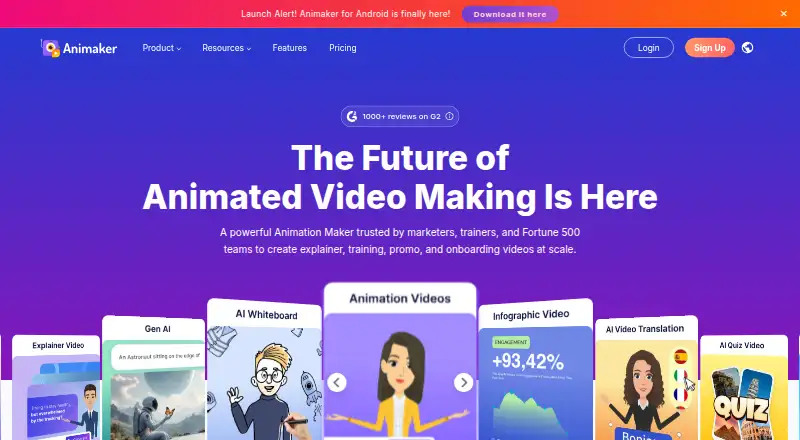
Animaker combines AI video generation with 2D animation and live-action video tools. You can use it in a browser or through iOS and Android apps. Users can start from text, edit the result, add voices, subtitles, translations, characters, and templates, then export video files. A free plan is available, and the Basic plan adds credits and HD output without a watermark.
Review
In a line
Animaker provides browser-based tools for producing animated and live-action videos. Its feature set includes AI functions, 2D animation, and mobile apps.
What it does
A text prompt can produce a draft video that you can review and edit. Whiteboard scenes, AI infographics, generated assets, subtitles, translation, and custom character creation are also available.
The voiceover library contains more than 1,000 options spanning over 100 languages, with lip movements synchronized automatically. Animaker also lists over 1,000 animation templates, a Brand Kit, and real-time collaboration. Completed projects can be saved as MP4, GIF, or WebM files at resolutions ranging from SD to 4K.
How it connects
You can work through Animaker's browser editor or its iOS and Android apps. An Ultra Gen API exposes RESTful, JSON-based endpoints so web and mobile applications can integrate video generation.
Its publishing flow can upload a video directly to a user's YouTube account. Animaker states that it encrypts information both in transit and at rest, follows GDPR and CCPA processes, and is ISO 27001:2022 certified.
Good fit
Animaker describes its audience as individuals, educators, businesses, and enterprises. Listed uses include learning and development, human resources, marketing and sales, and internal communications.
Enterprise teams get dedicated seats, real-time comments, task assignments, a shared resource library, and administrator controls.
Watch for
The free plan limits premium assets and puts an Animaker watermark on exports. Check the plan limits for video length, AI credits, downloads, resolution, and generative video before choosing a subscription.
Mobile creation is available through iOS and Android apps, while the main editor is web-based. Support includes tutorials, FAQs, training, and a contact option.
Pricing
Animaker follows a freemium pricing model. The Free plan provides basic animation tools, limited premium assets, and downloads bearing a watermark. A seven-day trial is available.
The Basic tier is $15 per month when billed annually at $180, with monthly billing also offered. It provides 1,500 AI Video Credits and 50 Gen AI Asset Credits each month, five-minute videos, five premium downloads monthly, HD output, and no watermark; Generative Video Credits are not included.
Starter is listed at $25 monthly on a $300 annual billing cycle. It offers 3,000 AI Video Credits per month, 10 premium downloads, 90 seconds of generative video monthly, 200 Gen AI Asset Credits, 15-minute videos, and FHD output. Pro is $43 monthly, billed annually at $516, and provides 5,000 AI Video Credits, 30 premium downloads, 180 seconds of generative video, 300 Gen AI Asset Credits, 30-minute videos, 2K output, commercial rights, and two-factor authentication.
Enterprise pricing is by request. This tier provides unlimited premium downloads and video length, 6,000 seconds of generative video annually, 5,000 Gen AI Asset Credits annually, 4K output, and commercial and reselling rights.
Verdict
Animaker suits people who want animated or live-action videos without limiting themselves to a desktop editor. Its browser access, mobile apps, templates, voice tools, and collaboration cover a wide range of production needs.
The free tier is useful for trying the basic workflow, but its watermark and asset limits make it less suitable for final client work. Paid plans differ sharply in credits, download allowances, video length, and resolution, so teams should match those limits to their expected output. Enterprise buyers should request a custom quote and review the included rights and controls.
Our take
Choose Animaker if you need one service for animated clips, live-action video, AI-assisted drafts, voiceovers, and team editing across web and mobile. The free option lets you start without payment, but watermarked exports and restricted premium assets make it mainly a trial path. Paid tiers suit different production volumes: Basic covers shorter HD work, while Starter and Pro raise limits and quality. Enterprise adds administrative tools, shared resources, longer output, and commercial or reselling rights. Check credit balances, download counts, video duration, and resolution against your regular workload before committing.
- Text prompts can generate editable videos.
- Its voice tools provide more than 1,000 voices across over 100 languages.
- MP4, GIF, and WebM downloads are available, with resolution reaching 4K.
- Real-time collaboration and a Brand Kit are available.
- iOS and Android apps support mobile creation.
- Exports on the Free plan include an Animaker watermark.
- Premium assets are limited on the Free plan.
- Plans cap credits, downloads, video length, or resolution.
- Basic includes no Generative Video Credits.
- Pick it ifEducators and businesses making explainers or internal videos; Teams needing browser, mobile, and collaboration features; Creators who want AI-assisted animation and voice tools
- Skip it ifYou need unlimited premium downloads on a low-cost plan.; Your workflow cannot accept watermarks or plan-based credit limits.
Pricing
A free tier and seven-day trial provide a low-cost start. Annual billing puts the entry paid tier at $15 per month ($180 yearly); higher tiers add credits, longer videos, better resolution, and commercial rights. Enterprise pricing is custom.
- Free3 video downloads/mo; manual subtitlesFree
- Basic$180 /Yearly; billed yearly. Pay monthly · 1500 AI Video Credits/mo · 50 Gen AI Asset Credits/mo · no Generative Video Credits · 5 mins video length · 5 Premium Downloads/mo · HD Quality Videos · no watermark$15/mo
- Starterannual billing · 75 mins/mo auto subtitle; 40 mins/mo translation$25/mo
- Proannual billing · 100 mins/mo auto subtitle; 60 mins/mo translation$43/mo
- Enterprise2000 mins/yr auto subtitleOn request
As app.animaker.com lists them, checked 17 Nov 2026.
Questions
Does Animaker have a free plan?
Yes. The Free plan offers basic animation tools and limited premium assets, while its downloads carry an Animaker watermark.
What devices support Animaker?
The editor is available in a web browser, and iOS and Android apps let users create animated videos on mobile devices.
Can Animaker turn text into video?
Yes. A text-to-video animation generator turns a prompt into a draft that users can review, edit, and generate.
What video files can Animaker export?
Animaker lets users download finished animations as MP4, GIF, or WebM files, with quality options from SD through 4K.
Does Animaker offer an API?
Yes. Ultra Gen provides RESTful, JSON-based endpoints for integrating video generation with web and mobile applications.
How much does Animaker cost?
Annual billing starts at $15 per month ($180 per year). Starter is $25 monthly, Pro is $43 monthly, and Enterprise pricing is available on request.