AnyBurn Review
anyburn.com · checked 15 Oct 2026
Windows utility for optical-disc burning, image-file work, audio ripping, and bootable USB creation.
How it plugs in
Signal on ISO Creation Software6.3#3 of 33
On Windows, AnyBurn handles CD, DVD, and Blu-ray burning, disc-image operations, Audio CD creation and ripping, and bootable USB media. Its free tier provides the main tools for home or workplace use. Pro costs $39.95 once and adds audio conversion plus Windows-to-USB installation.
Review
In a line
AnyBurn is a Windows tool for burning optical media, handling disc-image files, and building bootable USB drives. It supports both everyday disc jobs and image-file management.
What it does
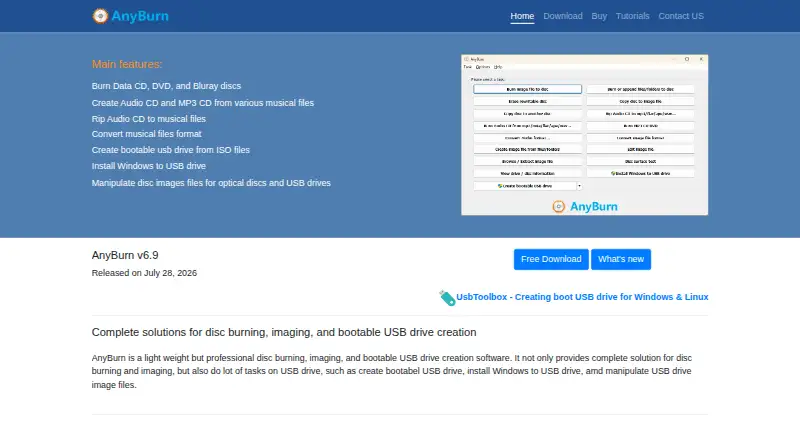
Files and folders can be written to CD, DVD, and Blu-ray media, including data, Audio, and MP3 discs. It can write discs on the fly, copy one disc to another, test disc surfaces, and show drive and disc details.
For audio, AnyBurn creates Audio CDs from MP3, M4A, FLAC, OGG, APE, WMA, and WAV files. It also rips Audio CDs into MP3, FLAC, OGG, APE, WAV, or WMA files.
The program creates, edits, converts, browses, and extracts disc-image files. Image support covers ISO, BIN/CUE, NRG, DMG, MDF/MDS, DAA, UIF, and ISZ. It can also create bootable USB drives and write image files to USB media.
How it connects
AnyBurn runs on Windows, with the download page listing Windows 11, 10, 8/8.1, 7, Vista, Server 2008, Server 2003, XP, and 2000. A fully functional portable edition runs without installation.
The package includes abcmd.exe, a command-line tool for burning, copying, and erasing discs, making images, and ripping CDs. The public developer material does not describe a web API, SDK, or software-development library.
AnyBurn uses LAME for MP3 ripping, Monkey's Audio SDK for APE decoding, and the FLAC library for FLAC decoding. It has no open-source license.
Good fit
AnyBurn suits Windows users who need one utility for disc burning, image files, audio CD work, and bootable USB media. Core burning, imaging, audio ripping, disc testing, and bootable USB creation are available in the free edition for personal and business use.
Its portable edition fits situations where installing software is not wanted. The command-line utility can help with repeatable disc and image tasks.
Watch for
Windows is the only listed platform. Installing Windows to a USB drive and converting audio formats are Pro-only features.
The installer enables online upgrade notifications by default, although that setting can be disabled. The EULA says update checks send no personal information.
The EULA provides the software as-is, without warranties, and disclaims responsibility for data loss and other damages. Redistribution inside commercial products requires permission.
Pricing
AnyBurn Free is available at no cost for personal and business use. It includes core burning, imaging, audio ripping, disc testing, and bootable USB creation. A free trial is available.
A one-time $39.95 purchase gets AnyBurn Pro. It adds audio-format conversion and Windows-to-USB installation, removes limits, and includes lifetime updates plus unlimited email support.
Pro purchases are processed through PayPal, with major credit cards and PayPal accepted. The maker says payment is available in six listed currencies.
Verdict
Choose AnyBurn if you use Windows and want disc burning, image handling, audio ripping, and bootable USB tools in one package. The free edition is enough for core tasks, while Pro is for Windows-to-USB installation, audio conversion, or removed limits.
Look elsewhere if you need macOS or Linux support, a web API, or open-source code. Before relying on it for important data, review the EULA's warranty and data-loss limits.
Our take
AnyBurn is a practical Windows option for optical-media work and bootable USB creation. Its free edition handles many everyday jobs, while the portable build works without installation. Pro becomes useful for Windows-to-USB installation, audio conversion, or fewer limits. The main reasons to pass are platform restrictions, the lack of a documented web API or open-source code, and the EULA's broad disclaimer for data loss and other damages.
- Free edition supports personal and business use
- Supports CD, DVD, and Blu-ray burning
- Handles many disc-image formats
- Creates bootable USB drives
- Portable edition runs without installation
- Windows only
- Windows-to-USB installation requires Pro
- No documented web API or SDK
- EULA disclaims liability for data loss
- Commercial redistribution requires permission
- Pick it ifWindows users handling discs and image files; People creating bootable USB media; Audio CD ripping and creation
- Skip it ifYou need macOS or Linux support; You require an open-source project or web API; You need Windows-to-USB installation in the free edition
Pricing
The free edition covers core features. Pro requires a one-time $39.95 payment and adds audio conversion, Windows-to-USB installation, lifetime updates, and unlimited email support.
- AnyBurn FreePersonal and business use · Core burning, imaging, audio ripping, disc testing and bootable USB creationFree
- AnyBurn ProUS$39.95 lifetime license · Adds audio file format conversion and Windows-to-USB installation; license includes lifetime updates and unlimited email technical support$39.95 one-time
- AnyBurn Pro lifetime licenseUS$39.95 one time · Adds audio-format conversion · Installs Windows to USB · Removes limits · Lifetime updates · Unlimited email support$39.95 one-time
As anyburn.com lists them, checked 15 Oct 2026.
Questions
Is AnyBurn free?
Yes. AnyBurn Free is available for personal and business use, and a free trial is also offered.
Which Windows versions does AnyBurn support?
The download page lists Windows 11, 10, 8/8.1, 7, Vista, Server 2008, Server 2003, XP, and 2000.
Can AnyBurn create bootable USB drives?
Yes. AnyBurn can create bootable USB drives and write image files to USB media. Installing Windows to USB requires AnyBurn Pro.
What disc-image formats can AnyBurn handle?
Supported formats listed include ISO, BIN/CUE, NRG, DMG, MDF/MDS, DAA, UIF, and ISZ.
Does AnyBurn have a command-line tool?
Yes. The package includes abcmd.exe for burning, copying, and erasing discs, making images, and ripping CDs.