
AUDIOVIZOR: Music Visualizer Review
audiovizor.com · checked 15 Oct 2026
AUDIOVIZOR turns music into beat-synced 3D visuals and exports MP4 videos.
How it plugs in
Signal on Audio Visualizer Software6.4#3 of 35
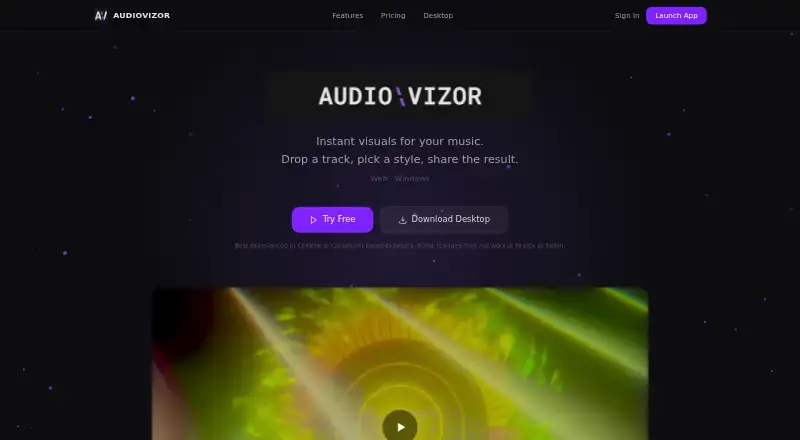
AUDIOVIZOR is a web and Windows audio visualizer that reacts to music in real time. It offers more than 15 GPU-rendered styles, beat detection, and MP4 export. The free plan uses uploaded audio and adds a watermark to 720p videos. Unlimited adds live audio inputs, clean exports up to 4K, editing controls, overlays, and the Windows app.
Review
In a line
AUDIOVIZOR creates real-time 3D visuals that move with music. You can use it in a browser or through its Windows desktop app.
What it does
The visualizer analyzes low, mid, and high sound ranges so animations respond to beats and other parts of the audio. It includes more than 15 presets, from calm ambient looks to bass-heavy styles.
Upload MP3, WAV, FLAC, OGG, AAC, or another format your browser can decode. AUDIOVIZOR exports the result as an MP4 video. Unlimited users can also change settings such as particle count, glow, colors, sensitivity, and speed, then add text overlays.
How it connects
The free plan accepts uploaded files. Unlimited adds microphone and system-audio capture, which lets the Windows app use sources such as Spotify or Apple Music. The desktop app can run in its own window for OBS Window Capture.
The browser renderer uses WebGPU when available and WebGL 2 otherwise. Audio analysis, rendering, and export happen on your computer, and uploaded audio is not sent to a server. AUDIOVIZOR is proprietary rather than open source.
Good fit
AUDIOVIZOR suits musicians, video makers, and streamers who need music-reactive visuals or MP4 clips. Unlimited is the better fit for live audio, OBS use, clean 4K output, adjustable presets, overlays, cloud sync, or batch export.
The browser version works on the web, while the Windows app adds system-audio capture and hardware-accelerated export.
Watch for
Mobile devices are not currently supported and may have serious performance problems. The maker recommends Chrome, Edge, or another Chromium browser; some functions have limited support in Firefox and Safari.
The maker targets about five-year-old integrated or dedicated graphics hardware for 60 frames per second, but heavier presets can drop frames on weaker systems. Free exports are limited to 720p and include a watermark.
The desktop software is licensed, not open source. Reverse engineering, resale, and redistribution are prohibited. Users must be at least 16.
Pricing
The Free plan costs free, never expires, and needs no account or credit card. It provides 15-minute sessions, file upload, all 15-plus presets, community presets, and 720p watermarked MP4 export.
Unlimited costs C$4.99 a month, billed monthly with automatic renewal. It adds unlimited sessions, file, microphone, and system audio, clean exports up to 4K, the preset editor, Windows app, text overlays, cloud sync, and batch export. Subscriptions include a 14-day money-back guarantee.
Verdict
Choose AUDIOVIZOR if you want music-driven 3D scenes without sending your audio to a server, or if you need browser previews, Windows capture, and clean high-resolution exports. The free tier is useful for short, watermarked clips.
Look elsewhere if you need mobile support, broad browser support, or open-source software.
Our take
AUDIOVIZOR is a choice for people making music videos, stream scenes, or social clips from an existing audio file. Its free access is permanent and does not require payment details, while the monthly plan covers live inputs, Windows capture, editing, overlays, and clean 4K files. Check your browser, graphics hardware, and operating system first: mobile is unsupported, some browsers have limited features, and demanding presets can lose frames. It is not suitable if you need open-source licensing or unrestricted redistribution.
- Permanent free plan with no account or credit card
- More than 15 beat-reactive 3D visual presets
- Audio stays on the user's machine
- Unlimited supports clean export up to 4K
- Windows app supports system audio and OBS capture
- Free exports are 720p and watermarked
- Mobile devices are not supported
- Firefox and Safari have limited feature support
- Heavy presets can drop frames on weaker GPUs
- Desktop software is proprietary
- Pick it ifMusic videos and stream visuals; Windows users needing live system-audio capture; Creators who want clean 4K MP4 exports
- Skip it ifYou need a mobile app; You require open-source software; Your computer has weak graphics hardware
Pricing
Free covers 15-minute sessions and watermarked 720p exports. Unlimited is C$4.99 a month, billed monthly and auto-renewing, with clean exports up to 4K and the Windows app.
- Free15-minute sessions · file upload · all 15+ presets · 720p watermarked MP4 · community presetsFree
- Unlimitedmonthly, auto-renewing · Unlimited sessions · file, microphone and system audio · up to 4K clean export · preset editor · Windows app · overlays · cloud sync · batch exportC$4.99/mo
As audiovizor.com lists them, checked 15 Oct 2026.
Questions
Is AUDIOVIZOR free?
Yes. The Free plan does not expire, requires no account or credit card, and includes 15-minute sessions with 720p watermarked MP4 export.
What does Unlimited cost?
Unlimited costs C$4.99 a month, billed monthly with automatic renewal. It includes a 14-day money-back guarantee.
Can AUDIOVIZOR use a microphone or Spotify?
Unlimited can capture microphone and system audio through the Windows app. The free plan is limited to uploaded files.
What video format and resolution does it export?
Exports are MP4. Free is limited to 720p with a watermark; Unlimited supports clean output up to 4K.
Does AUDIOVIZOR work on phones?
No. The app page says mobile devices are not currently supported and may have significant performance problems.
Which browsers are recommended?
Chrome, Edge, and other Chromium-based browsers are recommended. Some features have limited support in Firefox and Safari.
Is my uploaded audio sent to a server?
No. AUDIOVIZOR says audio analysis, rendering, and export run on your machine, and uploaded audio is not sent to a server.
Can I use exported videos commercially?
Paid-plan exports may be used commercially, and users retain ownership of their audio and exports.