
BitComet: Free BitTorrent, HTTP, and FTP Client
bitcomet.com · checked 15 Oct 2026
Free BitTorrent, HTTP, and FTP software for desktop and web, with an Android edition.
How it plugs in
Signal on Download Manager Software6.7#7 of 58
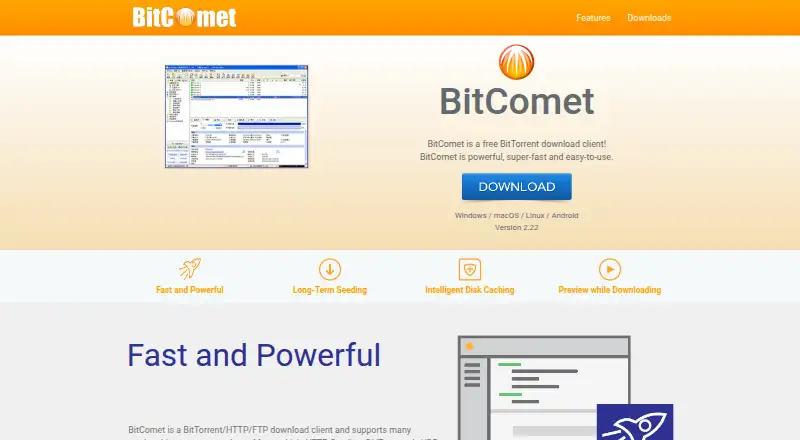
BitComet provides BitTorrent, HTTP, and FTP transfers at no cost. Magnet links, DHT, selective files, scheduling, bandwidth limits, video previews, and remote control are included. Windows, macOS, Linux, Android, Docker, and WebUI options are available. Its closed-source freeware terms allow private, personal, non-commercial use, and the API can differ across releases.
Review
In a line
BitComet downloads through BitTorrent, HTTP, and FTP at no cost. It is designed for many concurrent tasks on Windows, macOS, Linux, Android, or via a web interface.
What it does
You can add magnet links and torrent tasks, choose files selectively, and set upload or download limits for all tasks or individual tasks. Tags, schedules, bandwidth planning, and automatic shutdown help control ongoing downloads.
DHT can operate without a tracker, while HTTP seeding, UDP tracker Protocol v2, and Torrent Share are supported. Long-Term Seeding Technology searches for extra seeds when a download stalls around 99%.
While files arrive, video preview works by giving priority to the beginning and ending portions of the file. BitTorrent jobs can also use HTTP, FTP, and eMule sources through cross-protocol downloading. Multi-mirror mode claims gains of 300% or more, while multi-section mode claims up to 500% or more.
Intelligent Disk Caching keeps data in memory to lessen hard-drive read and write activity. Windows ICF and ICS settings and UPnP router port mapping are also supported.
How it connects
BitComet works with BitTorrent, HTTP, FTP, eMule sources, magnet links, DHT networks, trackers, and UPnP routers. A Chrome extension adds a context-menu command for sending links to BitComet, with file-type filters; it requires BitComet 1.38 or newer.
End-to-end encrypted cloud access allows BitComet Mobile to connect with a desktop client located behind NAT or a firewall. Linux users can deploy Docker images for a graphical interface or WebUI. The documented WebUI exposes a JSON API for third-party interfaces, although releases can alter the protocol and it is not a stable OpenAPI specification.
BitComet is closed source. The download page lists Windows, macOS, Linux, and Android packages, plus 53 languages. See Download Manager Software for related tools.
Good fit
BitComet suits people who need one client for BitTorrent, HTTP, and FTP downloads, especially when many tasks run together. It offers detailed task controls, selective files, magnet links, DHT, remote access, and a web interface.
It can fit users who want to run BitComet on Linux or in Docker, or control a desktop installation from Android. The help wiki, support forum, and email contact provide support resources.
Watch for
The freeware terms allow use only for private, personal, non-commercial purposes. Reverse engineering and redistribution are prohibited, and the software is supplied without a warranty.
The licence describes tracker and peer exchanges as anonymous, but the privacy documentation says tracker hashes and identifiers are sent to trackers, mirror searches transmit URLs and labels to BitComet servers, and aggregate version, location, and language information may be collected.
The WebUI API is intended for third-party interfaces but can change between releases. Android requires version 7.0 or newer; the app includes ads and in-app purchases, while Google Play reviewers have reported flashing screens, file-access problems, and VIP sessions reverting to the free version.
Pricing
BitComet is free of charge. Its BitComet and BitComet freeware plans cover Windows, macOS, Linux, and Android for private, personal, non-commercial use.
The Android listing shows ads and in-app purchases, although the BitComet software plan itself costs nothing.
Verdict
Choose BitComet if you need a free client for BitTorrent, HTTP, and FTP, can run many simultaneous tasks, and want scheduling, speed limits, selective files, and remote access.
Check the license before using it for work or redistribution, since the free terms are limited to private non-commercial use. Consider another option if you need a stable public API, open-source code, or an Android experience without the reported usability issues.
Our take
BitComet is a practical free choice for personal users who download through several protocols and want fine control over queues, bandwidth, and remote operation. Docker-based WebUI deployments extend its platform options, and magnet links, DHT, selective downloads, and video previews address common torrent tasks. The main conditions are important: commercial use is not covered, the project is closed source, the WebUI API is not stable, and Android has ads plus reported access and display problems. Review the privacy disclosures before enabling mirror searches or tracker connections.
- No-cost use for private, personal, non-commercial purposes
- Handles BitTorrent, HTTP, FTP, magnet links, and DHT
- Selective downloads, scheduling, limits, and automatic shutdown
- Android and WebUI options provide remote desktop control
- Available on Windows, macOS, Linux, Android, and Docker
- Commercial use and redistribution are excluded
- Closed-source software with a WebUI API that may change between releases
- Android app includes ads, in-app purchases, and reported usability issues
- Privacy documents describe tracker and mirror data sharing
- Software is supplied without warranty
- Pick it ifPersonal users managing many BitTorrent, HTTP, or FTP downloads; People needing Linux, Docker WebUI, or Android remote control; Users who want detailed queue and bandwidth controls
- Skip it ifYou need commercial rights, redistribution, or open-source code; You require a stable OpenAPI-style interface; You want an Android client without ads or reported file-access issues
Pricing
Desktop and mobile editions cost nothing for private, personal, non-commercial use. The Android listing also shows ads and in-app purchases.
- BitCometfree of charge · private personal use only · non-commercial purposes onlyFree
- BitComet freeware (home use)Free for private, personal, non-commercial use · Windows/macOS/Linux/Android buildsFree
As bitcomet.com lists them, checked 1 Oct 2026.
Questions
Is BitComet free?
Yes. Private, personal, non-commercial users can use BitComet without paying.
Which systems run BitComet?
Windows, macOS, Linux, and Android are supported. Linux also has Docker images for a graphical interface and WebUI.
Does BitComet support magnet links and DHT?
Yes. It supports magnet links and DHT without requiring a tracker.
Can BitComet download from HTTP or FTP?
Yes. BitComet handles HTTP and FTP downloads and can use those sources during BitTorrent downloads.
Is there a BitComet API?
The WebUI documentation describes a JSON API that third-party interfaces can use. Different releases may alter its protocol, so it is not a stable OpenAPI specification.
Can I control BitComet remotely?
Yes. BitComet Mobile uses encrypted cloud connectivity to reach a desktop client behind NAT or a firewall.
Is BitComet open source?
No. BitComet is closed source, although its Android package includes FFmpeg components under LGPL terms.
What are the Android limitations?
Android requires version 7.0 or newer. The app includes ads and in-app purchases, and Google Play reviewers report flashing screens, file-access problems, and VIP sessions reverting to the free version.
Near it
All alternatives →- 4V
 4K Video Downloader+#6 on this board
- PD
 Persepolis Download Manager#8 on this board
- HHydra#5 on this board
- FFirelink#9 on this board
- C
 ClipGrab#4 on this board
- D
 DLMan#10 on this board
- AD
 AB Download Manager#3 on this board
- FD
 Free Download Manager#11 on this board
- J
 JDownloader#2 on this board
- M
 Motrix#12 on this board