
Block Round Minecraft Shape Generator
vinisouza128.github.io · checked 7 Oct 2026
Make Minecraft-textured circles, ellipses, spheres and ellipsoids online at no cost.
How it plugs in
Signal on Minecraft Shape Generators6.3#4 of 39
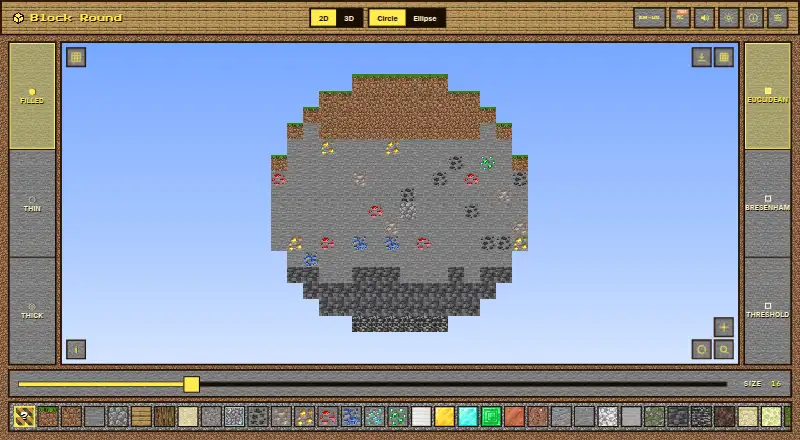
Block Round creates 2D and 3D round shapes using Minecraft block textures. Open it in a browser with no installation or account; it can also operate offline as a progressive web app. Export flat shapes as PNG images or 3D shapes as Sponge schematic files for use in WorldEdit, Litematica or MCEdit.
Review
In a line
This free browser utility builds circles, ellipses, spheres and ellipsoids from Minecraft block textures.
What it does
Choose a shape, dimensions and block style to create a 2D figure or a 3D model. A 3D preview shows spheres and ellipsoids before export.
For 2D work, you can choose Euclidean, Bresenham or Threshold drawing methods. Sphere and ellipsoid views offer X, Y and 45-degree diagonal cuts.
How it connects
Use the app directly in a browser: no install, account or backend is needed. It can also work offline as a progressive web app.
Save 2D figures as PNG files. Save 3D figures as Sponge schematic v2 files, which WorldEdit, Litematica and MCEdit can import.
Good fit
Minecraft builders can use Block Round for round structures or as a block-based guide before building. Its picker offers Grass Block, Dirt, Stone, Oak, Diamond, Sand, Gravel, a Random mix and other choices.
It is useful when you need either an image of a flat shape or a schematic for a 3D build.
Watch for
Settings last only for the current session. Reloading the page returns everything to its defaults.
The project states that its code, layout, design system and sound engine are All Rights Reserved.
Schematic export is for 3D figures, while PNG export is for 2D figures, so check the format your build workflow accepts.
Pricing
Block Round is free to use. There is one free plan for the core job and no paid tier is listed.
Verdict
Choose Block Round if you build in Minecraft and want quick round-shape plans without installing software or creating an account. The separate PNG and schematic exports cover flat references and importable 3D layouts.
Look elsewhere if you need saved settings between visits, a paid support plan, or rights to reuse the project’s code and design. Confirm that your Minecraft editor accepts Sponge schematic v2 files before relying on the 3D export.
Our take
Block Round is a practical choice for Minecraft builders who need circles, ellipses, spheres or ellipsoids made from block textures. It is free, browser-based and usable offline, with no account or installation. PNG output handles 2D references, while Sponge schematic v2 files support several named Minecraft editors. The main drawbacks are temporary settings and the project’s All Rights Reserved terms. Use it for quick shape planning and schematic creation, but verify your editor’s file support and review the license before reusing any project material.
- Free plan with no paid tier required
- Browser access without installing software or opening an account
- Works offline as a progressive web app
- Exports PNG images and Sponge schematic v2 files
- Supports several Minecraft block textures and drawing methods
- Settings reset to defaults after a page reload
- Schematic export is limited to 3D figures
- Project code and design are All Rights Reserved
- The project is unaffiliated with Mojang Studios and Microsoft
- Pick it ifMinecraft builders making round structures; Users needing PNG references or importable 3D schematics; People who want a browser tool with offline use
- Skip it ifYou need settings saved between visits; You need a different export format than PNG or Sponge schematic v2; You require rights to reuse the project’s code or design
Pricing
The free plan covers the core tool, and no paid tier is listed.
- Free planFree to use for the core job; no paid tier requiredFree
As itechguides.com lists them, checked 7 Oct 2026.
Questions
Is Block Round free?
Yes. It has a free plan for the core job, with no paid tier listed.
Do I need to install Block Round?
No. Open it in a browser; no installation, account or backend is required.
Can Block Round work offline?
Yes. The project describes it as an offline-capable progressive web app.
What shapes can it make?
Minecraft block textures can be used to form circles, ellipses, spheres and ellipsoids.
Which files can it export?
Two-dimensional figures export as PNG. Three-dimensional figures export as Sponge schematic v2 files.
Which Minecraft tools can open its schematics?
The project says WorldEdit, Litematica and MCEdit can import the exported Sponge schematic v2 files.
Are settings saved after I close or reload the page?
No. Settings are session-only and return to their defaults after a reload.
Near it
All alternatives →- BS
 Block Shape Generator#3 on this board
- MC
 Mcgic Circle Generator#5 on this board
- S
 SeedLander#2 on this board
- MP
 Minecraft Plot#6 on this board
- B
 BlockBlend#1 on this board
- M
 MineSchematic#7 on this board
- MT
 MinecraftCircle Tools#8 on this board
- MPMinecraftMaps Pixel Circle Generator#9 on this board
- AC
 Astroworld Circle & Dome Generator#10 on this board
- CM
 CartoVoxel Minecraft Shape Maker#11 on this board