
Blockbench: Free Low-Poly 3D Model Editor
blockbench.net · checked 14 Oct 2026
Open-source low-poly 3D editor for Minecraft-style models and pixel-art textures.
How it plugs in
Signal on 3D modeling software7.7#4 of 147
Blockbench is a free, open-source tool for editing low-poly 3D models with pixel-art textures. It offers cuboid and mesh modeling, texture painting, automatic UV templates, animation tools, plugins and Minecraft Java and Bedrock formats. It runs in a browser, on desktop systems and as a mobile web app.
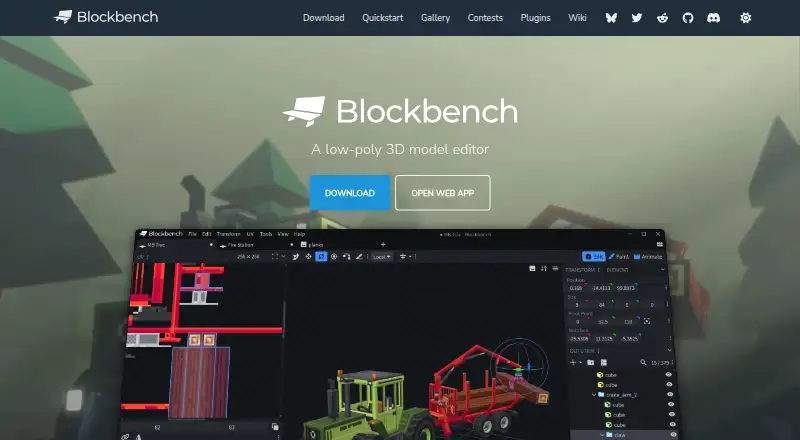
Review
In a line
Blockbench provides a visual workspace for building low-poly models, including assets with pixel-art textures. It is free and open source under GPL version 3.
What it does
You can build shapes with cuboid or mesh tools, paint textures directly on the model and generate a UV map with a texture template. An external image editor or pixel-art program can handle additional artwork.
Rigging and position, rotation, and scale keyframes are available in its animation editor, along with a graph editor. Minecraft Java and Bedrock workflows include blocks, items, entities and armor. Microsoft’s Entity, Item and Block Wizard plugins act as add-on project starters; Block Wizard also produces resource and behavior pack files and supports testing custom Bedrock blocks.
How it connects
The documented output list covers Java and Bedrock JSON, Java, JEM, JPM, OBJ, glTF and BBModel. Its plugin store includes extensions for tools, export formats and model generation, while custom plugins are also supported.
Plugin developers can use the documented public Blockbench API. The blockbench-types package on NPM adds TypeScript definitions and JavaScript autocomplete in VS Code. Plugins may be built for desktop, web or both, and community additions are submitted by pull request to the blockbench-plugins repository.
Windows, macOS, Linux and browser versions are available, while mobile users install the web app through a browser. Its source repository documents local web serving and Electron development for self-hosting. Models, textures, animations and screenshots you create belong to you.
Good fit
Blockbench suits Minecraft creators, low-poly artists and add-on makers who want a visual workflow for resource packs and custom entities. It also fits plugin authors who need an open codebase and public API.
You can compare it with other Game 3D Modeling Software or browse Minecraft Add-on Editors when choosing a tool.
Watch for
Blockbench has no scripting support. Check that its documented export formats and Minecraft workflows match your project before committing.
According to its privacy policy, Blockbench does not knowingly gather personally identifiable information, though it may collect anonymized usage details. Local Storage and cookies stay on your device for functions such as preferences. With Model Sharing enabled, model data remains for the duration you select; earlier removal can be requested, but absolute security is not promised.
On mobile, Blockbench is delivered as a progressive web app installed from a browser rather than as an APK or app-store listing.
Pricing
You can use Blockbench for any project without paying; there is no paid edition and no free trial. The free plan is available to all users for any purpose.
The core source is GPL-licensed. Extensions and themes that use its API can be open, proprietary or paid, so review their individual terms.
Verdict
Choose Blockbench when you want a visual, no-cost editor for Minecraft-style low-poly models, pixel textures and animations on desktop or in a browser. Its open source, plugin system and public API give advanced users room to extend the editor.
Look elsewhere if scripting is central to your workflow or if you need a different modeling focus.
Our take
Blockbench is a sensible choice for Minecraft add-on work, resource-pack assets and simple low-poly scenes when you want a visual editor without a purchase. Browser, desktop and mobile-web access make it easy to start, while plugins and an API support customization. The lack of scripting may rule it out for code-driven workflows. Review the export formats, plugin terms and Model Sharing storage settings before using it for a project with specific delivery or privacy needs.
- Free for projects of any kind, with no paid edition
- GPL open-source project with a public plugin API
- Cuboid and mesh tools for low-poly models
- Direct texture painting and automatic UV templates
- Minecraft Java and Bedrock formats included
- No scripting support
- Mobile access requires a browser-installed web app
- Model Sharing retains data for a chosen duration
- Plugin and theme prices or licenses may vary
- Pick it ifMinecraft Java and Bedrock add-on creators; Low-poly artists using pixel-art textures; Plugin authors extending a visual 3D editor
- Skip it ifYou need built-in scripting tools; You require an app-store or APK mobile install; Your workflow depends on an export format not listed
Pricing
Both the Blockbench and Free plans are free. They support any project and purpose without a paid edition, and no free trial is offered because the software itself costs nothing.
- BlockbenchFree to use for any type of project · no strings attachedFree
- Freeall users · any purpose · no paid edition requiredFree
As blockbench.net lists them, checked 28 Sept 2026.
Questions
Is Blockbench free?
Yes. Every project type is covered at no cost, with no paid edition required. There is no separate free trial.
Which systems run Blockbench?
It runs in a browser and on Windows, macOS and Linux. On mobile, install the progressive web app from a browser.
Can Blockbench make Minecraft add-ons?
Yes. Its built-in formats handle Minecraft Java and Bedrock blocks, items, entities and armor. Microsoft’s wizards can begin add-on projects and produce pack files.
What files can Blockbench export?
Documented output includes Java and Bedrock JSON, Java, JEM, JPM, OBJ, glTF and BBModel.
Does Blockbench have an API?
Yes. A generated reference covers the public API, while blockbench-types on NPM offers TypeScript definitions and VS Code autocomplete for plugin authors.
Where are shared models stored?
Model Sharing keeps model data for the period you choose. You can contact Blockbench to request earlier removal.
Is Blockbench open source?
Yes. Its source is released under GPL version 3. API-using plugins and themes may be open, proprietary or paid.