Brother P-touch Editor
brother-usa.com · checked 14 Oct 2026
Desktop software for creating and printing labels with compatible Brother P-touch and QL printers.
How it plugs in
Signal on Label Design Software6.7#1 of 32
Brother P-touch Editor 6 provides a desktop workspace for custom label design. It offers formatted text, artwork, symbols, tables, barcodes, QR codes, and variable information. Excel and other database records can supply label content for single or batch output, with USB or Bluetooth links to select Brother printers. Windows and Mac are supported.
Review
In a line
Brother P-touch Editor is a desktop application for designing labels for compatible Brother P-touch and QL printers. Its download lets users create and print customized labels.
What it does
Label layouts can combine text, pictures, clip art, symbols, frames, patterns, and hand-drawn shapes. The software lists more than 700 design elements; P-touch Editor 6.7 lists over 1,200 symbols, more than 30 fonts, and over 160 frames.
Text may use TrueType or OpenType fonts installed on the computer, along with fonts bundled with the application. A table cell can hold text, numbers, symbols, or a barcode. Barcode and QR labels are produced by selecting a format and supplying its data.
Graphics can be brought in as BMP, JPG/JPEG, GIF, TIF/TIFF, or PNG files. Excel sheets and other databases can provide mailing-list or asset records, sequential numbers, date/time values, and data for one-off or batch printing.
Search tools help locate templates and labels made earlier. Brother also describes sharing finished labels with its smartphone label-editing applications.
How it connects
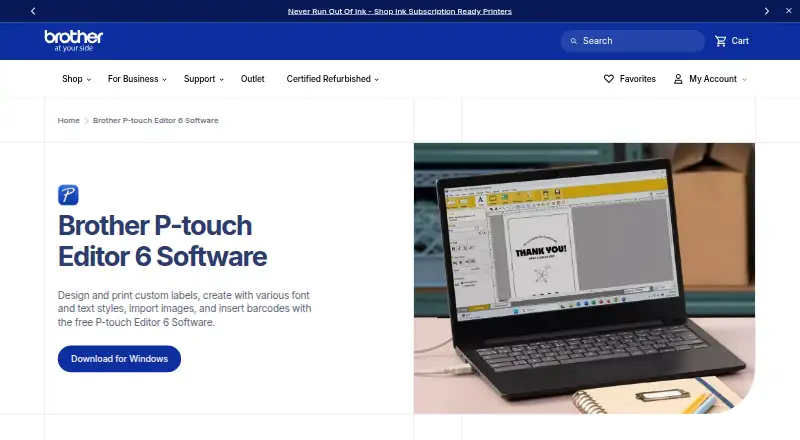
Brother describes P-touch Editor for Windows and Macintosh, with USB or Bluetooth connections to selected P-touch and QL printers. Its current download page shows Windows 10/11 and macOS 13, 14, 15, and 26 choices for a supported model.
P-touch Transfer Express packages administrator-made templates for delivery to users and printers. Brother also lists Transfer Manager, P-touch Library, Update Software, and printer-management utilities.
Developers can use Brother's mobile Print SDK, which includes Xcode and Android Studio guidance, or the Windows b-PAC component, DLLs, and OPOS driver. Smooth Print can initiate label printing from a web or mobile application through a URL scheme.
The software is proprietary rather than open source. It handles imported data and graphics, while associated workflows list PDF, JPEG, text, and RTF export.
Good fit
P-touch Editor suits custom work involving text, artwork, barcodes, QR codes, tables, mailing lists, or asset records. Unicode support permits several languages on one label.
It also fits recurring jobs that draw on database values, variable fields, or batch output. Scanner support, batch scanning, and searchable PDF are listed capabilities.
For other label tools, see Label Design Software.
Watch for
Only selected Brother P-touch and QL models are supported, so confirm the printer model first. Brother instructs users to attach the printer to a computer through USB or Bluetooth.
Brother says drivers are unavailable for ARM-based Windows processors on the referenced model page. Users on macOS 10.15 or later are directed to the App Store for the application.
Version 6.x omits template, database, and image backup as well as printer-data deletion; Brother points to version 5.4 for those tasks. The licence is free but prohibits reverse engineering.
Pricing
P-touch Editor 6 is offered as free software. The listed plan is a Windows version 6.0 download for selected Brother P-touch and QL models, with USB or Bluetooth printer connections.
Verdict
Choose P-touch Editor if you have a supported Brother printer and need a desktop tool for database-fed, barcode, QR-code, or batch labels. Its transfer utilities and developer components can support standardized templates or app-connected printing.
Consider another option if you need open-source software, ARM-based Windows drivers for the referenced model, or the backup and printer-data controls absent from version 6.x. Verify the precise printer and operating system before downloading.
Our take
P-touch Editor can suit owners of supported Brother P-touch or QL printers who need graphics, tables, barcodes, QR codes, Unicode text, database fields, or batch output. USB and Bluetooth connections are available, along with template-distribution and app-printing tools. Check model and processor compatibility first. Version 6.x omits backup and printer-data functions associated with version 5.4, which may be decisive.
- Handles barcodes, QR codes, tables, and variable fields
- Uses Excel and other database contents for labels
- Connects to select printers through USB or Bluetooth
- Imports common image formats and supports Unicode
- Works only with select Brother P-touch and QL models
- No ARM-based Windows drivers for the referenced model
- Version 6.x lacks several backup and data-management functions
- Proprietary licence forbids reverse engineering
- Pick it ifBrother printer owners making custom or batch labels; Database, barcode, QR-code, or asset labels; Teams distributing standard templates
- Skip it ifYou need open-source label software; You use ARM-based Windows with the referenced model; You require version 6.x backup or printer-data deletion
Pricing
P-touch Editor 6 is offered as a free Windows version 6.0 download. The plan covers selected Brother P-touch and QL models, with USB or Bluetooth printer connections.
- P-touch Editor 6Free software download · Windows version 6.0 · compatible select Brother P-touch and QL models · printer connection by USB or BluetoothFree
As brother-usa.com lists them, checked 14 Oct 2026.
Questions
Is Brother P-touch Editor free?
P-touch Editor 6 is offered as free software for download.
Which computers does it support?
Brother lists Windows and Macintosh compatibility. The current download page shows Windows 10/11 and macOS 13, 14, 15, and 26 choices for a supported model.
Can it print barcodes and QR codes?
Yes. Choose a code format, enter the data, and create a barcode or QR label; tables can also include barcodes.
Can labels use spreadsheet data?
Yes. Excel and other database programs can supply data for continuous or batch labels.
How does it connect to a printer?
Selected P-touch and QL printers can connect through USB or Bluetooth.
Does it work with mobile apps?
Brother describes sharing labels with its smartphone label-editing applications and offers a mobile Print SDK for developers.
Is P-touch Editor open source?
No. Brother's licence identifies proprietary software and grants free, non-exclusive, non-transferable use.
What is missing from version 6.x?
Brother says version 6.x lacks template, database, and image backup plus printer-data deletion, and recommends version 5.4 for those functions.