
Calculator+ Review
calculatorphotovault.info · checked 11 Oct 2026
An Android calculator disguise for storing private photos and videos.
How it plugs in
Signal on Photo Vault Apps5.0#31 of 32
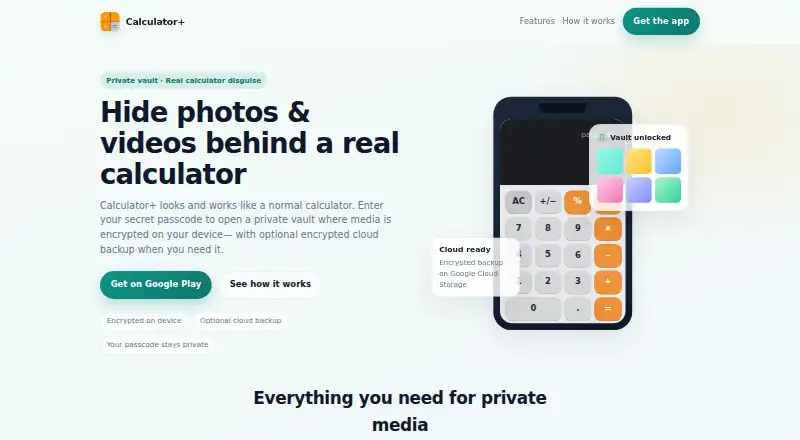
On Android, Calculator+ presents a working calculator over a private photo and video vault. Enter a four-digit code and use the percent key to get inside. Imported photos and stored videos are encrypted, with albums, export, sharing, optional fingerprint unlock, and optional encrypted cloud backup. The basic app is freemium; cloud backup needs a paid subscription.
Review
In a line
On Android, Calculator+ places a private photo and video vault behind a functioning calculator interface.
What it does
Create a four-digit code, enter it on the keypad, and press % to access the vault. Incoming photos are encrypted, while videos may be kept in their own vault.
Albums let you organize files, move them, export them, and share them after decryption. A private camera is included. Premium enables fingerprint unlocking when turned on.
How it connects
Calculator+ runs on Android. Google Cloud Storage handles optional cloud backup, with a setting to restrict transfers to Wi-Fi. Cloud content is encrypted before it is backed up, and cloud account data can be deleted at any time.
You may add a recovery email for a forgotten passcode. Google Play says the app may collect personal information and photos and videos, encrypts data while it moves between the app and its services, and accepts deletion requests.
Good fit
It suits Android users who want private folders for photos and videos behind a calculator-style screen. Albums, a private camera, encrypted imports, and file export cover basic vault organization.
Settings includes more than 40 language choices, and successfully backed-up media can be restored after changing or resetting a device.
Watch for
The free use described by Google Play does not include cloud backup; that feature is paid. The facts do not state the subscription price.
A forgotten passcode may be difficult to recover without setting a recovery email. Fingerprint unlock must be enabled and is a Premium feature.
Pricing
Calculator+ uses a freemium model. The facts do not give a price for Premium features.
Google Play requires a paid subscription for cloud backup. No subscription amount is listed.
Verdict
Choose Calculator+ if you use Android and want a calculator-fronted vault with encrypted imports, albums, video storage, and optional cloud backup.
Look elsewhere if you need a stated cloud price before signing up, a vault for a non-Android platform, or a way to rely on passcode recovery without configuring a recovery email.
Our take
Calculator+ makes sense for Android users who value a calculator disguise and want to keep both photos and videos in encrypted folders. Its organization tools, private camera, and optional fingerprint access cover everyday vault needs. Cloud backup can restore media after a phone change or reset, but it requires a paid subscription whose cost is not provided. Set a recovery email if losing the passcode is a concern. People on other platforms or buyers who need clear subscription pricing should consider another option.
- A calculator-style screen protects the vault, opened with a four-digit code and %
- Photos receive encryption on import, while videos have their own vault
- Albums, file export, and sharing are included
- Encrypted cloud backup is optional and can help restore media after a device change
- Fingerprint unlock is offered as a Premium feature
- Android only
- Cloud backup requires a paid subscription
- Passcode recovery email is optional, not automatic
- Pick it ifAndroid users wanting a calculator-disguised photo and video vault; People who need albums and encrypted cloud backup
- Skip it ifYou need iPhone or another non-Android platform; You require a published price for cloud backup before subscribing
Pricing
Calculator+ is freemium, but no Premium price is given.
Questions
What is Calculator+?
On Android, it provides a private photo and video vault behind a functioning calculator interface.
How do I open the vault?
Enter the four-digit code on the calculator keypad, then press %.
Are my photos and videos encrypted?
Imported photos are encrypted. Videos can remain in a dedicated vault, and cloud copies are encrypted before backup.
Does Calculator+ back up files online?
It can optionally back up through Google Cloud Storage, with a Wi-Fi-only setting. Google Play says this feature requires a paid subscription.
Can I recover a forgotten passcode?
A recovery email can be added optionally. The facts do not describe another recovery method.
Does it support fingerprint unlocking?
Yes. When enabled, fingerprint access is described as a Premium feature.
Which devices and languages are supported?
Calculator+ runs on Android. Google Play's latest update notes say Settings offers more than 40 languages.