Legal Document Management Software
CaseFox legal practice software review
casefox.com · checked 15 Oct 2026
Hosted legal practice software for cases, billing, documents, time, and trust accounting.
How it plugs in
Signal on Legal Document Management Software6.6#1 of 33
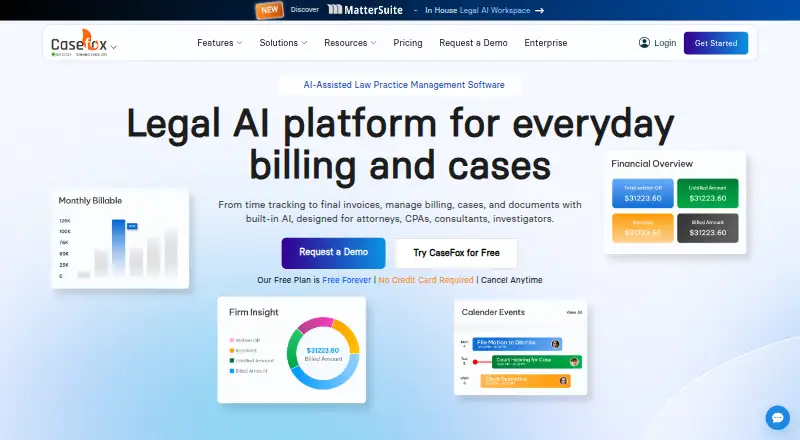
CaseFox is hosted legal practice software for attorneys, CPAs, consultants, and investigators. It combines case workspaces, task and calendar tools, time and expense tracking, invoicing, trust accounting, documents, and client intake. A web app provides the full feature set, with iOS and Android apps for basic routine work and offline syncing.
Review
In a line
CaseFox is hosted software for running legal and related professional practices. It brings case information, billing, documents, time, calendars, tasks, and trust accounts into one service.
What it does
Each matter has a central workspace for clients, cases, documents, tasks, and calendar entries. Practice tools include court calendars, deadline reminders, case reports that can be exported to Excel, customizable intake forms, and built-in conflict checks for new clients.
Time and expense tracking supports one-click or batch invoices, recurring billing, UTBMS codes, and LEDES invoices. Trust and operating accounts include IOLTA tools, ledgers, reconciliation, and accounting reports. Payment plans, a client payment portal, ACH, and card payments are available.
CaseFox AI can draft or review legal documents, examine case files and contracts, pull details and citations from uploaded files, and provide matter insights.
How it connects
CaseFox lists connections to Box, Dropbox, Google Drive, Google Calendar, Gmail, Microsoft Office 365, Outlook, QuickBooks, Xero, PayPal, and LawPay. It also supports legal billing connections and payment tools. See legal billing software and legal payments software for related categories.
A Web API exists, but access is selective and requires discussing the use case with CaseFox. Data can be exported in one step to an Excel workbook, including time and expenses, trust transactions, clients, cases, invoices, payments, calendar entries, and tasks. The help center covers importing, exporting, integrations, and other setup topics.
The service runs in a browser without desktop installation. iOS and Android apps support basic routine functions, offline case work, and later synchronization; the full feature set stays on the web.
Good fit
CaseFox is aimed at solo practitioners, small and midsize firms, large firms, and enterprise legal teams across different practice areas. It also names CPAs, consultants, and investigators as users.
It suits teams that want timekeeping, billing, trust accounting, intake, document handling, calendars, and tasks in one hosted workspace. The maker also advertises onboarding, staff training, data migration, and support by phone, email, or chat around the clock.
Watch for
The mobile apps cover only basic routine work, so users needing every feature will rely on the web application. Some reviewers report slow or limited mobile functions, limited report customization, and friction with document storage.
Review summaries also mention invoice-formatting problems and difficulty editing invoices after billing. One review reports trouble with partial payments and historical invoices changing unexpectedly; support experiences are not uniform.
CaseFox says data older than five years may be purged after notice. Export older records beforehand if you need to keep them. The API is not automatically available, and the service is not open source.
Pricing
CaseFox has a free plan and no free trial. Solo is free forever for four cases and two users, with all Pro features.
Professional costs $45 a month per user. It includes unlimited cases, 10 GB or more of storage, two-factor authentication, and Solo features. Enterprise costs $99 a month, or $79 per month when billed annually, and adds white labeling, a complimentary firm website, custom data migration, and priority support.
Verdict
Choose CaseFox if your practice needs one hosted place for matters, billing, trust accounts, intake, and schedules, with exports and connections to common storage, email, accounting, and payment services. The free Solo plan gives small practices a way to start, while higher plans add capacity and firm services.
Check mobile limits, invoice editing, reporting needs, API availability, and the five-year data-retention term before signing up. Practices that need a fully featured mobile app, highly customized reports, or guaranteed control over older records may need to look elsewhere.
Our take
CaseFox is a broad practice platform for firms that want case management, billing, trust accounting, intake, documents, and calendars together. Its free Solo plan covers four cases and two users, while paid plans add unlimited cases, storage, security controls, and enterprise services. The browser app holds the complete feature set; mobile apps are narrower. Before choosing it, confirm that its reporting, invoice editing, API access, mobile coverage, and data-retention rules match your workflow.
- Free Solo plan supports four cases and two users
- Handles billing, trust accounting, intake, cases, tasks, and calendars
- Exports core records to an Excel workbook
- Connects with storage, email, accounting, and payment services
- Offline case work is available in the mobile apps
- Mobile apps provide only basic routine functions
- Some reviewers cite limited reporting customization
- Invoice formatting and later edits draw complaints
- Web API access is offered selectively
- Data older than five years may be purged after notice
- Pick it ifSolo practices and firms needing billing plus case management; Teams that use trust accounting and common cloud services; Users wanting browser access with mobile offline work
- Skip it ifYou need the full feature set in a mobile app; You require highly customized reports or unrestricted API access; You must retain records older than five years without exporting
Pricing
CaseFox offers a free Solo plan forever for four cases and two users. Professional is $45 a month per user. Enterprise is $99 a month, or $79 per month when billed annually. There is no free trial.
- SoloFree forever · 4 cases · 2 users · all Pro featuresFree
- ProfessionalPer user/month · Unlimited cases · 10 GB+ storage · 2-factor authentication · all Solo features$45/mo
- Enterprise$79 per month if billed annually · Everything in Pro · white labeling · complimentary firm website · custom data migration · priority support$99/mo
As casefox.com lists them, checked 15 Oct 2026.
Questions
Does CaseFox have a free plan?
Yes. Solo is free forever and includes four cases, two users, and all Pro features.
What does CaseFox cost?
Professional is $45 a month per user. Enterprise is $99 a month, or $79 per month when billed annually.
Can CaseFox handle trust accounting?
Yes. It supports trust and operating accounts, IOLTA tools, detailed ledgers, reconciliation, and accounting reports.
Is there a CaseFox API?
A Web API exists, but access is selective. Prospective users must contact CaseFox about their use case.
Does CaseFox work on phones?
Yes. iOS and Android apps handle basic routine functions, support offline case work, and sync later. The full feature set is on the web.
Can I export my CaseFox data?
A one-click export creates an Excel workbook containing time and expenses, trust transactions, clients, cases, invoices, payments, calendar entries, and tasks.
Does CaseFox offer client payments?
Yes. It provides a client payment portal, payment plans, ACH payments, card payments, and connections to payment services.
How long does CaseFox keep data?
Its terms say data older than five years may be purged after notice. Users should export older data first.