CertifiKit: Self-Hosted Certificate Generator
github.com · checked 9 Oct 2026
Open-source, self-hosted certificate maker with templates, batch CSV generation, and PNG export.
How it plugs in
Signal on Certificate Maker Software5.8#13 of 28
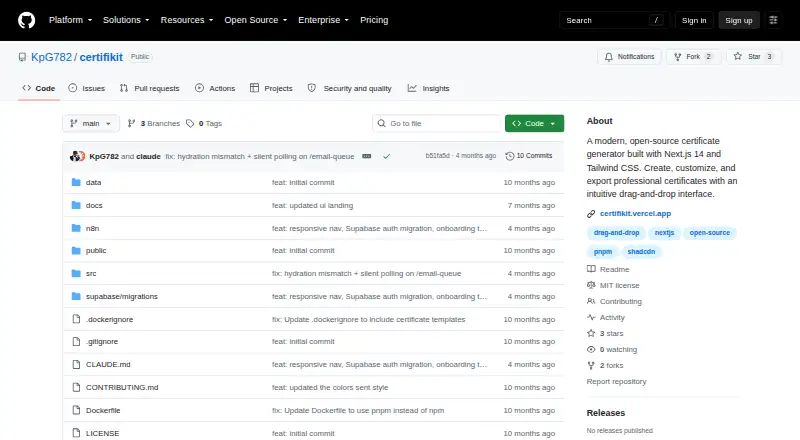
CertifiKit is a free, open-source certificate generator that runs on your own server or in a web browser. Its editor positions text and customizes fonts, sizes, colors, and alignment, while templates and custom designs support different events. You can create certificates one by one or from a CSV file, export PNG images, and queue email delivery through PostgreSQL and an n8n webhook.
Review
In a line
CertifiKit is a free, open-source tool for making, customizing, and exporting certificates. It is self-hosted, so you deploy it yourself and use it through the web.
What it does
With drag-and-drop controls, you can move text and adjust its font, size, color, and alignment. Built-in templates are available, and you may upload a certificate design of your own alongside logos or other images.
Provide recipient information as CSV, and the app can produce certificates in batches. Finished certificates download as PNG images at twice the usual resolution.
The project also describes an email queue for sending batches, tracking their status, and triggering automated delivery through an n8n webhook.
How it connects
CertifiKit uses the MIT license, whose terms allow personal and commercial use, modification, and distribution. It supports CSV recipient-data import and PNG export.
Email queuing uses PostgreSQL, a database that stores the queue and its status. Automated sending connects through an n8n webhook. The project documents Docker and manual deployment, with Docker presented as the easiest option.
Good fit
Organizations looking to produce certificates in bulk while running the software on their own infrastructure may find CertifiKit suitable. It can handle custom artwork, logos, and branded layouts.
It is useful when recipient information is already in a CSV file and when email batches need status tracking or n8n-based automation.
Watch for
Self-hosting leaves setup and maintenance to you. For a manual install, Node.js 18 or newer is required; PostgreSQL supports the email queue, while n8n is used for automated email.
The project describes session-based login, protected routes, and seven-day sessions. Its guidance says to replace default credentials, use environment variables, and enable HTTPS in production.
You are responsible for having rights to certificate assets and for following privacy laws such as GDPR and CCPA when handling recipient data. Support is handled through GitHub issues, documentation, and existing discussions.
Pricing
CertifiKit is free and has a free plan. It is open source, with no paid plan listed in the facts. You provide the hosting and deployment environment needed to run it.
Verdict
Choose CertifiKit if you want a no-license-cost certificate workflow that you can host yourself, customize, and run in batches from CSV data. It is a sensible match for teams comfortable managing a web application, database, and optional email automation.
Look elsewhere if you need a ready-made hosted service or do not want to handle server setup, security settings, asset rights, and privacy duties. Check the Node.js, PostgreSQL, and n8n requirements before committing to automated email delivery.
Our take
CertifiKit is a practical option for teams that need branded certificates without paying for software licenses. The drag-and-drop editor, custom images, CSV bulk creation, and PNG output cover the main production steps. Self-hosting gives you control over deployment, but it also means managing credentials, HTTPS, updates, and recipient privacy. Email automation adds PostgreSQL and n8n requirements. Pick it when your organization can operate its own web app; avoid it when you want a managed service with setup and infrastructure handled for you.
- Free and open-source under the MIT license
- Drag-and-drop editing for text styles and placement
- Batch certificate creation from CSV data
- PNG downloads at 2x resolution
- Docker deployment is documented, with the project recommending it as the easiest setup
- You must host and maintain the application yourself
- A manual installation needs Node.js 18 or newer
- Email queue needs PostgreSQL; automation needs n8n
- You handle security settings and privacy compliance
- Pick it ifTeams creating branded certificates in bulk; Organizations comfortable with self-hosted software; Workflows using CSV data and n8n email automation
- Skip it ifYou need a hosted certificate service with no server setup; You cannot manage database, HTTPS, or privacy responsibilities
Pricing
CertifiKit is free, with an open-source MIT license. No paid plans are listed, but you provide the hosting needed to run it.
Questions
Is CertifiKit free?
Yes. CertifiKit is free, has a free plan, and is open source under the MIT license.
Where does CertifiKit run?
It is self-hosted and used through the web. The project documents Docker and manual deployment.
Can it create certificates in bulk?
Yes. A CSV containing recipient data can be used to create multiple certificates in one batch.
What files can CertifiKit export?
The application provides PNG downloads at 2x resolution.
Does it send certificates by email?
The project outlines a PostgreSQL email queue that supports batches and status tracking, plus an n8n webhook for automated sending.
What does manual deployment require?
Node.js 18 or later is required for manual deployment; PostgreSQL supports the email queue, and n8n handles email automation.
What security steps are advised?
Guidance includes replacing default credentials, using environment variables, and enabling HTTPS in production. Authentication uses sessions, with protected routes described by the project.
Who handles privacy compliance?
Users are responsible for rights to certificate assets and for complying with GDPR, CCPA, and other applicable privacy laws when handling recipient data.
Near it
All alternatives →- Q
 QRCertificates#12 on this board
- 1123Certificates#14 on this board
- CCerthive#11 on this board
- CMCertificate Magic#15 on this board
- CCertopus#10 on this board
- C
 CertifyLink#16 on this board
- C
 CertificatesMaker#9 on this board
- EA
 EZdoc AI Certificate Maker#17 on this board
- SSertifier#8 on this board
- MMailMyCertificate#18 on this board