CLCL: Free Windows Clipboard Cache
nakka.com · checked 11 Oct 2026
Free Windows clipboard caching with history, templates, customizable menus, and plug-ins.
How it plugs in
Signal on Clipboard Manager Software6.3#6 of 39
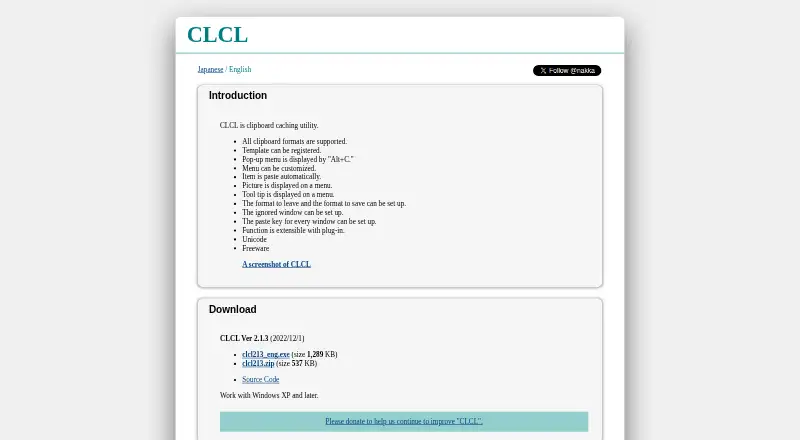
CLCL is a free clipboard caching utility for Windows XP and later. It keeps selected clipboard formats, lets you reuse history or saved text templates, and opens a customizable menu with Alt+C. Additional tools and format handling are available through plug-ins. The maker lists Unicode support and provides source code through GitHub.
Review
In a line
CLCL is a freeware clipboard caching utility for Windows. It stores clipboard history and lets you reuse saved items.
What it does
Use Alt+C to bring up CLCL's pop-up menu. Selecting a history or registered entry sends it directly to the active editor.
Frequently used text can be saved as templates. You can customize the menu and have it display pictures and tooltips.
Settings let you determine which clipboard formats remain or are saved. Windows can be excluded, and each window can have its own paste key.
How it connects
CLCL runs on Windows XP and later. The maker says it supports all clipboard formats and Unicode.
Plug-ins extend CLCL with functions such as text conversion and clipboard clearing, along with RTF and Windows metafile formats. The download page also links to CLCL source code on GitHub.
Good fit
CLCL suits Windows users who want reusable clipboard history or text snippets without paying. It can help people who repeatedly paste the same text, need format-specific history controls, or want per-window paste settings.
It may also fit users who want to customize a clipboard menu or add functions through plug-ins.
Watch for
CLCL is listed for Windows only, with the maker stating support for Windows XP and later. Check that this matches your computer before choosing it.
The available maker pages do not state security, compliance, or support terms. Plug-in behavior and compatibility may need separate checking.
Pricing
CLCL is free freeware. It has a free plan, and no free trial is listed.
Verdict
Choose CLCL if you need a no-cost Windows clipboard history tool with templates, format controls, and a customizable Alt+C menu. Its plug-in system and linked source code may appeal to users who want to extend or inspect the utility.
Look elsewhere if you need software for another platform or documented security and support commitments.
Our take
CLCL is a straightforward choice for Windows users who want clipboard history and reusable text at no price. Its controls cover saved formats, ignored windows, templates, and window-specific paste keys, while plug-ins add extra functions. The main checks are platform fit and the level of assurance you require: the listed pages do not provide security, compliance, or support terms. Users seeking a different operating system should compare other clipboard tools.
- Free freeware with no purchase cost
- Supports all clipboard formats, according to the maker
- Reusable clipboard history and text templates
- Customizable Alt+C menu with pictures and tooltips
- Plug-ins can add tools and format support
- Windows only
- Maker pages give no security or compliance statement
- Pick it ifWindows users who want free clipboard history; People who reuse text templates and snippets; Users needing format and per-window controls
- Skip it ifYou need macOS, Linux, or mobile support; You require documented security, compliance, or support terms
Pricing
CLCL is freeware with a free plan and no free trial listed.
- FreewareFreeware; works with Windows XP and laterFree
As nakka.com lists them, checked 11 Oct 2026.
Questions
What is CLCL?
CLCL is a clipboard caching utility that stores clipboard history and lets you paste saved entries or templates.
Which systems does CLCL support?
According to the maker's English page, CLCL works with Windows XP and later.
How do I open the CLCL clipboard menu?
Use Alt+C to open the customizable pop-up menu, then choose an entry to paste it into the active editor.
Can CLCL save text snippets?
Yes. Frequently used text can be registered as templates and selected again from the menu.
Does CLCL support rich text?
The maker says CLCL handles all clipboard formats. Plug-ins also provide RTF and Windows metafile handling.
Can CLCL be extended?
Yes. Its plug-ins can provide tools such as text conversion and clipboard clearing, as well as additional format support.
Is CLCL free?
Yes. CLCL is freeware with a free plan, and no free trial is listed.
Does CLCL have source code available?
The download page provides a link to CLCL's source code on GitHub.