cnc-ddraw software review
github.com · checked 14 Oct 2026
Free, open-source DirectDraw wrapper for improving older 2D game compatibility.
How it plugs in
Signal on Game Compatibility Layers7.7#1 of 27
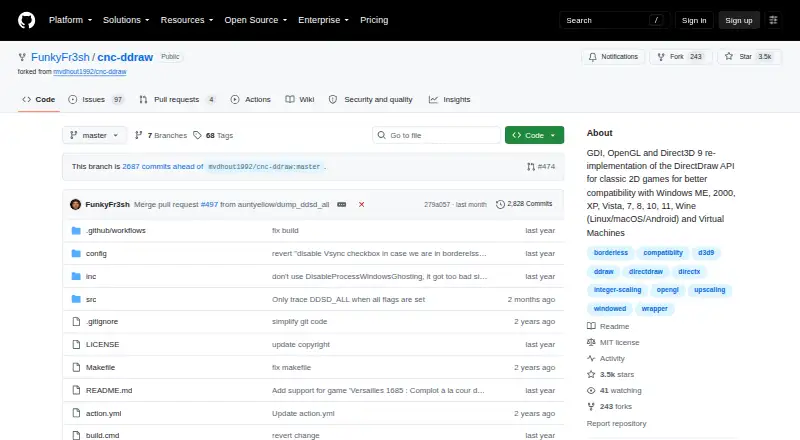
By reimplementing the DirectDraw API, cnc-ddraw helps classic 2D games work more reliably. It aims at issues including black screens, crashes, sluggish performance and unreliable Alt+Tab switching. Supported environments include Windows, Linux, macOS and Android, along with Wine and virtual machines. The MIT-licensed project is free, provided the game uses DirectDraw software rendering.
Review
In a line
cnc-ddraw is a free, open-source compatibility wrapper for older 2D games that use DirectDraw. It translates those game calls through selectable graphics renderers to improve how the games display and run.
What it does
Install it by downloading cnc-ddraw.zip, extracting the files into a game folder and starting the game. It is intended to resolve black screens, crashes, low performance and unreliable Alt+Tab switching.
The wrapper offers GDI, OpenGL and Direct3D 9 backends, with automatic selection available. Windowed, exclusive-fullscreen and borderless presentations are supported, while Alt+Enter toggles fullscreen and windowed views.
GLSL shaders can enlarge the rendered image. Included controls cover an FPS limiter, VSync, optional mouse-sensitivity scaling, and automatic preservation and restoration of window position, size and state. Preliminary libretro shader support is also available.
How it connects
cnc-ddraw is MIT-licensed open-source software. Its repository includes C and C++ source folders, a Makefile, and Visual Studio project files.
The compatibility list covers Windows ME through Windows 11, Wine on Linux, macOS, Android and virtual machines. When using Wine, manually override ddraw in winecfg or run cnc-ddraw config.exe once.
More than 200 classic games appear in the project’s list, which the project says is incomplete and not regularly updated. Some games need extra steps in the project wiki. Startup or crash problems may require creating and uploading a debug log.
Good fit
cnc-ddraw suits people keeping older 2D games running on modern Windows systems or through Wine on Linux, macOS or Android. It is also useful when a game has black screens, unstable frame rates, crashes or unreliable display switching.
Its renderer choices, borderless mode, scaling shaders, frame limiter and VSync give players several ways to adjust presentation and timing.
Watch for
A compatible title needs to use DirectDraw’s software renderer; games rendered through Direct3D are outside cnc-ddraw’s support.
Some Wine setups can still show major menu artifacts, and certain games require game-specific configuration. You may need to try different renderers and follow wiki instructions.
The supported-game list is incomplete and may not reflect newer compatibility work.
Pricing
cnc-ddraw is free. The software is released under the MIT License, which allows use, copying, modification, distribution, sublicensing and sale under that license's terms.
Verdict
Choose cnc-ddraw if you need a no-cost way to make a DirectDraw-based classic game behave better on current systems or under Wine. Its broad environment support and display controls make it practical for many older 2D titles.
Skip it for a game built around Direct3D rendering, or if you need guaranteed results without per-game setup. Wine users should be ready to change renderers and consult game-specific guidance when menus or startup fail.
Our take
cnc-ddraw is a sensible first try for owners of older 2D games that rely on DirectDraw software rendering. It costs nothing, includes its source code, and covers Windows, Wine, macOS, Android and virtual machines. The renderer options and display controls address several common problems without replacing the game itself. Compatibility is not universal: Direct3D games are excluded, the game list is incomplete, and some titles need manual Wine overrides or wiki instructions. Use it when the target game matches the required renderer and you can handle occasional per-game troubleshooting.
- Free and MIT-licensed
- Open source with build files included
- Works across Windows, Wine, macOS, Android and virtual machines
- Provides GDI, OpenGL and Direct3D 9 renderer choices
- Includes scaling, VSync and frame limiting
- Requires DirectDraw software rendering
- Direct3D-rendered games are unsupported
- Certain titles need additional per-game setup
- The compatibility list is incomplete
- Wine setups may still show menu artifacts
- Pick it ifClassic 2D games with DirectDraw problems; Players using older games through Wine; Users who want free, adjustable display options
- Skip it ifYour game uses Direct3D rather than DirectDraw software rendering; You cannot manage manual configuration or troubleshooting
Pricing
The only plan is free. There is no paid tier; the software is MIT-licensed.
- cnc-ddrawMIT-licensed software · requires a game with a DirectDraw (Software) rendererFree
As github.com lists them, checked 28 Sept 2026.
Questions
What is cnc-ddraw?
It is an open-source wrapper that reimplements the DirectDraw interface used by older 2D games, helping address display and performance problems.
Which operating systems and environments are supported?
The project lists Windows ME through Windows 11, Wine on Linux, macOS and Android, as well as virtual machines.
How do I install cnc-ddraw?
Get cnc-ddraw.zip, unpack it into the game directory, then launch the game. On Wine, manually override ddraw in winecfg or run cnc-ddraw config.exe once.
Can it run games rendered with Direct3D?
No. A supported game needs a DirectDraw software renderer; Direct3D-rendered games are not supported.
Which display controls does it provide?
Windowed, exclusive-fullscreen and borderless modes are available, with Alt+Enter toggling views; GLSL upscaling, VSync and an FPS limiter are included.
What if a game crashes or will not start?
The project asks users to generate and upload a debug log and check the wiki for game-specific setup steps.