
CodeAnt AI: Security Testing and Code Review
codeant.ai · checked 21 Oct 2026
AI security testing and code review for code, cloud, and runtime.
How it plugs in
Signal on AI Code Review Tools5.9#17 of 47
CodeAnt AI combines automated security testing, code review, and quality checks. It analyzes pull requests, source code, Git history, cloud settings, and runtime risks. Teams can use its web app, API, CLI, IDE extensions, or self-hosted deployment. It connects with major code hosts and tracking tools, but there is no permanent free plan.
Review
In a line
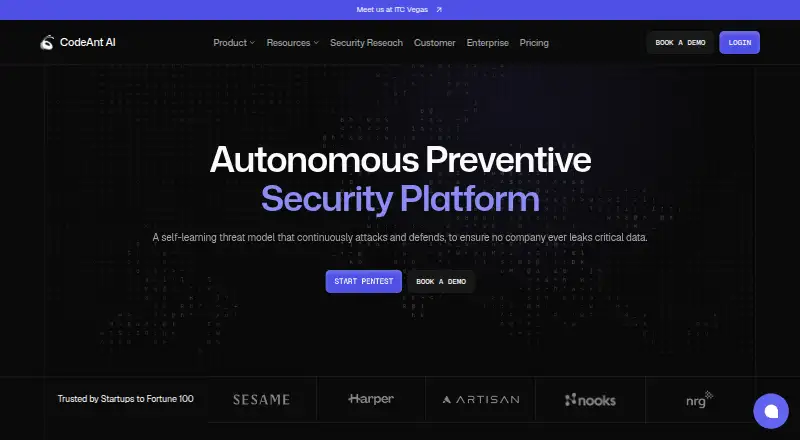
CodeAnt AI is an automated security platform for continuous testing and code review. It covers code, cloud, and runtime environments.
What it does
Blackbox pentesting starts with a domain and checks what is exposed online without source code or login details. Whitebox pentesting examines source files and Git history, helping uncover problems that outside-in testing can overlook.
Its agents examine pull requests in depth, adding inline findings with severity ratings, proposed remedies, and steps to reproduce issues. They can also write pull request summaries from a repository template, follow custom review rules, and approve requests under set policies.
The documented security coverage spans application scans, secret checks, infrastructure-as-code review, and software composition analysis. Quality features flag dead or duplicate code, complex functions, antipatterns, and bugs, while also generating docstrings and reports. Documentation includes DORA and developer productivity measurements.
How it connects
Connections are available for GitHub, GitLab, Bitbucket, and Azure DevOps. The integrations list also names Jira, Azure Boards, Slack, and Microsoft Teams, alongside extensions for VS Code, Cursor, Windsurf, and IntelliJ.
A developer API uses API tokens for CI pipelines. The product also provides a command-line tool, Git hooks, and an MCP server for coding agents and other MCP clients. The CLI installs with `npm install -g @codeant/cli`.
Cloud use, a browser extension, or self-hosting are available. Setup documentation explains on-premises use with GitHub Enterprise, GitLab, Bitbucket Data Center, and Azure DevOps Server. Documentation lists support through a help portal and email.
Good fit
Small, midsize, and enterprise teams can use CodeAnt for pull-request checks alongside wider security analysis. Supported languages include Python, Java, C, C++, C#, JavaScript, Kotlin, Go, Ruby, and Swift.
Teams needing compliance controls can use listed SOC 2, HIPAA, and SSO SAML support. The Trust Center describes product, data, network, application, endpoint, and corporate controls.
Watch for
There is no ongoing free plan. The free Blackbox Pentesting option includes one full AI scan; low and medium findings stay free, while high and critical findings require payment.
Check deployment and administration needs before choosing self-hosting. Enterprise features such as on-premises or VPC deployment, SSO, audit logs, and dedicated support use custom pricing.
Pricing
CodeAnt is paid, with prices starting at $20 per user a month. A 14-day trial is available without a credit card. Another free trial offer includes 100 pull request reviews, premium features, and unlimited seats for 14 days.
The Code Security plan starts at $20 per user a month and includes SAST, software composition checks, secrets detection, infrastructure-as-code scanning, and an SBOM. AI Code Review costs $24 per user a month when billed annually, or $30 per user monthly.
Enterprise and Attack Surface Management use price on request. Enterprise adds SSO, audit logs, on-premises or VPC deployment, and dedicated support. Attack Surface Management covers continuous domain discovery, cloud asset inventory, exposed services, and real-time alerts.
Verdict
Choose CodeAnt if your team wants one service for pull request review, offensive testing, code quality checks, and cloud or runtime security. Its integrations, API, CLI, IDE plugins, and self-hosted options can fit different development setups.
Look elsewhere if you need a lasting free plan or a simple code-review-only tool. Buyers should confirm which findings, deployment choices, and enterprise controls are included in their selected plan before committing. It can also be compared with AI code review tools and code quality management software.
Our take
CodeAnt AI is a broad choice for teams that want security testing and pull request analysis in the same product. Connections to major code hosts, IDEs, CI pipelines, and self-hosted installations let it accommodate varied workflows. The trade-off is cost: core use is paid, some security findings unlock only after payment, and advanced enterprise features require a custom quote. Teams seeking only lightweight review may find its wider security scope unnecessary. Compare it with code review software before deciding.
- Covers offensive testing, code review, and code, cloud, and runtime risks
- Integrates with GitHub, GitLab, Bitbucket, and Azure DevOps
- Offers API, CLI, Git hooks, MCP, IDE plugins, and self-hosting
- Includes SOC 2, HIPAA, and SSO SAML support
- Free trials include 14 days and no credit card requirement
- No permanent free plan
- High and critical Blackbox findings require payment
- Enterprise and attack-surface plans have custom pricing
- Self-hosted deployments require separate setup
- Pick it ifTeams combining security testing with pull request review; Organizations needing self-hosted or CI pipeline options; Companies using major code hosts and IDE plugins
- Skip it ifYou need a permanently free code review service; You want only a small, review-focused tool; You cannot manage custom-priced enterprise features
Pricing
AI Code Review is $24 per user a month with annual billing, or $30 monthly. Free trials last 14 days; Enterprise and Attack Surface Management are price on request.
- Blackbox PentestingOne full AI pentest scan included · low and medium findings always free · high and critical findings unlock on paymentFree
- 14-day free trial14 days · no credit card requiredFree
- Free trial14 days · 100 PR reviews · premium features · unlimited seats · no credit cardFree
- Code SecurityStarts at $20 per user per month, as stated in CodeAnt’s July 2026 guide · SAST · SCA · secrets detection · IaC scanning · SBOM$20/mo
- AI Code Review$24 per user per month billed annually ($30 monthly), as stated in CodeAnt’s July 2026 comparison · Unlimited PR reviews · PR SAST · dashboards · CI/CD integration · Scan Center$24/mo
- EnterpriseCustom pricing · SSO · audit logs · on-premises or VPC deployment · dedicated supportOn request
- Attack Surface ManagementContinuous discovery of domains, subdomains and IPs · AWS, Azure and GCP asset inventory · exposed ports and services · real-time alertsOn request
As codeant.ai lists them, checked 3 Oct 2026.
Questions
Is there a free CodeAnt AI plan?
No permanent free plan is listed. Blackbox Pentesting includes one full AI scan, with low and medium findings free; high and critical findings require payment.
How long is the free trial?
The listed trials last 14 days and do not require a credit card. One offer includes 100 pull request reviews, premium features, and unlimited seats.
Which code hosts does it support?
It supports GitHub, GitLab, Bitbucket, and Azure DevOps, with self-hosted guides for their enterprise or server editions.
Can CodeAnt AI run on a company’s own systems?
Yes. Organizations can use self-hosted deployment, with guides for GitHub Enterprise, GitLab, Bitbucket Data Center, and Azure DevOps Server.
Does it provide an API?
Yes. Documentation describes API tokens for CI pipelines and a CodeAnt API. A reference page documents a team-member removal endpoint using a POST request and bearer token.
What does AI Code Review cost?
The annual-billing rate is $24 per user each month, while month-to-month billing is $30 per user.
Which compliance features are listed?
The Trust Center lists SOC 2, HIPAA, and SSO SAML, along with product, data, network, application, endpoint, and corporate controls.