
Compresto: Offline Compression for Mac
compresto.app · checked 15 Oct 2026
Offline macOS app for batch-compressing videos, images, PDFs and GIFs.
How it plugs in
Signal on PDF Compression Software7.8#1 of 39
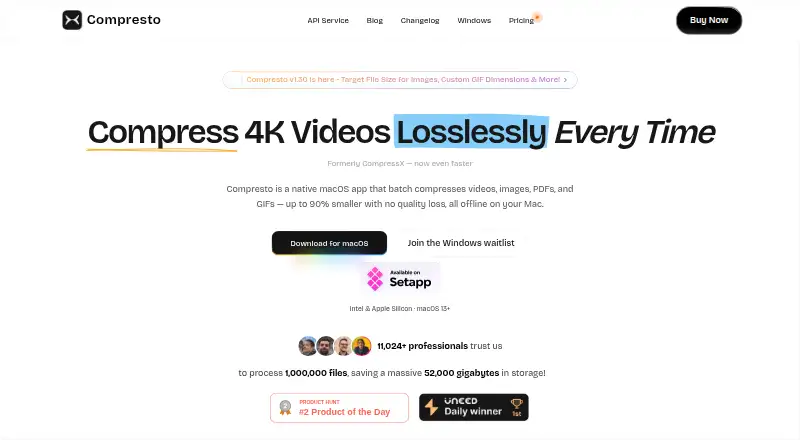
Compresto is a native macOS app that compresses videos, images, PDFs and GIFs in batches. It works offline, monitors folders, and offers a floating Drop Zone. A REST API handles image compression, while a free web tool accepts small JPEG, PNG and WebP files without signup. It runs on Intel and Apple Silicon Macs with macOS 13 or later.
Review
In a line
Compresto is a native Mac app for compressing videos, images, PDFs and GIFs locally. It also includes a web image tool and a REST API for image compression.
What it does
The app processes hundreds of files or whole folders with parallel processing and progress tracking. It claims file-size reductions of up to 90% while preserving visual quality.
Video support includes MP4, MOV and other major codecs, with hardware acceleration, quality presets and H.264, H.265 or VP9 choices. Image tools handle PNG, JPEG, HEIC, WebP, TIFF and GIF files, with quality and resizing controls.
You can convert videos to GIFs, adjust GIF quality and dimensions, and compress standard PDFs with Best, High, Balanced or Low settings. Watched folders process new files automatically, and the floating Drop Zone accepts files without opening the main window.
How it connects
Compresto has a Raycast extension and supports compresto://open and compresto://import links for starting jobs with settings such as format, quality, output path, naming and recursive processing.
Its public REST API uses an X-API-Key from the Compresto dashboard. The image endpoint accepts base64 data or a public URL and can set quality, output format, maximum width and maximum height. Free API access allows 500 requests a month; Pro allows 5,000. Both tiers are limited to 60 requests per minute.
The app downloads FFmpeg, Gifski, pngquant and Ghostscript during setup. The opened pages do not state an open-source license or official SDK packages.
Good fit
Compresto suits Mac users who need repeated local compression for media and documents. Batch processing, watched folders and the Drop Zone help with recurring file cleanup.
It also fits keyboard-driven workflows through Raycast and programmatic image compression through its API.
Watch for
There is no Windows or Linux version. The app requires an Intel or Apple Silicon Mac running macOS 13 or later.
Selected files stay on the Mac and are not uploaded or stored by the app. Anonymous compression statistics can be turned off, while TelemetryDeck collects anonymized usage data and the privacy policy says personally identifiable information is not collected.
The API requires a dashboard key and is limited by monthly request and rate caps. Initial setup downloads several supporting tools into the app support folder.
Pricing
Compresto is paid, with plans starting at $49. The Personal plan costs $49 one-time for one Mac, lifetime updates, all listed file types, batch processing, Drop Zone and automatic folder monitoring.
The Standard plan costs $69 one-time for two Macs and includes the same features and lifetime updates. A crossed-out $98 is shown for this plan.
A free trial is available. The pricing page also offers a free, no-signup web compressor for JPEG, PNG or WebP files up to 5 MB. The API lists Free and Pro tiers, with 500 or 5,000 requests per month respectively.
Verdict
Choose Compresto if you use a recent Mac and want offline batch jobs for several media and document formats. Its folder watching, Drop Zone and Raycast support suit repeat workflows, while the API covers automated image requests.
Check the operating-system requirement before buying, especially if your computers include Windows or Linux. The web tool handles occasional small image files, while video and PDF compression is available in the Mac app. API users should plan around the monthly and per-minute limits.
Our take
Compresto is a practical choice for people working mainly on Intel or Apple Silicon Macs who need recurring compression across videos, images, PDFs and GIFs. The one-time licenses include lifetime updates, and local processing avoids sending selected files to a server. Its free web page handles only small image files, so it is not a full replacement for the desktop app. Buyers on Windows or Linux should look elsewhere, and teams planning automated image jobs need to check the API quotas before committing.
- Processes videos, images, PDFs and GIFs in batches
- Works locally without uploading selected files
- Folder monitoring and Drop Zone automate repeat jobs
- Raycast extension and REST API support automation
- Personal plan includes lifetime updates
- No Windows or Linux version
- Requires macOS 13 or later
- API has monthly request and rate limits
- Setup downloads several supporting tools
- Free web tool limits files to 5 MB
- Pick it ifMac users compressing media and PDFs repeatedly; People who want local, folder-based processing; Developers needing an image-compression API
- Skip it ifYou need a Windows or Linux app; You only compress files larger than 5 MB in a browser; Your API workload exceeds the listed quotas
Pricing
Personal covers one Mac; Standard costs $69 one-time for two Macs. A free trial and a free web tool for JPEG, PNG or WebP files up to 5 MB are available. The API has Free and Pro monthly request tiers.
- PersonalOne-time payment · 1 macOS device · lifetime updates · video, image, GIF and PDF support · batch processing · Drop Zone · automatic folder monitoring$49 one-time
- Standard$98 crossed out; $69 shown · One-time payment · 2 macOS devices · lifetime updates · video, image, GIF and PDF support · batch processing · Drop Zone · automatic folder monitoring$69 one-time
As compresto.app lists them, checked 15 Oct 2026.
Questions
What platforms does Compresto support?
The desktop app supports Intel and Apple Silicon Macs running macOS 13 or later. There is no Windows or Linux version.
Does Compresto upload my files?
The macOS app processes selected files locally and does not upload or store them. Anonymous compression statistics can be disabled in settings.
What file types can it compress?
It handles MP4, MOV and other major video codecs; PNG, JPEG, HEIC, WebP, TIFF and GIF images; and standard PDFs.
Is there a free option?
Yes. There is a free trial and a no-signup web tool for JPEG, PNG or WebP files up to 5 MB. The API also lists a Free tier.
How much do the desktop plans cost?
Personal costs $49 one-time for one Mac. Standard costs $69 one-time for two Macs. Both include lifetime updates and the listed compression features.
Does Compresto have an API?
Yes. Its REST API compresses images, accepts base64 data or public URLs, and requires an X-API-Key. Free and Pro tiers allow 500 or 5,000 requests per month.
Near it
All alternatives →- BH
 BentoPDF Hyper Compress#2 on this board
- P
 PDF2Go#3 on this board
- XC
 Xodo Compress PDF#4 on this board
- I
 iLovePDF#5 on this board
- S
 Smallpdf#6 on this board
- PC
 PDF Candy#7 on this board
- GBgs-batch-pdf#8 on this board
- PR
 PDF Resizer#9 on this board
- CCompressify#10 on this board
- FP
 Foxit PDF Compressor#11 on this board