
Concepts: Infinite-Canvas Sketching and Design
concepts.app · checked 15 Oct 2026
Concepts is a vector sketching, note-taking and design workspace with an infinite canvas.
How it plugs in
Signal on Vector Graphics Software6.6#7 of 51
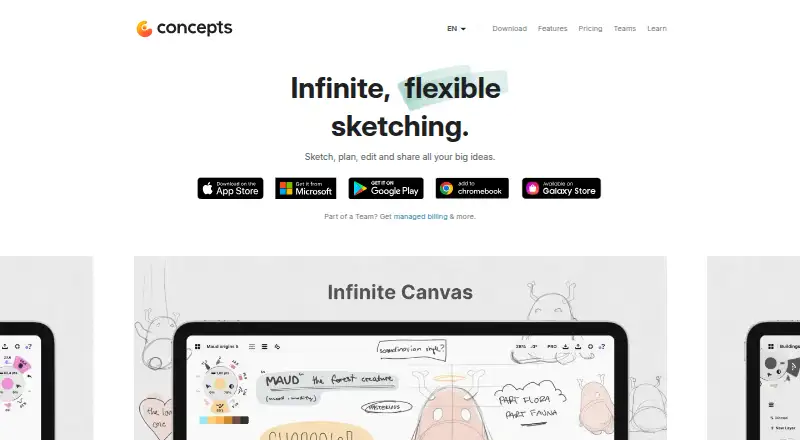
Concepts combines editable vector strokes, an infinite canvas, drawing tools, layers and measured-layout guides. It runs on iOS, Android and Windows, with mobile and desktop apps. You can import PDFs and images, export several file types, and use cloud backups that vary by platform. A free plan is available, with paid options and a seven-day trial.
Review
In a line
Concepts is a sketching, note-taking and design workspace built around an infinite canvas. Its vector-based strokes can be edited after you draw them.
What it does
You can zoom around movable artboards and work at different detail levels. Pens, pencils, markers, airbrushes and watercolor tools support pressure, tilt, speed and live smoothing.
Each stroke can be moved, resized, recolored or adjusted without drawing it again. Automatic and manual layers are available, with unlimited layers on paid plans.
Grids, snapping, scale, measurement and shape guides help with measured drawings and technical layouts. Object libraries let you reuse built-in packs or objects you make yourself.
The app includes templates, illustration tools and presentation design. Presentation Mode supports live sketching for clients or teams and is listed as an iOS feature.
How it connects
Concepts imports PDF files and images. It exports PDF, JPG, PNG, PSD, SVG and DXF files.
Cloud options depend on the device: iCloud Drive backup is listed for Apple devices, configurable cloud services for Windows, and Google Drive backup for Android and ChromeOS. iOS also lists Pexels image search.
The app is proprietary rather than open source. iOS uses .concept files, while Windows, Android and ChromeOS use .concepts files; those formats are not yet compatible.
Good fit
Concepts suits people who want one workspace for freehand sketches, visual notes, illustration and design layouts. Its infinite canvas and editable vectors support brainstorming and repeated changes.
The precision tools fit technical drawing, architecture and product-design work. Reusable objects, templates and presentation mode can help when showing ideas to clients or teams.
Watch for
The free version restricts some image importing, unlimited layers and standard exports. Check which tools your work needs before choosing a plan.
There is no real-time collaboration. Touch-focused selection and lasso actions may be limiting on non-touch PCs.
Platform features are not fully alike, and the iOS and Windows/Android/ChromeOS file formats cannot currently be exchanged directly. Some Android reviewers also report missing palettes or shape recognition without a subscription, account and purchase issues, and drawing failures with Samsung DeX.
Minimum requirements are iOS 15, Windows 10 version 19041 or Android 8. Memory minimums are 1GB on iOS and Android and 4GB on Windows.
Pricing
Concepts has a free plan and a seven-day trial. Basics is free and includes an infinite canvas, unlimited drawings and folders, five layers, grids, snapping, scale, measurement and JPG export.
Pro is $4.99 a month when billed monthly, or $29.99 a year when billed annually. It adds cross-platform features, brush and object packs, unlimited layers and PDF import/export. An Essentials plan is a $39.99 one-time purchase for a single platform.
Teams self-service costs $10 a month or $100 a year per teammate. Education is free for qualifying institutions. Enterprise pricing is on request; its business page lists plans from $200. A Basic plan with five layers is listed without a price.
Verdict
Choose Concepts if you want an editable drawing surface that can hold sketches, notes and design work together, especially on iOS. The free tier is enough for basic canvases and JPG output, while paid plans add deeper editing and file support.
Look elsewhere if live co-editing is required, if your devices need to share files directly across the iOS and other platform formats, or if you rely on a non-touch Windows computer for precise selection. Compare the plan limits with your import, export and layer needs first.
Our take
Concepts is a sensible choice for sketchers, visual note-takers and designers who value an infinite canvas and editable strokes. Its precision guides, reusable objects and broad export list also suit technical layouts and presentation work. The free Basics plan covers core drawing, while subscriptions and one-time plans unlock more layers, file support and tools. Be careful with platform differences: file formats do not currently match across iOS and other systems, and there is no real-time collaboration. Non-touch Windows users should check whether selection feels workable for them.
- Editable vector strokes can be moved, resized and recolored.
- Infinite canvas supports movable artboards and different detail levels.
- Exports include PDF, JPG, PNG, PSD, SVG and DXF.
- Runs on iOS, Android and Windows.
- Free Basics plan includes five layers and JPG export.
- Some imports, unlimited layers and standard exports are behind a paywall.
- No real-time collaboration is provided.
- iOS and other platform file formats are not compatible.
- Touch-oriented selection can be difficult on non-touch PCs.
- Some Android features require a subscription, according to reviewers.
- Pick it ifSketching, visual notes and illustration on an infinite canvas; Architecture, product design and measured layouts; Presenting live ideas from an iOS device
- Skip it ifYou need people to edit together in real time.; Your workflow moves files directly between iOS and Windows or Android.; You mainly use a non-touch PC for selection and lasso work.
Pricing
A free tier covers basic drawing. A seven-day trial is offered.
- BasicFive layersOn request
- Pro monthly subscriptionbilled monthly · Subscription access to Pro features and services$4.99/mo
- Pro yearly subscriptionbilled annually · Subscription access to Pro features and services$29.99/yr
- Teams self-service monthlybilled monthly · Regular updates · Priority support · Self-service billing · Re-assignable licenses · Multiple admins$10/mo
- Teams self-service yearlybilled annually · Regular updates · Priority support · Self-service billing · Re-assignable licenses · Multiple admins$100/yr
- EducationFree for qualifying institutions · Teacher and student licenses for qualifying schoolsFree
- BasicsInfinite canvas · unlimited drawings and folders · five layers · grids, snap, scale and measure · JPG exportsFree
- Pro subscription$4.99 / month · Every feature across platforms · all brush and object packs · infinite layers · PDF import/export · seven-day trial$4.99/mo
As concepts.app lists them, checked 23 Sept 2026.
Questions
Does Concepts have a free plan?
Yes. Basics is free and includes an infinite canvas, unlimited drawings and folders, five layers, measured-layout tools and JPG export.
What devices run Concepts?
Concepts has apps for iOS, Android and Windows. Minimum versions listed are iOS 15, Windows 10 version 19041 and Android 8.
Can I import and export files?
You can import PDFs and images. Exports include PDF, JPG, PNG, PSD, SVG and DXF.
Does Concepts support collaboration?
It has no real-time collaboration. Presentation Mode supports live sketching for clients or teams and is listed as an iOS feature.
How much does the Pro plan cost?
Pro costs $4.99 a month when billed monthly, or $29.99 a year when billed annually. A seven-day trial is included.
Can Concepts files move between platforms?
Not directly between iOS and the other listed platforms. iOS uses .concept files, while Windows, Android and ChromeOS use .concepts files, which are not yet compatible.