Nonprofit Text-to-Give Software
Continue to Give: Online Giving and Fund Accounting
continuetogive.com · checked 14 Oct 2026
A giving, donor-administration and fund-accounting service for churches, nonprofits and missionaries.
How it plugs in
Signal on Nonprofit Text-to-Give Software6.6#4 of 41
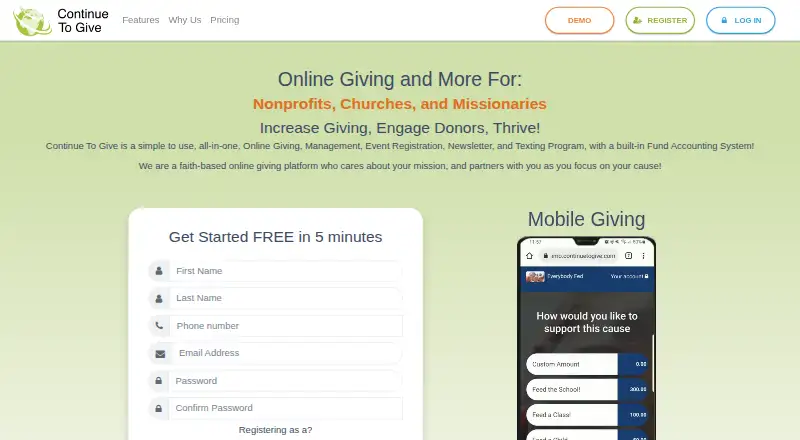
Continue to Give brings online and mobile donations together with donor records, event tools, communications and fund accounting. Churches, nonprofits, missionaries and individuals are its audience, with emphasis on organizations collecting less than $500,000 annually. The hosted service works on web, Android and iOS, offering free transaction-based plans alongside paid options for larger or more advanced needs.
Review
In a line
Continue to Give provides hosted tools for collecting gifts, managing donors and handling fund accounting. Churches, nonprofits, missionaries and individuals access it through web, Android and iOS applications.
What it does
One-time and recurring contributions can come through online forms, text, mobile apps, QR codes, Facebook, kiosks, virtual terminals and crowdfunding. Through the service or Givers App, donors may schedule contributions and change their payment details.
Its church and donor-management toolkit covers dashboards, forms, communications, pledges, events, reporting, small-group registration, child check-in and task management. Fund accounting includes transactions, journal entries, transfers, bank imports, matching deposits and accounting reports.
How it connects
Accounting and customer-record connections, data exports and custom configurations are listed by the service. Integration setup appears in the help center, while GetApp users identify WooCommerce and QuickBooks Desktop connections.
The reviewed official pages offer no public programming interface or software development kit. No self-hosting deployment is stated; the offering is a hosted service with mobile applications. Transaction data is protected with 256-bit encryption, and the service says it follows PCI compliance regulations.
Good fit
Churches, nonprofits and missionaries seeking one system for donations, donor administration, communications and accounting may find Continue to Give suitable. Its stated emphasis is on organizations bringing in less than $500,000 each year.
Individuals and sending organizations using the missionary plans may also find a fit. Recurring contributions, campaign pages, tax receipts, a donor portal and several giving channels address common fundraising tasks.
Watch for
Reviewers commonly characterize the site and navigation as dated or hard to follow; some also mention small technical glitches, delayed donations or inconsistent response times. Apple reviewers say the Givers App may fail or prove difficult, and one Google Play review cites a payment outage.
Review transaction pricing, processing requirements and integrations before selecting a plan. The Givers App needs iOS 13 or newer; its listing also covers iPadOS 13+, Apple Silicon Macs running macOS 11+ and visionOS 1+.
Pricing
A free trial and no-cost plans are available. Silver Online Giving carries no monthly charge for U.S. and Canadian organizations below $5,000 in monthly giving, with fees of 3.2% plus $0.45 per transaction or ACH at 0.5% plus $0.35. Organizations above that threshold can use Online Giving for $29 monthly, with roughly 2.5% plus $0.25 per transaction and ACH charges.
Via Sending Organization has no plan charge and takes 2.7% plus $0.25 per transaction. Individually is also free, charging 3.9% plus $0.45 per transaction. Fund Accounting and Gold each list at $29 monthly; Advanced Donor Management is $40 monthly plus $0.03 per contact; Advanced ChMS shows $403 monthly, while another ChMS display shows $15 monthly plus one cent per contact.
Gold Online Giving uses quote-based pricing for U.S. and Canadian clients giving more than $5,000 monthly. The site states that starting requires no setup fee, monthly fee, contract or card, although a minimum discount fee can apply.
Verdict
Continue to Give may work for organizations that want donation intake, donor administration and fund accounting in one place, including text, mobile, social and kiosk channels. Its free entry plans reduce initial fixed costs, while paid modules expand accounting and donor-management capabilities.
Evaluate transaction charges, app dependability and interface complexity before committing. Organizations that need a public developer API or self-hosted deployment should look elsewhere. A personal demonstration and the support team can clarify setup and plan fit.
Our take
Continue to Give can suit smaller churches, nonprofits and missionary work seeking giving, donor records and accounting in one system. Its varied donation channels and no-cost starting plans may help groups limit fixed expenses. Transaction charges remain part of the budget, and reviewers give mixed feedback on the interface and mobile app. Check integrations, device requirements and payment volume before signing up. Larger organizations can request Gold Online Giving pricing, while public-API or self-hosting requirements point to other products.
- Accepts gifts through web, text, apps, kiosks, QR codes and social channels
- Places donor administration alongside fund accounting
- Offers no-cost plans plus a trial period
- Includes recurring giving, campaign pages and tax receipts
- Reviewers find the interface dated or difficult to navigate
- Some users mention processing delays and technical glitches
- The mobile app receives reports of failures and usability problems
- Reviewed pages do not show a public API or self-hosting
- Pick it ifChurches and nonprofits collecting below $500,000 annually; Missionaries and individuals seeking donation tools; Teams wanting giving, donor records and accounting together
- Skip it ifYou need a public developer API or self-hosted deployment; You require a consistently straightforward interface and mobile app; Transaction charges are unsuitable for your payment volume
Pricing
No-cost plans levy transaction charges. Gold Online Giving uses quote-based pricing.
- Gold Online GivingU.S. and Canadian-based clients · Over $5,000/month in giving · Unlimited projects/purposes · Unlimited donorsOn request
- Via Sending Organization2.7% + $0.25 per transaction · For missionaries whose sending organization uses Continue To GiveFree
- Individually3.9% + $0.45 per transaction · For individuals who do not work directly with a sending organization, or whose sending organization does not use Continue To GiveFree
- Silver Online Giving$ 0 /mo. · 3.2% + $0.45 per transaction · ACH (0.5% + $0.35) per transaction · under $5,000/month organizations · U.S. and Canadian clients · text, app, kiosk, QR, forms, peer-to-peer, virtual terminal · unlimited donors and projectsFree
- Online Giving$ 29 /mo. · ~2.5% + $0.25 per transaction interchange plus rates · ACH (0.5% + $0.35) per transaction · over $5,000/month organizations · same listed giving features as Silver$29/mo
- Fund Accounting$ 29 /mo. · starting balances · fund/account management · registrar transactions · journal entries · contribution links · bank integrations · advanced reporting · fund transfers$29/mo
- GoldGreat for churches raising over $5,000/Month · ~2.5% + $0.25 per transaction · ACH (0.5% + $0.35) per transaction$29/mo
- Advanced Donor Management$ 40/month + $0.03 per contact · CRM/donor management · dashboards · tags and contact lists · tasks · email and text · events/tickets · forms · mail merge · pledges · mass SMS/email · groups · calendars · reporting · child check-in$40/mo
As giverapp.continuetogive.com lists them, checked 20 Sept 2026.
Questions
Is a no-cost Continue to Give plan available?
Yes. Silver Online Giving, Via Sending Organization and Individually have no plan charge, though each applies transaction fees.
Which channels can donors use to give?
The service supports online forms, text, mobile apps, QR codes, Facebook, kiosks, virtual terminals and crowdfunding.
Can the service handle repeating donations?
Yes. Donors can set up, schedule and manage recurring contributions and update payment methods in the platform or Givers App.
Can it connect with accounting programs?
Accounting and CRM integrations plus data exports are listed. GetApp user reports name WooCommerce and QuickBooks Desktop connections.
Is a developer API publicly available?
The reviewed official pages explain integrations and exports but do not show a public API reference or SDK download.
Which devices support Givers App?
It needs iOS 13 or later. The listing also supports iPadOS 13+, Apple Silicon Macs on macOS 11+ and visionOS 1+; Google Play lists an Android version.
What are the startup and cancellation terms?
The site says starting requires no setup fee, monthly fee, contract or credit card, and customers may cancel at any time.