ControllerMate Review
orderedbytes.com · checked 9 Oct 2026
On macOS, ControllerMate turns controller and MIDI input into tailored keyboard, mouse, and MIDI responses.
How it plugs in
Signal on Controller Mapping Software6.3#12 of 29
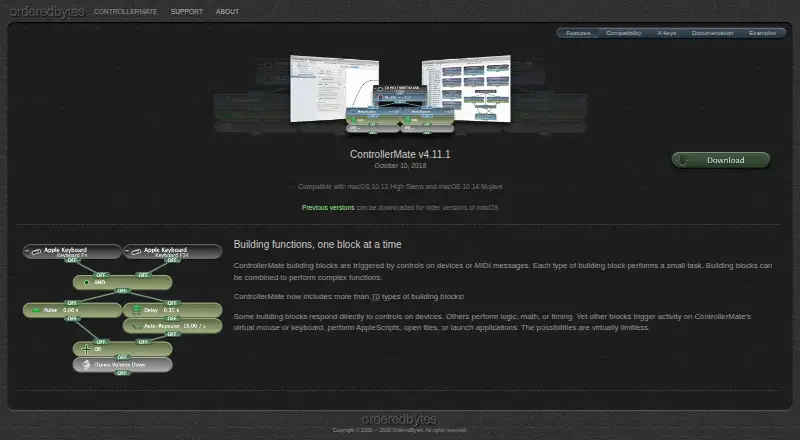
On a Mac, ControllerMate lets input-device controls and MIDI data drive customized keyboard, mouse, and MIDI results. Its block-based programming supports logic, math, timing, AppleScripts, files, applications, and virtual devices. The no-cost unregistered mode does not expire, but only 10 blocks may generate output.
Review
In a line
On macOS, ControllerMate lets input hardware and MIDI messages drive personalized keyboard, mouse, and MIDI behavior.
What it does
Functions are assembled from a library of over 70 block types. They provide logic, calculations, timing, keyboard or mouse output, AppleScript execution, file opening, and application launching.
With its driver, you can change or deactivate keyboard buttons and choose built-in or customized mouse-acceleration curves. Programming can also drive virtual mouse, tablet, and joystick devices.
A companion process can watch attached controllers and keep the current programming active once the main application has been closed.
How it connects
Block functions may respond to MIDI notes, controller values, and patch changes, and a virtual MIDI source can carry messages sent by ControllerMate.
Numerous X-keys programmable keyboards, keypads, pedals, and switch interfaces are supported. It runs on macOS; the listed ControllerMate for X-keys v4.11.1 supports macOS 10.13 High Sierra and 10.14 Mojave.
Good fit
ControllerMate is aimed at audio and video editing, music production, gaming, and flight simulation. It suits people who need detailed remapping or want controller input to trigger computer actions.
It is also a fit for X-keys owners who want programmable keyboards, keypads, pedals, or switch interfaces.
Watch for
ControllerMate is made for macOS, so it is not a choice for other operating systems. The unregistered mode remains available indefinitely, but just 10 output-producing blocks are permitted; input, logic, math, and timing blocks have no such limit.
The free ControllerMate for X-keys edition leaves out the MIDI Source and MIDI Output blocks. Check your macOS version and X-keys model against the maker’s compatibility information before committing.
Support comes through documentation, the OrderedBytes forum, and email.
Pricing
ControllerMate follows a freemium model, with a free plan and trial. Its unregistered option costs nothing, does not expire, and permits 10 output-producing building blocks; input, logic, math, and timing blocks remain unlimited.
A separate free ControllerMate for X-keys edition is available for owners of X-keys devices, but it does not include MIDI Source or MIDI Output blocks.
Verdict
Choose ControllerMate if you use a Mac and need custom controller mappings for creative work, games, flight simulation, or X-keys hardware. Its block system covers automation, virtual devices, and MIDI routing in one tool.
Look elsewhere if you need Windows or Linux support, or if your setup depends on more than 10 output-generating blocks without registering.
Our take
ControllerMate makes sense for Mac users who want to turn varied controller and MIDI signals into tailored computer actions. The free mode lets you build and test logic without a time deadline, but its output limit may constrain larger setups. X-keys owners get a dedicated edition, though MIDI output features are excluded there. Before choosing it, confirm your macOS release, hardware compatibility, and whether your project needs more than the free block allowance.
- Routes input hardware and MIDI into keyboard, mouse, and MIDI behavior
- Offers over 70 block types covering logic, math, timing, and automation
- Can provide programmed virtual mouse, tablet, and joystick devices
- The free mode does not expire
- Runs only on macOS
- The unregistered mode permits 10 output-producing blocks
- The free X-keys edition excludes MIDI Source and MIDI Output blocks
- Listed X-keys compatibility targets older macOS versions
- Pick it ifMac users in audio/video editing, music, gaming, or flight simulation; Owners of X-keys keyboards, keypads, pedals, or switches; People needing custom MIDI and controller routing
- Skip it ifYou need Windows or Linux support; Your design requires more than 10 output-generating blocks for free use; You need MIDI blocks in the free X-keys edition
Pricing
Freemium software with a free plan and free trial. The unregistered option costs nothing and has no time limit, but only 10 building blocks may generate output; input, logic, math, and timing blocks are unlimited. The X-keys edition is free for X-keys owners and excludes MIDI Source and MIDI Output blocks.
- ControllerMate (unregistered)No time limit · maximum 10 output-generating building blocks · unlimited input, logic, math, and timing blocksFree
As orderedbytes.com lists them, checked 9 Oct 2026.
Questions
What does ControllerMate do?
On macOS, it assigns input-device and MIDI signals to customized keyboard, mouse, and MIDI actions.
How many building blocks are available?
Its programming library contains more than 70 block varieties that can be joined into functions.
Is there a free version?
Yes. The unregistered option is free indefinitely, with a limit of 10 blocks capable of producing output. Input, logic, math, and timing blocks are unlimited.
Does it support MIDI?
MIDI notes, controller values, and patch changes can activate blocks, and messages can be sent via a virtual MIDI source.
Can it create virtual controllers?
Yes. Programming can operate virtual mouse, tablet, and joystick devices.
What systems support ControllerMate?
It runs on macOS, and ControllerMate for X-keys v4.11.1 is listed for macOS 10.13 High Sierra and 10.14 Mojave.
Who is ControllerMate for?
The maker cites audio/video editing, music production, gaming, and flight simulation, as well as use with many X-keys devices.