
Coolify Review: Open-Source Deployment on Your Servers
coolify.io · checked 15 Oct 2026
Open-source, self-hosted deployment platform for apps, databases, and services on your own Linux servers.
How it plugs in
Signal on Preview Environment Software7.7#1 of 38
Coolify deploys websites, databases, web apps, and more than 300 one-click services to servers you control. It connects to GitHub, GitLab, Bitbucket, and Gitea, builds commits with several methods, and deploys over SSH. The open-source platform runs on Linux, with a free self-hosted plan and cloud pricing from $5 a month.
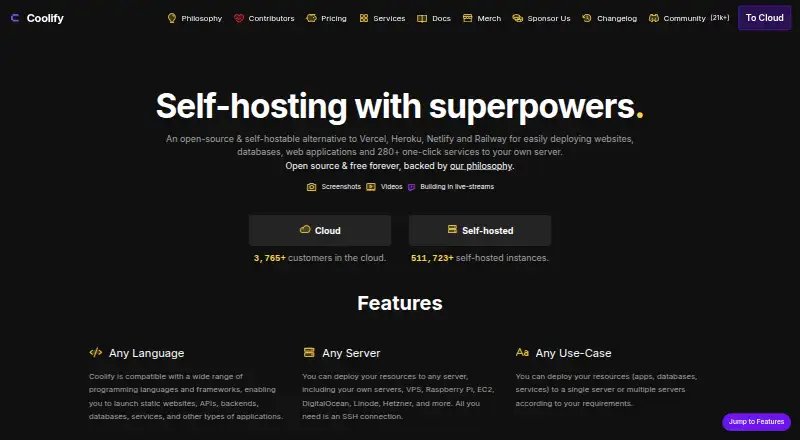
Review
In a line
Coolify is an open-source platform for deploying and running applications, databases, and services on Linux servers you control. It is a self-hosted alternative to services such as Vercel, Heroku, Netlify, and Railway.
What it does
Coolify builds each commit and sends the deployment to a connected server over SSH. Projects can use Nixpacks, Railpack, a Dockerfile, Docker Compose, a static site, or an existing Docker image.
You can run websites, web applications, databases, and more than 300 one-click service templates. Pull-request deployments, scheduled tasks, shared environment variables, monitoring, backups to S3-compatible storage, and one-click rollbacks are included.
How it connects
Push-to-deploy connections include GitHub, GitLab, Bitbucket, and Gitea, with GitHub Apps, webhooks, pull-request events, public repositories, and deploy keys supported. Databases include PostgreSQL, MySQL, MariaDB, MongoDB, Redis, KeyDB, Dragonfly, and ClickHouse.
Coolify has a REST API for teams, projects, applications, databases, services, servers, deployments, and other resources. Its MCP server lets AI clients such as Claude and Cursor inspect resources, deploy, read logs, restart services, and troubleshoot. The code is available under the Apache-2.0 license.
Good fit
Coolify suits people who want deployment automation on their own infrastructure, including Linux servers, virtual private servers, Raspberry Pi, AWS EC2, DigitalOcean, Linode, Hetzner, and other Docker-compatible servers. It can replace several managed deployment tools; see Deployment Automation Software.
It is useful when you need Git-based deployments, databases, Compose services, custom domains, reverse-proxy routing, automated HTTPS certificates, monitoring, backups, or rolling rollouts.
Watch for
Self-hosting requires Linux and at least 2 CPU cores, 2 GB of RAM, and 10 GB of free disk on amd64 or arm64 hardware. Supported systems include Debian, Ubuntu, CentOS, Fedora, Red Hat, AlmaLinux, Rocky, SUSE, openSUSE, Arch, Alpine, and 64-bit Raspberry Pi OS.
Coolify Cloud uses managed Coolify infrastructure, but you still bring your own servers for application deployments. You remain responsible for server hardening, system and Docker updates, application security, backups, monitoring, and incident response.
Self-hosted plans provide community support. Cloud adds limited email support. Check your server capacity and operating-system support before choosing it.
Pricing
The Self-hosted plan is free forever. It includes full feature access, your own infrastructure, no product limits, community support, and automated or self-managed updates.
Coolify Cloud costs $5 a month on monthly billing, connects two servers, and allows unlimited deployments per server. Extra servers cost $3 per month each. Annual billing saves 20%, and you still bring your own servers.
Verdict
Choose Coolify if you are comfortable running Linux servers and want open-source deployment control without product feature paywalls. It covers application builds, databases, Compose services, APIs, backups, and rollbacks in one dashboard.
Look elsewhere if you want a fully managed platform that supplies the application servers, or if you cannot take responsibility for operating-system, Docker, security, and backup work. For hosted alternatives, compare Northflank or Netlify.
Our take
Coolify is a practical choice for developers and small teams that already have Linux or Docker-compatible servers and want one place to deploy applications, databases, and services. Its free self-hosted plan removes product limits, while the cloud plan adds managed Coolify infrastructure but still requires your own servers. The trade-off is operational responsibility: users handle server security, updates, backups, monitoring, and incidents. Pick it when infrastructure control matters; avoid it when you need hosting that manages the servers for you.
- Open-source Apache-2.0 code with no features behind paywalls
- Free self-hosted plan with full feature access
- Connects to GitHub, GitLab, Bitbucket, and Gitea
- Deploys databases and 300+ one-click services
- REST API and MCP tools support automation
- Runs only on Linux-based operating systems
- Self-hosting needs at least 2 CPU cores, 2 GB RAM, and 10 GB disk
- Cloud users must provide their own application servers
- Users handle hardening, updates, backups, and incident response
- Pick it ifPeople deploying apps on Linux or Docker-compatible servers; Teams wanting open-source control over deployments and databases; Users needing Git, API, backup, and rollback features
- Skip it ifYou want a fully managed host that supplies application servers; You cannot maintain Linux, Docker, security, and backup operations
Pricing
Self-hosted is free forever with full features and no product limits. Cloud is $5/month for two connected servers; extra servers are $3/month each. Annual billing saves 20%. You bring your own servers for cloud deployments.
- Self-hostedFree forever · Full feature access · Own infrastructure required · No product limits · Community support · Automated or self-managed updatesFree
- CloudMonthly base price; annual billing saves 20% · Connects 2 servers · +$3/month per additional server · Unlimited deployments per server · Bring your own servers · Managed Coolify infrastructure$5/mo
As next.coolify.io lists them, checked 15 Oct 2026.
Questions
Is Coolify free?
Yes. The Self-hosted plan is free forever, with full feature access and no product limits. Cloud starts at $5 a month.
What operating systems does Coolify support?
Coolify runs only on Linux. Supported systems include Debian, Ubuntu, Fedora, Red Hat, AlmaLinux, Rocky, SUSE, openSUSE, Arch, Alpine, and 64-bit Raspberry Pi OS.
Which Git services can Coolify use?
Push-to-deploy support includes GitHub, GitLab, Bitbucket, and Gitea. GitHub Apps, webhooks, pull requests, public repositories, and deploy keys are supported.
Can Coolify deploy databases?
Yes. One-click options include PostgreSQL, MySQL, MariaDB, MongoDB, Redis, KeyDB, Dragonfly, and ClickHouse, with persistent storage and backup workflows.
Does Coolify have an API?
Yes. Its REST API manages teams, projects, applications, databases, services, servers, deployments, and other resources. An MCP server supports AI clients such as Claude and Cursor.
How much does Coolify Cloud cost?
Cloud costs $5 a month for two connected servers. Each additional server costs $3 a month. Annual billing saves 20%, and you provide the application servers.