Core FTP Windows FTP Client Review
coreftp.com · checked 28 Sept 2026
Windows FTP client with secure protocols, synchronization, automation, and free or paid editions.
How it plugs in
Signal on FTP and SFTP clients6.9#6 of 36
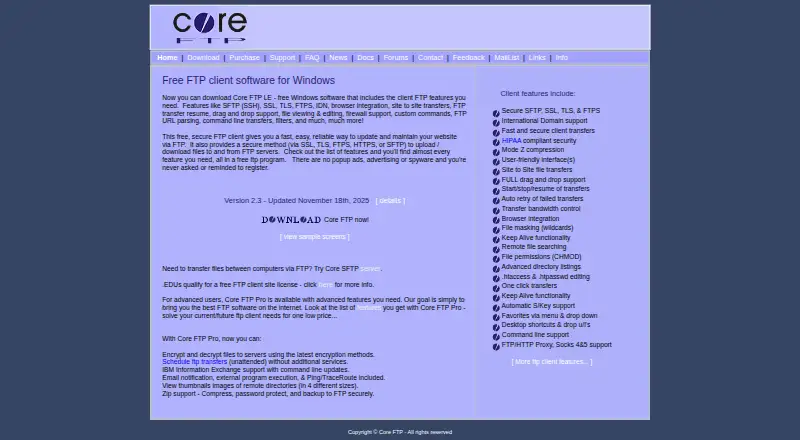
For Windows file transfers, Core FTP handles protocols such as SFTP, FTPS, HTTPS, SSL, and TLS. It offers synchronization, scheduled and automated jobs, plus a portable option. Core FTP LE is free Windows software, with Standard and Pro licenses also available.
Review
In a line
Core FTP is file-transfer software for Windows. Its free Core FTP LE edition provides FTP client features, while Core FTP Pro adds functions for business file transfers.
What it does
The client moves files between locations using multiple transfer protocols. Synchronization, scheduled jobs, automated transfer tasks, and site-to-site transfers are supported.
A portable version is available. Browser integration, command-line transfers and operations, email notifications, and external program execution are among the client features. Pro can encrypt and decrypt files on servers.
How it connects
Transfers may use SSL, TLS, FTPS, HTTPS, or SFTP. Core FTP Pro can connect with IBM Information Exchange through command-line updates.
It is a Windows client rather than a listed server product. For other client options, see FTP and SFTP clients or SFTP client software.
Good fit
Core FTP suits Windows users who need recurring or automated file transfers, synchronization, or scheduled jobs. Its command-line support also fits workflows that run transfer commands outside the main app.
Educational institutions qualify for a free FTP client site license. The free client runs without popup ads, advertising, spyware, or registration prompts.
Watch for
Core FTP runs on Windows, so it does not fit buyers who need another operating system. Licenses cover only the client software, and the listed client licenses include email support only.
Check whether you need Pro features such as file encryption, HIPAA-compliant security, IBM Information Exchange updates, email notifications, or external program execution before choosing an edition.
Pricing
A free plan is available through Core FTP LE, the free Windows client. Paid access starts at $24.95, and the pricing information includes a 45-day trial.
For Standard, monthly pricing is $24.95 for one user, $22.95 for 2-9 users, $19.95 for 10-19 users, and $16.95 for 20-50 users. Pro monthly pricing is $39.95 for one user, $36.95 for 2-9 users, $33.95 for 10-19 users, and $29.95 for 20-50 users.
One-time Standard listings show $24.95 for one user, $22.95 for 2-9 users, $19.95 for 10-19 users, and $16.95 for 20-50 users. These one-time listings specify email support only.
Verdict
Choose Core FTP for Windows-based FTP work when you need the free client or capabilities available in its paid editions. The protocol range covers common secure-transfer needs, while scheduling and command-line operation help with repeat jobs.
Look elsewhere if you require a client for macOS or Linux, a server product, or support beyond the email-only terms listed for client licenses.
Our take
Core FTP is a practical choice for Windows users who need FTP and secure transfer options without paying for the basic client. The free edition removes advertising and registration prompts, while Pro provides additional security-related capabilities. Its main boundary is platform coverage: Windows is the listed platform. Buyers should also check which edition includes the functions they need and whether email-only support is sufficient for their organization.
- Free Windows client without popup ads, advertising, or spyware
- Transfers can use SFTP, FTPS, HTTPS, SSL, or TLS
- Synchronization, scheduled transfers, and automation are supported
- Portable option with command-line operations
- Educational institutions qualify for a free site license
- Runs on Windows only
- Licenses cover the client software only
- Listed client licenses provide email support only
- Some business features are reserved for Core FTP Pro
- Pick it ifWindows users needing FTP or SFTP transfers; Repeat jobs that need scheduling or command-line control; Schools eligible for a free client site license
- Skip it ifYou need macOS or Linux support; You need server software rather than a Windows client; You require support beyond email-only client terms
Pricing
Monthly Standard and Pro prices vary by user count, and one-time Standard licenses are also listed.
- Standard single-user license1 user$24.95/mo
- Pro single-user license1 user$39.95/mo
- Standard user license, quantity 2-92-9 users$22.95/mo
- Pro user license, quantity 2-92-9 users$36.95/mo
- Standard user license, quantity 10-1910-19 users$19.95/mo
- Pro user license, quantity 10-1910-19 users$33.95/mo
- Standard user license, quantity 20-5020-50 users$16.95/mo
- Pro user license, quantity 20-5020-50 users$29.95/mo
As coreftp.com lists them, checked 20 Sept 2026.
Questions
Is Core FTP available for free?
Yes. Core FTP LE is free Windows software with FTP client features. The free client has no popup ads, advertising, spyware, or registration prompts.
Which operating systems does Core FTP support?
The listed platform is Windows.
Can transfers use SFTP and FTPS?
Yes. Transfers can use SFTP, FTPS, HTTPS, SSL, or TLS.
Are transfer jobs automatable?
Yes. The client supports synchronization, scheduled transfers, transfer automation, and command-line operations.
Which capabilities are included with Core FTP Pro?
Pro can encrypt and decrypt files to servers and includes HIPAA-compliant security, IBM Information Exchange command-line updates, email notifications, and external program execution.
Do paid Core FTP plans have a trial?
Yes. The pricing information lists a 45-day trial, with paid access starting at $24.95.