
CortexDJ AI DJ Software Review
cortexdj.com · checked 15 Oct 2026
CortexDJ uses AI to turn local tracks into beatmatched DJ sets, with live decks and file export.
How it plugs in
Signal on AI DJ Software6.6#3 of 17
CortexDJ works from music stored on your computer. It analyzes tempo, key and song structure, then creates beatmatched sets around a requested length, vibe and energy path. You can render WAV or FLAC files, use two live decks, export library data, or add controllers and streaming on Pro. Streaming music catalogs are not supported.
Review
In a line
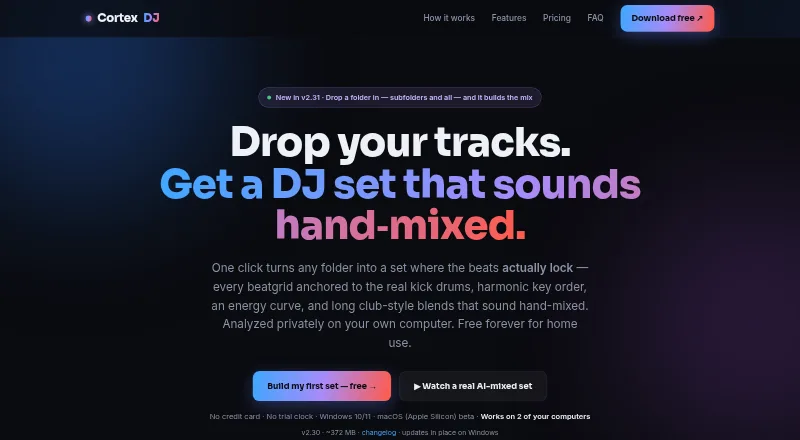
CortexDJ is an AI DJ app for Windows, Apple-Silicon macOS beta, the web and an API. It scans a selected local music folder and builds a set matched to a chosen mood and duration.
What it does
The software finds each track’s BPM, Camelot key, energy and structure. It resets beat grids to real kick drums, then orders songs by tempo fit, key and a requested energy curve. You can describe a target in plain English, such as a 90-minute peak-time house set.
Its AI mixer moves between songs with effects such as filter sweeps, echo throws and bass swaps. Tracks with beat grids that cannot be locked confidently are left out and flagged. Sets can be rendered to WAV or FLAC files.
The desktop app has two decks with sync, key lock, EQ, filters, effects, loops, hot cues, pads and a crossfader. You can take over these controls while the AI keeps mixing. On-device stem separation splits bass, drums and vocals, and a mashup tool scores vocal and instrumental pairings from 0 to 100.
How it connects
The app accepts MP3, FLAC, WAV, AIFF, M4A/AAC and OGG files from your computer. Spotify, Apple Music, TIDAL and other streaming catalogs are not supported, so your tracks must be stored locally. The maker says analysis, mixing and your library stay on the computer.
Rekordbox XML exports are available on every tier, carrying beat grids, keys, hot cues and crates; Serato-readable M3U8 playlists and crate files are included too. Serato hot cues are not exported. Pro adds automatic mapping for listed Pioneer/AlphaTheta, Hercules and Numark controllers, MIDI-learn for other class-compliant USB MIDI devices, and import or export of mappings.
Pro can record audio or HD video and stream to YouTube, Twitch, Facebook or a custom RTMP address. Music licensing is not included. A browser-based mixer is available as a beta and is separate from the full desktop app. For a wider category view, see AI DJ Software.
Good fit
This is aimed at people with locally stored music who want the software to generate a beatmatched set instead of planning each transition themselves. It can help create mixes around tempo, key, energy and duration, then let you refine them from live decks.
It also fits DJs who need rekordbox or Serato library exports, mashup suggestions, stem-based swaps, or Pro controller and livestream support.
Watch for
The workflow depends on local files; major streaming libraries cannot be used. The browser option is only a beta mixer, and macOS support is an Apple-Silicon beta. Listed requirements are roughly 8 GB of RAM and 64-bit Windows 10/11 or Apple-Silicon macOS.
Automatic sets exclude tracks with uncertain beat grids. The documented render formats are WAV and FLAC, not MP3. Recording and streaming on macOS are described as newer beta functions. Windows may show SmartScreen because its installer is not code-signed.
Each key works on up to two computers, and activation sends the key plus a hashed computer identifier to the maker’s server. Diagnostics can include system and activity details but can be disabled. You remain responsible for music rights when streaming or publishing.
Pricing
The Free plan is free forever for home use and needs no trial or card. It includes analysis, auto-mixed WAV/FLAC sets, mashups, live decks, rekordbox and Serato exports, and two computers.
Pro monthly costs $7.45 a month. Pro yearly costs $59 a year. Both include MIDI controller support, audio and HD-video recording, streaming to YouTube, Twitch, Facebook or a custom RTMP address, priority email support and use on two computers.
A $127 one-time Lifetime purchase includes Pro features, future Pro features, two computers and a 30-day money-back guarantee. There is no free trial.
Verdict
Choose CortexDJ if your collection is made of local files and you want software to select tracks, match beats and shape energy for you. The Free plan covers home mixing and common library exports, while Pro is aimed at controller use, recording and livestreaming.
Consider another option if you depend on Spotify, Apple Music or TIDAL, want a non-beta macOS release, or need MP3 rendering. Check controller coverage, computer limits and music permissions before paying.
Our take
CortexDJ is a practical option for home DJs with local MP3, FLAC or other supported files who want automated selection and beatmatched transitions. Its free tier covers core analysis, generated WAV or FLAC sets, mashups, live decks and library exports. Paid plans matter mainly for MIDI hardware, recording, livestreaming and support. The main trade-offs are the lack of streaming-library access, a beta browser mixer, Apple-Silicon macOS beta status and no listed MP3 output. Anyone publishing or broadcasting must also obtain their own music rights.
- The free plan has no trial deadline or card requirement
- Builds sets using tempo, key and a requested energy curve
- Exports rekordbox XML and Serato playlist and crate files
- Pro supports controllers, recording and livestreaming
- Analysis and mixing run locally on the computer
- Spotify, Apple Music and TIDAL libraries cannot be used
- macOS version is an Apple-Silicon beta
- Browser mixer is beta and not the full app
- Documented rendered outputs are WAV and FLAC, not MP3
- Each license key is limited to two computers
- Pick it ifHome DJs with local music files; Automated sets, mashups and beatmatched transitions; Pro users who need controllers or livestreaming
- Skip it ifMost of your library comes from Spotify, Apple Music or TIDAL; You need a stable non-beta macOS or browser app; You require MP3 rendering or supplied music licenses
Pricing
Free is permanent for home use. Pro is $7.45 a month or $59 a year; Lifetime is $127 one-time. Paid plans add controllers, recording, streaming and priority support. No free trial is offered.
- Freeforever · Home use · analysis · auto-mixed WAV/FLAC sets · mashups · live decks · rekordbox/Serato export · 2 computersFree
- ProUp to 2 computers · MIDI controllers · audio and HD video recording · live-streaming · priority email support · cancel anytime$7.45/mo
- Pro monthlymonthly · Everything in Free · MIDI controllers · audio/HD-video recording · YouTube/Twitch/Facebook/custom RTMP streaming · priority email support · 2 computers$7.45/mo
- ProUp to 2 computers · MIDI controllers · audio and HD video recording · live-streaming · priority email support · cancel anytime$59/yr
- Pro yearlyyearly · Everything in Free · MIDI controllers · audio/HD-video recording · YouTube/Twitch/Facebook/custom RTMP streaming · priority email support · 2 computers$59/yr
- Lifetimeone-time · Everything in Pro · future Pro features · 30-day money-back guarantee · 2 computers$127 one-time
As cortexdj.com lists them, checked 15 Oct 2026.
Questions
Does CortexDJ work with Spotify or TIDAL?
No. The app works with local MP3, FLAC, WAV, AIFF, M4A/AAC and OGG files, not Spotify, Apple Music, TIDAL or other streaming catalogs.
What does the free plan include?
Free includes local analysis, auto-mixed WAV/FLAC sets, mashups, live decks, rekordbox and Serato exports, home use and two computers.
Can CortexDJ stream a mix?
Yes, on Pro. It can stream to YouTube, Twitch, Facebook or a custom RTMP endpoint. It does not supply music licenses.
Which controllers are supported?
Pro auto-maps listed Pioneer/AlphaTheta, Hercules and Numark controllers. MIDI-learn works with other class-compliant USB MIDI devices.
Can I export to rekordbox or Serato?
Every tier can produce rekordbox XML containing grids, keys, hot cues and crates, along with Serato-readable M3U8 playlists and crate files. Serato hot cues are not exported.
Does the app upload my music?
The maker says analysis and mixing run locally, and your library, mixes and analysis do not leave the computer.