
Craftmatic Minecraft Schematic Toolkit Review
craftmatic.click · checked 2 Oct 2026
Free Minecraft schematic workspace for inspecting, transforming, and building structure files.
How it plugs in
Signal on Minecraft Schematic Tools6.0#14 of 42
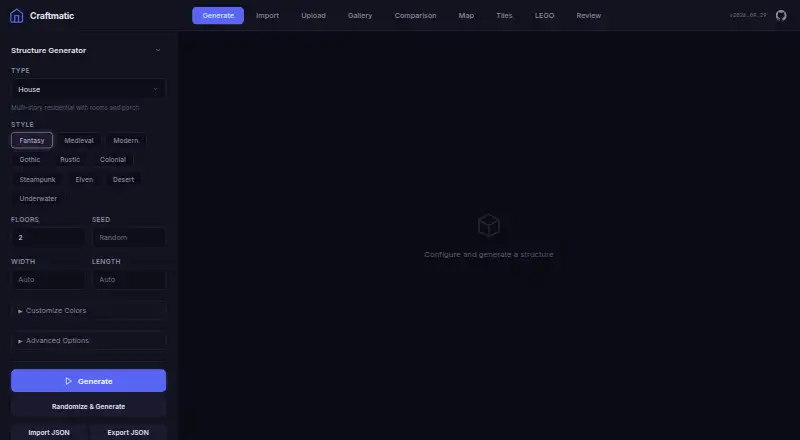
Craftmatic provides browser and self-hosted tools for Minecraft schematics. It handles .schem files for parsing, creation, display, and conversion, while also accepting .litematic and .glb imports. Its in-browser Three.js viewer offers orbiting and cutaway inspection. Output options span Minecraft formats, 3D assets, web viewers, layer references, and printable PDFs. The software costs nothing and can also be used through npm or its command line.
Review
In a line
Craftmatic is a free toolkit for working with Minecraft schematic files. You can use it online or deploy your own copy.
What it does
The toolkit parses, creates, displays, and converts .schem files. Generation supports 10 kinds of structures, 9 architectural styles, and 20 room types.
Its interactive Three.js viewer lets you rotate, zoom, pan, and use a cutaway view. Uploaded files are processed in the browser, so .schem parsing does not require a server.
You can enter an address for satellite imagery, review a schematic with reference images, and search for a LEGO set before uploading its LDraw file. Bedrock live delivery is marked as experimental.
How it connects
The web app can import .schem, .litematic, and .glb files. Exports range from Bedrock add-ons and structures to Java schematics, Litematica files, STL, GLB, OBJ, Three.js JSON, standalone HTML viewers, layer guides, and PDF print output.
Beyond the website, Craftmatic is published for npm use and as a command-line utility, installed with npm install craftmatic. The project is MIT licensed; its bundled Faithful 32x textures use the CC-BY-SA license.
Its address pipeline can connect to services such as Census, Parcl, Smarty, OpenStreetMap, Mapbox, Google Solar, Google Street View, Mapillary, Overture, and AWS Terrarium. The static app makes API calls from the browser, and its documentation says keys are stored in localStorage and visible to client-side code.
Good fit
Craftmatic works well for Minecraft builders inspecting or converting schematic files, creating structures, or making files for various game and modeling tools.
It also fits workflows that need browser previews, printable layer guides, web viewers, or 3D exports. Developers can use the npm library or command-line tool rather than only the web interface.
Watch for
There is no world import workflow; placement is export-only. Craftmatic requires JavaScript to run.
The browser-first design exposes stored API keys to client-side code, so check whether that security model fits your address-data setup.
The GitHub Pages mirror does not include the LEGO model corpus, LDraw parts library, or related proxy routes available on craftmatic.click.
Pricing
Craftmatic has a free plan. The facts list no paid plans or additional charges.
Verdict
Choose Craftmatic if you want a no-cost way to view, generate, and convert Minecraft schematics, especially when you need many export formats or a browser 3D preview.
It is less suitable if you need to place builds directly into a world, avoid JavaScript-based processing, or depend on the LEGO workflow through the GitHub Pages mirror. Teams handling sensitive API credentials should review the localStorage limitation first.
Our take
Craftmatic is a sensible pick for Minecraft creators who need file conversion, structure generation, and visual inspection without paying for a plan. Its broad export list can support Minecraft, 3D, web, and print workflows from one tool. The main trade-offs are a lack of world import, export-only placement, and browser-visible API keys. Anyone relying on LEGO data should use the main site rather than its GitHub Pages mirror. If those limits fit your workflow, the free plan removes a major barrier to trying it.
- Free plan with no paid tier listed
- The browser accepts .schem, .litematic, and .glb as imports
- Outputs cover Minecraft, 3D, web, layer-guide, and PDF formats
- Three.js preview supports orbiting and cutaway inspection
- Usable as an npm package or command-line utility
- No world import; placement is export-only
- API credentials reside in localStorage and can be seen by client-side code
- Bedrock live delivery is experimental
- The GitHub Pages mirror omits LEGO and LDraw resources
- Requires JavaScript to run
- Pick it ifMinecraft builders converting and previewing schematic files; Users needing many export formats; Developers wanting an npm package or CLI
- Skip it ifYou need direct world import or in-game placement; Your workflow cannot expose API keys in browser storage; You rely on LEGO resources from the GitHub Pages mirror
Pricing
Craftmatic is free. The facts list a free plan and no paid alternatives or extra charges.
Questions
Is Craftmatic free?
Yes. Craftmatic has a free plan, and no paid plans are listed in the provided facts.
What file types can I load into Craftmatic?
Craftmatic's web importer handles .schem, .litematic, and .glb files.
Which output formats does Craftmatic provide?
Craftmatic can produce Bedrock add-ons and structures, Java .schem, .litematic, STL, GLB, OBJ, Three.js JSON, HTML viewers, layer guides, and PDF output.
Can Craftmatic bring in a Minecraft world?
No. The facts specify no world import, and placement is export-only.
Does Craftmatic offer 3D previews?
Yes. Its interactive Three.js viewer supports orbiting, zooming, panning, and cutaway viewing.
Can I run Craftmatic locally?
Yes. It is available as a self-hosted web application, an npm library, and a command-line tool installed with npm install craftmatic.
Are API keys kept private?
According to the architecture documentation, API keys live in localStorage and remain visible to client-side code.
Near it
All alternatives →- SStructurize#13 on this board
- MSMinecraft Structure Forge#15 on this board
- M
 MineSchematic#12 on this board
- SSchematicWebViewer#16 on this board
- SPSeija-Printer#11 on this board
- Sschematic4j#17 on this board
- CCurseForge#10 on this board
- SStructmatic#18 on this board
- MMagicalChalk#9 on this board
- OObjToSchematic#19 on this board