
Craiyon Review
craiyon.com · checked 8 Oct 2026
Web-based AI image generator with text prompts, reference images, editing, and a free plan.
How it plugs in
Signal on AI image generators6.2#84 of 124
From a written prompt, Craiyon can produce photos, artwork, logos, anime, posters, and coloring pages. Style and shape controls, reference inputs, editing tools, and a searchable gallery are included. It runs on the web, has no public API, and offers a free plan plus paid yearly options with private images and edit credits.
Review
In a line
Craiyon is an online image generator whose origins trace to DALL·E mini, launched by the company in 2021 before taking the Craiyon name in 2022.
Descriptions become images, and the service also accepts reference images and provides editing tools.
What it does
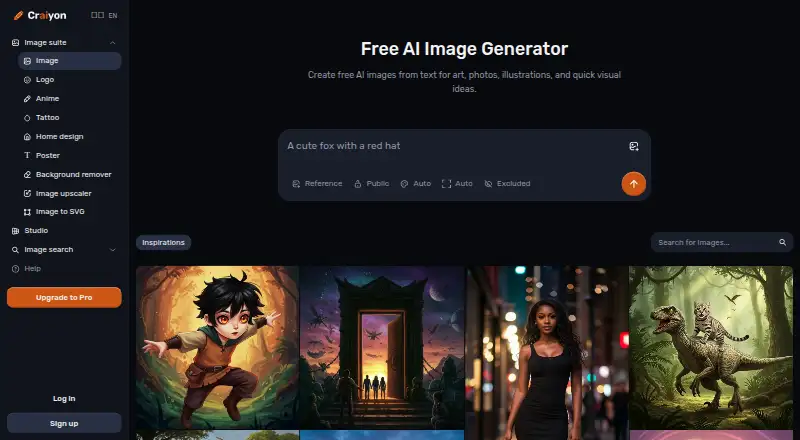
Enter a description for photos, artwork, logos, anime, posters, or coloring pages. Style and image shape can be selected individually or left on Auto. An Exclude option tells Craiyon which elements to leave out.
The gallery presents themed images, their prompts, and options to make your own versions. Craiyon also provides keyword search and a way to discover similar images. Prompts may be written in languages besides English, according to Craiyon, and commercial use is included.
Generating images from text alone uses no credits. Credits are deducted for retouching, photo input, reference images, upscaling, SVG conversion, and video; any monthly balance left unused expires.
How it connects
Craiyon runs on the web and does not currently provide a public API. A mobile app is described as coming soon.
Images made on the free plan can be seen by anyone who has their link, whereas paid plans offer private images. Help is available by email and in Craiyon’s Discord community.
The site uses Google Analytics cookies and may share information with service providers such as payment, analytics, or marketing companies.
Good fit
Craiyon suits people who want to make varied images from plain-language prompts without installing software. It can also help with visual ideas that start from a photo or another reference image.
It fits users who need commercial use, a searchable gallery for inspiration, or image tasks such as editing, enlarging, vector conversion, and animation on a paid plan.
Watch for
The free plan adds a watermark, keeps images public, limits image generation, and may make you wait during busy periods.
There is no public API, so Craiyon is not suited to an app workflow that needs automated access. Credits remaining at the end of a month are forfeited.
Craiyon warns that its training data can reflect social bias, which may lead to stereotypes or biased images.
Pricing
A Free option provides limited image generation, adds a watermark, leaves images public, and may involve waits at busy times.
Professional is billed at $240 yearly and includes unlimited images, 300 edit credits, animation, upscaling, and vector conversion. Supporter is billed at $120 yearly with 100 edit credits and the same listed extras. Ultra is billed at $840 yearly with 1,200 edit credits and those extras. The listed prices for these plans are not shown separately.
Verdict
Choose Craiyon if you want browser-based image creation, commercial use, and options for reference-based work or editing. The free tier is a way to try text-to-image generation, but public images and watermarks may rule it out for private projects.
Look elsewhere if you need an API, clear posted subscription prices, or monthly credits that carry forward. Users concerned about biased outputs should review results carefully before sharing or using them.
Our take
Craiyon is a reasonable starting point for making images from text in a browser, especially when commercial use and support for reference images matter. Its free option lowers the barrier to trying the service, while paid tiers add privacy and editing credits. The main tradeoffs are a missing public API, unclear listed plan prices, expiring credits, and public free-tier images. Consider another tool when automated integration, transparent pricing, or tighter control over image access is essential.
- Free plan is available for text-only image generation.
- Supports text prompts, reference images, editing, and commercial use.
- Offers style, shape, and Exclude controls for prompts.
- The gallery provides keyword search, prompts, and similar-image discovery.
- Paid plans include private images and edit credits.
- No public API is currently available.
- Free images are public and carry a watermark.
- Free use may involve waits and limited image generation.
- Credits left unused each month are forfeited.
- Pick it ifBrowser-based image creation from plain-language prompts; People needing commercial use or reference images; Users who want a free way to try AI image generation
- Skip it ifYou need an API or automated app integration.; You require private images on a free plan.; You want published prices or credits that carry over.
Pricing
A free tier is available. Professional is billed at $240 yearly, Supporter at $120 yearly, and Ultra at $840 yearly; the plans’ listed prices are not shown separately. Paid tiers add unlimited images, edit credits, animation, upscaling, and vector conversion.
- FreeLimited image generation · watermark · public images · possible waits at busy timesFree
- Professional$240 billed yearly · Unlimited images · 300 edit credits · animate · upscale · vectorizeOn request
- Supporter$120 billed yearly · Unlimited images · 100 edit credits · animate · upscale · vectorizeOn request
- Ultra$840 billed yearly · Unlimited images · 1,200 edit credits · animate · upscale · vectorizeOn request
As craiyon.com lists them, checked 8 Oct 2026.
Questions
Is there a free Craiyon option?
Yes. The Free plan has limited image generation, a watermark, public images, and possible waits when demand is high.
Does Craiyon permit commercial use?
Commercial use is included.
Is a Craiyon API available?
No public API is currently available. Craiyon says it expects to offer one in the future.
Can free-plan Craiyon images be kept private?
No. Anyone with the image link can access free-plan images. Paid plans allow private images.
Which Craiyon features consume credits?
Text-only generation uses no credits. Retouching, photo input, reference images, upscaling, SVG conversion, and video use credits.
What happens to unused Craiyon credits each month?
Any monthly credits left unused expire rather than carrying forward.
Which paid Craiyon tiers are listed?
Professional is billed at $240 yearly, Supporter at $120 yearly, and Ultra at $840 yearly. Each includes unlimited images and different edit-credit amounts.
Which platforms support Craiyon?
Craiyon runs on the web. Its mobile app is described as coming soon.
Near it
All alternatives →- FFromImage#83 on this board
- AN
 AIArt.net#85 on this board
- DVDeepAI Video Generator#82 on this board
- UDUnstable Diffusion#86 on this board
- AAArtflow AI#81 on this board
- PPhotix#87 on this board
- SA
 Sahinov AI Image Generator#80 on this board
- D
 Dreamsmith#88 on this board
- IImgMuse#79 on this board
- A
 Artbreeder#89 on this board