Crater: Free Game Gear Emulator for macOS and Linux
github.com · checked 7 Oct 2026
A no-cost Game Gear emulator for macOS and Linux that bundles Z80 assembly utilities.
How it plugs in
Signal on Game Gear Emulators6.4#13 of 31
Written in C, Crater emulates Sega's Game Gear on macOS and Linux. ROMs can come from its directory or a command-line path; keyboard and controller input are available, and compatible cartridge RAM is stored as .sav files. It also includes an assembler and disassembler for Z80 code. Most games are playable, but there is no audio or save-state support.
Review
In a line
For macOS and Linux, Crater provides Sega Game Gear emulation. Its tools turn Z80 assembly into Game Gear ROM images and inspect ROMs as assembly.
What it does
Game Gear ROMs may be placed in Crater's roms folder or supplied as a file path when the program starts. Display options include fullscreen, integer scaling in a window, and forced square pixels.
You can play with a keyboard, joystick, or controller. For games that support it, cartridge RAM goes to a .sav file; saving can use a custom location or be disabled. Save states are not available.
How it connects
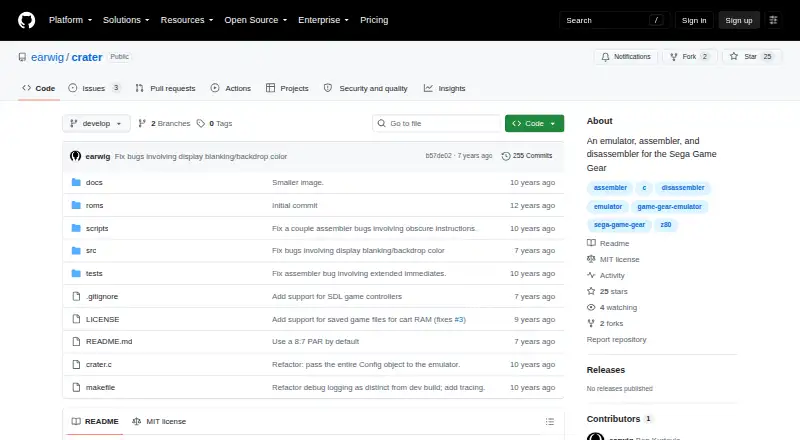
Crater is open source under the MIT License, so it can be used, copied, changed, shared, sublicensed, or sold under that license's conditions. The project says building needs a modern C11 compiler and SDL 2; it has tested only OS X and Linux.
Controller input uses SDL mappings. A gamecontrollerdb.txt file lets you add or change those mappings. The included assembler is described as complete, while the disassembler cannot reliably tell program code from data.
Good fit
Crater suits people who want a free, source-available Game Gear emulator on macOS or Linux, or who want to study or create Z80-based ROMs.
Most games are described as playable with minor bugs, making it useful for general play when its missing features are acceptable. For broader comparisons, see Game Gear emulators.
Watch for
There is no audio support, and a few uncommon CPU instructions and advanced graphics features are missing. Some games may therefore show bugs or fail to work correctly.
Custom keyboard mappings are not supported, and save states are absent. The disassembler's inability to separate code from data also limits its usefulness. The GitHub releases page lists no releases, so building from the project is required.
Pricing
Crater is free software with no paid plan and no free trial. Its MIT license permits broad use, subject to the license conditions.
The free setup still needs a C11 compiler and SDL 2 for building.
Verdict
Choose Crater if you use macOS or Linux and want a no-cost Game Gear emulator whose source and Z80 tools are available. It is a reasonable fit for learning, tinkering, and playing many games.
Look elsewhere if you need sound, save states, advanced graphics, configurable keyboard controls, or a packaged release instead of a build process.
Our take
Crater is a practical choice for technically comfortable Game Gear players on macOS or Linux who value free, modifiable software. Its core emulation covers most games, and the built-in assembler adds a useful angle for Z80 projects. The trade-offs are clear: no sound, no save states, incomplete support for some hardware behavior, and no published releases. Controller setup can be adjusted through SDL's mapping file, but keyboard layouts cannot be customized. Pick it for simple play or study, not for a fully featured, plug-and-play emulator.
- Free and MIT-licensed
- Runs on macOS and Linux
- Most games are playable with minor bugs
- Comes with Z80 assembly and disassembly tools
- Keyboard and controller input are supported
- No audio support
- No save states
- Custom keyboard mappings are unavailable
- Some CPU and graphics features are missing
- No releases are listed on GitHub
- Pick it ifMacOS or Linux users wanting a free Game Gear emulator; Learners working with Z80 assembly and ROM images; Players who can accept minor emulation bugs
- Skip it ifYou need sound, save states, or advanced graphics support; You require custom keyboard controls; You want a ready-made release instead of building from source
Pricing
Crater has one free plan and no trial. Building it needs a modern C11 compiler and SDL 2.
- FreeMIT-licensed software · requires a C11 compiler and SDL 2Free
As github.com lists them, checked 7 Oct 2026.
Questions
What systems does Crater run on?
Crater supports macOS and Linux. The project says those are the only operating systems it has tested.
How do I load a Game Gear game?
Place the ROM in Crater's roms directory, or give its path as a command-line argument when starting Crater.
Does Crater support save files or save states?
Compatible games can store cartridge RAM in a .sav file, using a custom location or disabling saves. Save states are not supported.
Can I use a controller?
Yes. Crater accepts joystick or controller input through SDL mappings, which you can define in a gamecontrollerdb.txt file.
Does Crater include development tools?
Yes. The assembler turns Z80 assembly into a Game Gear ROM image. The disassembler turns ROM images into assembly but cannot distinguish code from data.
Is Crater free to use?
Yes. It is MIT-licensed software with no paid plan. There is no free trial because the software is already free.