Crinkler Review: Tiny Windows Executable Compression
github.com · checked 9 Oct 2026
An open-source Windows linker for compressing tiny 32-bit executables used in demoscene intros.
How it plugs in
Signal on Executable Packers6.3#2 of 28
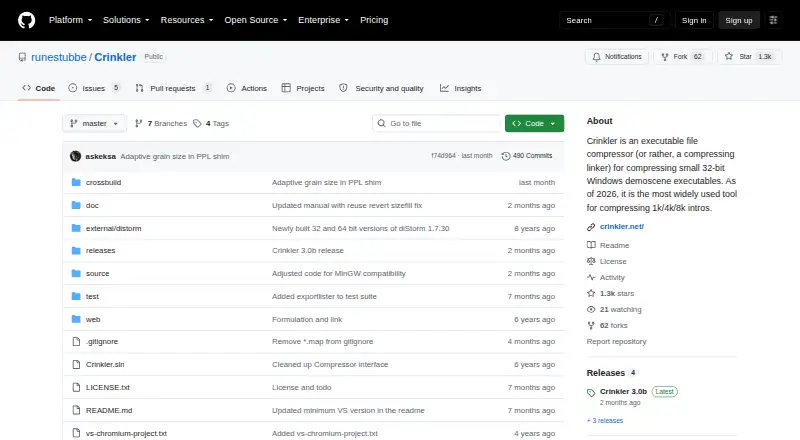
For very small 32-bit Windows EXE files, Crinkler performs linking and compression together. It is aimed at 1k, 4k, and 8k demoscene intros and can stand in for the Visual Studio linker. The project is free, open source, and distributed under the zlib license. Version 3.0 runs on Windows 10 or later and requires SSE4.2.
Review
In a line
Crinkler links and compresses Windows executables that are only a few kilobytes in size. Its focus is small demoscene productions such as 1k, 4k, and 8k intros.
What it does
Crinkler joins the linking and compression steps. The resulting EXE unpacks itself into memory when it starts.
Context modelling drives the compressor, which handles code, optional text, and general data as separate default parts. Each part accepts up to 64 KB of uncompressed input.
How it connects
Crinkler can act in place of the Visual Studio linker and handles its basic options through Visual Studio project settings. The makers also welcome integrations with other tools and build toolchains.
A separate data-compressor library can help estimate compressed data size. Crinkler produces EXE files and is distributed under the zlib license, which allows commercial use under its conditions.
Windows 10 or newer is required for Crinkler 3.0, though the generated files can target older Windows versions. Both Crinkler 3.0 and its output require SSE4.2.
Good fit
Crinkler suits demoscene developers making extremely small 32-bit Windows intros. It is aimed at 1k, 4k, and 8k productions where executable size matters.
It can fit projects already built with Visual Studio and toolchains that need a separate compression-size estimate.
Watch for
This is a specialist Windows tool, not a general executable packer. With tiny-header mode, decompression can become prohibitively slow for files significantly larger than 1 KB.
Building it requires Visual Studio 2022 or later and nasm.exe on the executable path for custom assembly build rules. Check the 64 KB-per-part limit and SSE4.2 requirement before adopting it.
Pricing
Crinkler is free, with no paid plan or trial. It is open source and uses a perpetual license under the zlib terms.
The README points to GitHub Releases for downloads; the latest listed release is Crinkler 3.0b. Usage information and version history are provided in a manual.
Verdict
For very small 32-bit Windows demoscene executables, Crinkler puts linking and compression into one workflow. Visual Studio users can configure it through project settings, and the separate compressor library may help with size planning.
Avoid it for ordinary Windows software, non-Windows projects, or files outside its small-part limits. Confirm Windows, SSE4.2, build-tool, and decompression-speed requirements before committing. General questions and comments go to the Pouët.net forum.
Our take
Crinkler is a focused choice for demoscene creators who measure success in kilobytes. Its free zlib licensing, Visual Studio linker replacement, and separate compressor library support that narrow workflow. The trade-offs are equally specific: Windows-only operation, 32-bit output, SSE4.2 requirements, a 64 KB limit for each uncompressed part, and possible slowness in tiny-header mode. Teams building normal desktop applications or larger binaries should look elsewhere, while intro authors should verify their target hardware and build setup first.
- Free, open-source software under the zlib license
- Performs linking and compression together
- Works with Visual Studio's basic linker options
- Separate library can estimate compressed size
- Built for 1k, 4k, and 8k intros
- Windows-only tool for 32-bit executables
- Requires SSE4.2 on the tool and its output
- 64 KB uncompressed limit per part
- Tiny-header mode can slow decompression for files significantly larger than 1 KB
- Building requires Visual Studio 2022+ and nasm.exe
- Pick it ifDemoscene creators making 1k, 4k, or 8k Windows intros; Visual Studio projects where executable size is critical
- Skip it ifYou need a general-purpose packer or software for platforms other than Windows; Your executable parts exceed 64 KB or target hardware lacks SSE4.2
Pricing
Crinkler has one free plan, with no trial or paid tier. Its zlib license permits commercial use subject to the license conditions.
- Crinklercompressing linker for small 32-bit Windows executables · distributed under the Zlib licenseFree
As github.com lists them, checked 9 Oct 2026.
Questions
What is Crinkler used for?
It creates very small 32-bit Windows EXE files by linking and compressing them, chiefly for 1k, 4k, and 8k demoscene intros.
Can Crinkler replace the Visual Studio linker?
Yes. Crinkler handles Visual Studio's basic linker options and is configured through project settings.
What operating system does Crinkler need?
Crinkler 3.0 runs on Windows 10 and newer; files it produces can target earlier Windows versions.
What CPU feature is required?
SSE4.2 is required by Crinkler 3.0 and by the executables it produces.
Is Crinkler free?
Yes. The open-source project uses the zlib license, and there is no free trial because no paid plan is offered.
How large can each compressed part be?
In Crinkler 3.0, each part may contain at most 64 KB of uncompressed data.
Where can users get help?
The project README directs general questions, discussion, and comments to the Pouët.net forum.