Cytado: Academic Citation and Source Finder
cytado.com · checked 15 Oct 2026
Academic source finder that returns page-specific citations, quotes, links, and formatted bibliographies.
How it plugs in
Signal on AI Citation Generators6.3#6 of 30
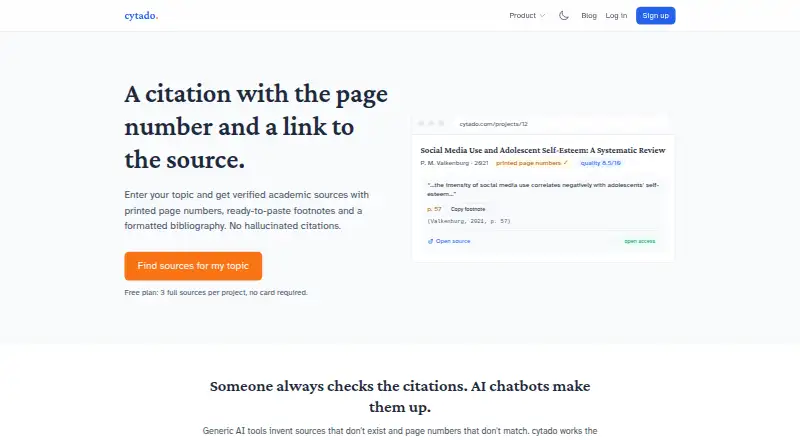
Cytado finds academic publications that support a claim, identifies printed pages and short quotes, and creates citations. It checks bibliographies against Crossref, OpenAlex, Google Books and other databases. The service runs on the web, through a browser extension, document add-ons, an MCP connection for Claude and ChatGPT, and a public citation API.
Review
In a line
Cytado is a citation service for finding academic evidence behind written claims. It returns a supporting publication, printed page number when available, a short quote and a formatted citation.
What it does
Paste a sentence and Cytado searches for a publication that supports it. It reads the source document, identifies the printed page containing the claim and can create an in-text citation, footnote or bibliography entry.
You can also paste or upload an existing bibliography. Cytado checks entries against academic databases and marks entries it cannot confirm. Its evidence API compares a claim with full-text passages and can return an explicit not-found result instead of a merely similar source.
Bibliographies support APA 7, MLA 9, Chicago, Harvard and numbered footnotes. Exports include Word, PDF, LaTeX, BibTeX and RIS.
How it connects
Cytado is available as a web app, API and browser extension. Integrations listed by the maker include Google Docs, Microsoft Word, Claude through MCP, ChatGPT and Chrome.
The public REST API documents endpoints for usage, finding a source and retrieving sources for a chapter. Requests use Bearer authentication with separate test and live key types. Examples use curl, Python requests and JavaScript fetch; no separately named official SDK is listed.
The Google Docs add-on turns highlighted text into a native Docs footnote. The Chrome extension handles selected text and does not collect other page content or browsing history. It cannot read Google Docs canvas text, so Google Docs users are directed to the add-on. The source corpus covers English, Polish and German publications.
Good fit
Cytado suits students, researchers and writers who need page-specific support for claims or want to verify a bibliography. It is also useful for people formatting references across several citation styles.
Teams building citation features can use the API or MCP server. The API accepts up to 60 claims in one find-source request, while the Google Docs and Word connections fit document-based writing.
Watch for
Cytado does not invent support for an unsupported claim; it reports a miss. It will not attach a page number when a document has no printed pagination, and some sources return metadata and short quotations rather than full text.
The web product limits unpaid work to one project at a time and applies daily and monthly source-search caps. Paid API plans permit overage only up to an additional 100% of the plan, after which requests receive HTTP 429 responses.
Batch bibliography checking, department dashboards and team seats are described as being built and offered through a waitlist, not as generally available features.
Pricing
Cytado has a free tier. Free includes three full sources per project, summaries and quality scores, with no card required. The Test plan is also free and provides 100 citations per month, three new topics and a test key that is not billed.
An Unlocked project costs $13 one time. It includes all found sources, printed-page fragments, a paragraph source finder, exports to Word, PDF, LaTeX, BibTeX and RIS, and a project that stays unlocked.
Monthly plans are Basic at $19 per month for 400 citations and five new topics, Start at $49 per month for 1,200 citations and 15 new topics, and Pro at $99 per month for 3,000 citations and 40 new topics. Each adds citations at $0.04 and topics at $1.00.
Verdict
Choose Cytado if your work depends on traceable academic evidence, printed page references or checked bibliographies. The free options let you try the workflow, while the one-time project plan may fit a single paper and monthly plans target recurring volume.
Look elsewhere if your sources lack printed pagination, you need unrestricted search volume, or you require institutional dashboards now. Developers should review the API’s billing, batching and overage rules before sending production traffic.
Our take
Cytado is a practical choice for academic writing that needs a source tied to a specific page, rather than a general web search. Its document add-ons and browser workflow help when citations must be inserted while writing, and the API covers automated use. The free plans are limited, but the $13 project option can suit one assignment. Ongoing researchers should compare monthly allowances with the extra-use rates and check whether their documents have printed page numbers.
- Returns supporting publications with printed pages, quotes and source links
- Checks bibliography entries against Crossref, OpenAlex and Google Books
- Exports references to Word, PDF, LaTeX, BibTeX and RIS
- Works through web, Chrome, Google Docs, Word, MCP and a REST API
- No page number for documents without printed pagination
- Unpaid web projects are limited to one at a time
- Daily and monthly source-search caps apply
- Institution dashboards and batch checking are still in build
- Pick it ifStudents and researchers needing page-specific academic citations; Writers checking bibliographies across several styles; Teams adding citation search through an API or MCP
- Skip it ifYou need page numbers from sources that have no printed pagination; You require unlimited searches or ready-made institutional dashboards
Pricing
A free tier is available.
- Free3 full sources per project · summaries and quality scores · no card requiredFree
- Test100 citations/month · 3 new topics · test key not billedFree
- Unlocked projectall found sources · printed-page fragments · paragraph source finder · Word/PDF/LaTeX/BibTeX/RIS export · project remains unlocked$13 one-time
- Basicmonthly · 400 citations/month · 5 new topics · $0.04 extra citation · $1.00 extra topic$19/mo
- Startmonthly · 1,200 citations/month · 15 new topics · $0.04 extra citation · $1.00 extra topic$49/mo
- Promonthly · 3,000 citations/month · 40 new topics · $0.04 extra citation · $1.00 extra topic$99/mo
As cytado.com lists them, checked 15 Oct 2026.
Questions
Does Cytado provide page numbers?
Yes, when the source has printed pagination. It does not attach a page number to documents without printed pages.
Which citation styles are supported?
APA 7, MLA 9, Chicago, Harvard and numbered footnotes are supported, with in-text citations and bibliography exports.
Can I check an existing bibliography?
Yes. Paste or upload it for checking against Crossref, OpenAlex, Google Books and other academic databases. Unconfirmed entries are labeled.
What does the free plan include?
The Free plan gives three full sources per project, summaries and quality scores, with no card required. The separate Test plan includes 100 citations per month and three new topics.
Can Cytado work in Google Docs?
Yes. Highlight text in the Docs add-on to insert a verified citation as a native footnote. The Chrome extension cannot read Google Docs canvas text.
Is there a public API?
Yes. REST endpoints cover usage, finding a source and chapter sources. Bearer keys are provided in test and live forms, with curl, Python and JavaScript examples.
What happens when no source supports a claim?
Cytado returns an explicit miss instead of choosing a merely similar publication.
Near it
All alternatives →- C
 CitePlex#5 on this board
- S
 Scholarly#7 on this board
- CA
 Conch AI Citation Generator#4 on this board
- YAYomu AI Citation Generator#8 on this board
- PPDFSimpli#3 on this board
- LALearnFast APA Citation Generator#9 on this board
- PPaperpal#2 on this board
- SSolvely#10 on this board
- BC
 Backrow Citation Generator#1 on this board
- L
 Logically#11 on this board