DBDock Database Backup and Migration Toolkit
dbdock.xyz · checked 15 Oct 2026
Open-source software for protecting, copying, and moving databases.
How it plugs in
Signal on Database Documentation Tools7.7#1 of 27
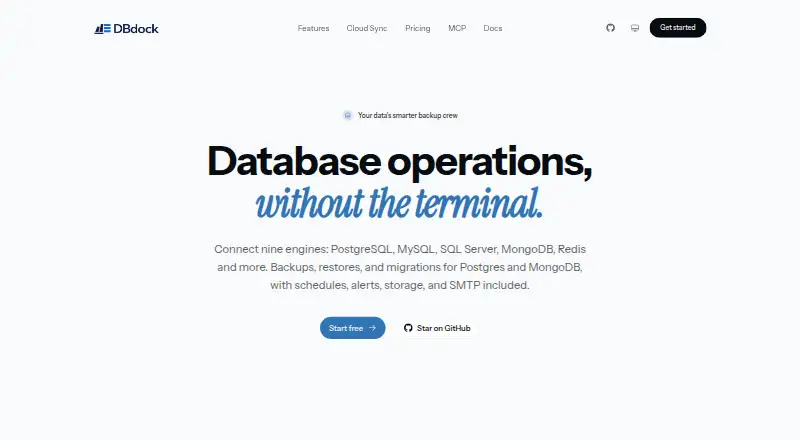
DBDock combines a command-line utility with a hosted dashboard for database protection and movement. It backs up and restores several systems, clones databases between environments, and moves data between MongoDB and PostgreSQL. Backups may remain local or use cloud storage, with automation and alerts available. A free, self-hosted CLI is offered.
Review
In a line
DBDock brings backup, restore, database-copy, and migration tasks into one toolkit. Its command-line edition is free and MIT licensed, with an optional hosted cloud dashboard.
What it does
For PostgreSQL, MySQL/MariaDB, SQL Server, and Redis, the CLI can create and restore backups. Its copydb command clones a database between environments such as production, staging, and local.
DBDock also moves data between MongoDB and PostgreSQL through schema mapping, dry runs, and incremental synchronization. Backup retention can use age or count, with a safety check, and zstd compression is documented.
Jobs can run on cron schedules from the CLI or cloud. Schedules include retries and run history, while email, Slack, and webhook alerts report backup and schedule events.
How it connects
Backups can go to local disk or AWS S3. Cloudflare R2, Cloudinary, and managed DBDock Storage are also available.
DBDock Cloud is a browser dashboard for connecting databases, scheduling encrypted backups, and managing operations without running infrastructure. Local projects can link to it through Cloud Sync; that process transfers project metadata, while database passwords, storage keys, encryption secrets, and webhook URLs remain on the user's machine.
The project is open source under the MIT license. Node.js applications can use its TypeScript SDK programmatically. The CLI runs on Linux, macOS, Windows, and through self-hosted or web deployments.
Good fit
DBDock suits teams that need one tool for database protection and movement across environments. It covers several common database systems and supports custom backup frequency.
It can also suit teams wanting scheduled cloud jobs, managed storage, team features, alerts, or no-code administration dashboards built from their data.
Watch for
Running the CLI means having Node.js 18 or newer. PostgreSQL work also needs client tools such as pg_dump, pg_restore, and psql, with a client major version at least as new as the server.
Check that your database is among the supported systems. MongoDB is listed for migration with PostgreSQL, while backup and restore support is listed for PostgreSQL, MySQL/MariaDB, SQL Server, and Redis.
Cloud Sync transfers non-secret project metadata to the hosted dashboard. Secrets are intended for environment variables; logs mask credentials, .pgpass is supported, and strict mode rejects secrets in configuration files.
Pricing
The Open-source CLI plan is free forever. It is self-hosted, MIT licensed, and includes backups, restores, copies, migrations, and optional cloud sync.
The facts list a free plan and do not give a separate price for DBDock Cloud.
Verdict
Choose DBDock if you want an open-source command-line toolkit that covers backup, restore, copying, and MongoDB–PostgreSQL migration in one place. Its storage choices, scheduling, alerts, encryption details, and optional hosted dashboard broaden its use beyond a basic backup script.
It is a weaker fit if you cannot install Node.js 18 or the required PostgreSQL tools, or if your database falls outside the listed support. Review what metadata Cloud Sync sends before linking a local project to the hosted service.
Our take
DBDock is a practical choice for people who prefer self-hosted software and need more than simple database dumps. The free CLI combines backup, restore, copying, and cross-database migration, while optional cloud features add scheduling, storage, teams, and alerts. Setup centers on Node.js 18 or newer, plus PostgreSQL client tools for PostgreSQL tasks. Confirm database coverage and decide whether Cloud Sync’s metadata handling fits your policy before adopting it.
- Free forever, self-hosted CLI under the MIT license
- Backups and restores for four listed database systems
- MongoDB–PostgreSQL migration with mapping and dry runs
- Local and cloud storage choices
- Cron schedules, retries, history, and alerts
- Node.js 18 or newer is needed
- PostgreSQL tasks need matching client tools
- Cloud Sync transfers non-secret project metadata
- No separate DBDock Cloud price is stated
- Pick it ifSelf-hosted teams managing backups across several databases; Teams moving data between MongoDB and PostgreSQL; Users wanting optional hosted scheduling and alerts
- Skip it ifYou need support for a database outside the listed systems; You cannot install Node.js 18 or PostgreSQL client tools; Cloud Sync metadata sharing does not fit your requirements
Pricing
The listed Open-source CLI plan costs free forever and is self-hosted under the MIT license. It includes core backup, restore, copy, and migration features, with optional cloud sync. No separate DBDock Cloud price is provided.
- Open-source CLIfree forever · self-hosted · MIT licensed · backups, restores, copies and migrations · optional cloud syncFree
As github.com lists them, checked 15 Oct 2026.
Questions
What databases does DBDock back up?
Backups and restores are available through the CLI for PostgreSQL, MySQL/MariaDB, SQL Server, and Redis.
Can DBDock migrate between MongoDB and PostgreSQL?
Yes. Migration works in both directions, with schema mapping, dry runs, and incremental synchronization.
Where can backups be stored?
Storage may use local disk, AWS S3, Cloudflare R2, Cloudinary, or managed DBDock Storage.
Is DBDock free?
The Open-source CLI is free forever, self-hosted, and MIT licensed. The facts do not state a separate Cloud price.
What does Cloud Sync send?
It transfers non-secret project metadata. Database passwords, storage keys, encryption secrets, and webhook URLs stay on your machine.
What does the CLI require?
Node.js 18 or newer is required. PostgreSQL operations also require client tools, with a client major version at least as new as the server.