dbmate: Free Open-Source SQL Migration Utility
github.com · checked 5 Oct 2026
SQL migration utility for synchronizing database schemas from development through production.
How it plugs in
Signal on Database Migration Tools6.6#5 of 32
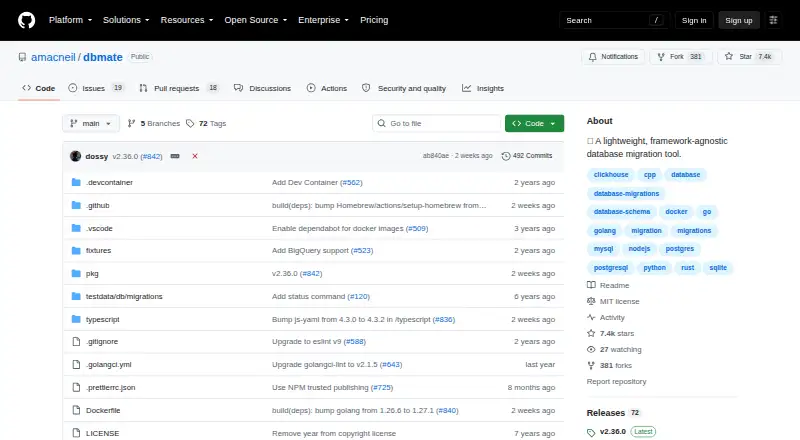
Dbmate is a free, open-source command-line tool for database migrations. It stores timestamped SQL files, applies or rolls back changes, and can keep a schema snapshot in source control. It runs on Linux, macOS, Windows, or a self-hosted setup and supports several databases, including PostgreSQL, MySQL, SQLite, and ClickHouse.
Review
In a line
Dbmate keeps database structures synchronized between developers and production servers. It comes as a standalone command-line program.
What it does
Migrations are plain SQL files identified by timestamps. Dbmate provides commands to create, apply, and reverse them, check their status, and wait for a database server.
When supported by the database, each migration is atomic by default within a transaction; files may disable that behavior.
A schema.sql dump can be kept current for source-control review and comparison, using client programs such as pg_dump, mysqldump, or sqlite3 to produce it.
How it connects
The supported database list includes MySQL, MariaDB, PostgreSQL, SQLite, and ClickHouse. Its documentation also covers BigQuery connections and Spanner databases that use the PostgreSQL dialect.
By default, Dbmate takes its connection from DATABASE_URL and can read variables from a .env file. Because the executable is language independent, projects in Go, Node.js, Python, Ruby, PHP, Rust, C++, and other frameworks can use it.
The README documents NPM, Homebrew, Scoop, a Linux binary, and Docker images in GitHub Container Registry for installation. Go applications can use dbmate as a library, and Go embed can package migrations in an application binary. Dbmate is MIT-licensed open-source software.
Good fit
Teams can use Dbmate to share SQL migration files across local development and production. Timestamped naming is intended to limit version conflicts when multiple developers add migrations.
It fits projects that need rollback commands, schema snapshots, or a workflow managed in their own environment.
Watch for
Producing schema dumps requires the corresponding database client programs, including pg_dump, mysqldump, or sqlite3. Spanner schema dumps are unavailable because pg_dump calls functions that Spanner does not provide.
The repository does not specify a support service or response time, and it lists no security or compliance certification.
Pricing
Dbmate is free. It is open source, includes a free plan, and offers no free trial. The project states that it does not upsell a SaaS service.
Verdict
Choose dbmate if your team is comfortable writing SQL and wants migrations that can run in many programming environments. Its database coverage, transaction handling, rollback commands, and Git-friendly schema file address common migration workflows.
Check the required client tools before relying on schema dumps, especially with Spanner. For a wider comparison, see database migration tools.
Our take
Dbmate is a practical choice for developers who want a small, SQL-first migration workflow that stays in their own environment. It works across several languages and operating systems, and its free MIT-licensed code removes subscription costs. The main checks are operational: install the needed database client for schema dumps, confirm your database is covered, and understand the Spanner dump restriction.
- Free, MIT-licensed open-source project
- Works with MySQL, MariaDB, PostgreSQL, SQLite, and ClickHouse
- Timestamped plain-SQL migrations include rollback commands
- Available on Linux, macOS, Windows, and self-hosted systems
- Can preserve schema.sql snapshots for Git review
- Schema exports depend on database client tools
- Spanner schema exports are unavailable
- No support response terms or security certifications are stated
- A command-line workflow may not suit teams wanting a hosted service
- Pick it ifTeams managing SQL migrations across development and production; Projects using different programming languages; Self-hosted workflows with Git-based schema review
- Skip it ifYou require a hosted migration service or formal support contract; You need Spanner schema dumps; Your team does not want to manage database client tools
Pricing
Dbmate costs nothing to use. It is open source with a free plan, no free trial, and no stated SaaS upsell.
- dbmateOpen-source database migration tool · no paid SaaS upsell statedFree
As github.com lists them, checked 5 Oct 2026.
Questions
Is dbmate free?
Yes. Dbmate is free and released under the MIT license. The project states that it does not upsell a SaaS service.
Which databases does dbmate support?
The README names MySQL, MariaDB, PostgreSQL, SQLite, and ClickHouse. It also documents BigQuery connections and Spanner databases using the PostgreSQL dialect.
What format do dbmate migrations use?
Migration content is plain SQL stored in timestamped files. Dbmate can create, apply, reverse, and report on those migrations.
Can dbmate create schema snapshots?
Yes. Dbmate can update a schema.sql dump for review and Git comparison. Creating dumps uses tools such as pg_dump, mysqldump, or sqlite3.
Where can dbmate run?
Dbmate is available for Linux, macOS, Windows, and self-hosted use. Installation is documented through NPM, Homebrew, Scoop, a Linux binary, and Docker images.
Does dbmate support transactions?
When the database supports them, migrations execute atomically in a transaction by default. Individual migration files may turn that off.
Can I use dbmate with my programming language?
Yes. Its standalone executable works independently of language and can serve Go, Node.js, Python, Ruby, PHP, Rust, C++, and other frameworks.
Are Spanner schema dumps supported?
No. The documentation explains that pg_dump invokes functions Spanner does not provide, so Spanner schema dumps are unsupported.