Dendy NES/Famicom Emulator Review
github.com · checked 29 Sept 2026
Free NES/Famicom emulation for desktop terminals and today’s browsers.
How it plugs in
Signal on NES Emulators6.3#5 of 26
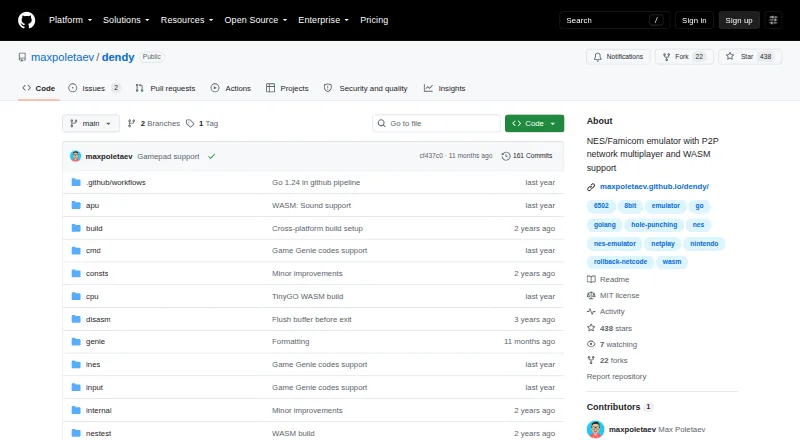
Written in Go, Dendy emulates NES and Famicom software at no cost. Windows, macOS, Linux, and WebAssembly browser builds are available. Desktop play uses the command line and includes save states, rewind, screenshots, shaders, and cheat codes. Peer-to-peer rollback multiplayer works on supported desktop builds, while the browser version omits netplay and compatibility is incomplete.
Review
In a line
Dendy is a free NES and Famicom emulator implemented in Go. Desktop releases launch from a terminal, and a WebAssembly edition runs in current browsers.
What it does
The desktop application takes a .nes ROM as its command-line argument instead of presenting a graphical front end. Player one may use the keyboard or a detected gamepad, and mouse input can emulate the Zapper light gun.
Available options include save states, rewind, screenshots, a CRT-effect switch, and Game Genie codes. Rollback netplay links desktop peers for multiplayer.
How it connects
Builds target Windows, macOS, Linux, and modern browsers. The repository offers ready-made desktop binaries and explains installation through Go or compilation from source.
When players are behind NAT, a public relay can help discover peers and UDP hole punching can establish the connection. The author runs a relay, while users may compile and operate their own relay binary. This approach cannot connect two players who are both behind symmetric NAT.
WebAssembly builds currently omit netplay. Dendy uses the MIT license and names Raylib Go bindings for graphics and audio and kcp-go for multiplayer networking.
Good fit
Dendy suits people seeking a free NES emulator they can start in a terminal, as well as users wanting a browser option without installing desktop software.
It is also aimed at players who want rewind, save states, screenshots, cheat codes, shaders, or peer-to-peer multiplayer on compatible desktop builds.
Watch for
The maker explains that Dendy does not seek parity with established emulators for accuracy or compatibility, and some games may not run correctly. Audio emulation remains in progress and may introduce pops or crackles.
There is no desktop GUI. Netplay is unavailable in browsers, and relay connections fail when both participants use symmetric NAT.
Pricing
Dendy costs nothing to use. The project lists a free plan and does not advertise a trial or any paid tier.
Verdict
Choose Dendy if command-line software is comfortable for you and you want rewind, save states, cheats, or desktop netplay. Its MIT license and source-build path suit technically inclined users.
Look elsewhere if broad compatibility, cleaner sound, or a graphical desktop interface is your priority.
Our take
Dendy suits users who want a no-cost NES emulator with desktop netplay, rewind, and save states. Windows, macOS, Linux, and browser builds provide several deployment choices. However, desktop use is command-line only, browser versions lack multiplayer, and compatibility and audio remain works in progress. It is better for flexible experimentation than for the most polished way to run every NES game.
- Available at no cost on Windows, macOS, Linux, and modern browsers
- Rollback multiplayer through peer-to-peer desktop connections
- Save states, rewind, screenshots, shaders, and cheat codes
- MIT license with source-build and relay options
- Desktop releases have no graphical interface and use the command line
- Some games may not run or may have compatibility problems
- Audio development can cause pops and crackles
- Browser builds do not provide netplay
- Relay connections fail when both players are behind symmetric NATs
- Pick it ifPeople seeking a free NES/Famicom emulator operated from the command line; Desktop players wanting rollback multiplayer and rewind; Users who prefer a browser-based emulator without installation
- Skip it ifYou require a graphical desktop interface; Accurate operation of every NES game is essential; You need multiplayer in the browser edition
Pricing
Dendy is offered under a free plan; no paid tier or trial is listed.
Questions
Is Dendy free?
Yes. The project lists a free plan and no trial or paid plan.
Which platforms does Dendy support?
Versions are available for Windows, macOS, Linux, and modern browsers through WebAssembly.
Does Dendy have a graphical interface?
No. Desktop use starts from the command line with a .nes ROM file, while the WebAssembly build runs in a browser page.
Can Dendy play multiplayer games online?
Desktop releases provide rollback multiplayer over peer-to-peer links. The browser build currently has no netplay.
What controls can I use?
Player one can play with a keyboard or detected gamepad, and mouse input can stand in for the NES Zapper.
Will every NES game work?
Not necessarily. The maker notes that Dendy does not target the accuracy or compatibility of established emulators, so some games may fail or show problems.
Can users run their own relay?
Yes. The README says users can compile and run their own relay binary if the public relay is unavailable.