Dooble Browser Review
textbrowser.github.io · checked 8 Oct 2026
Free, open-source desktop browser with Chromium-based rendering and built-in privacy controls.
How it plugs in
Signal on Web browsers7.6#22 of 154
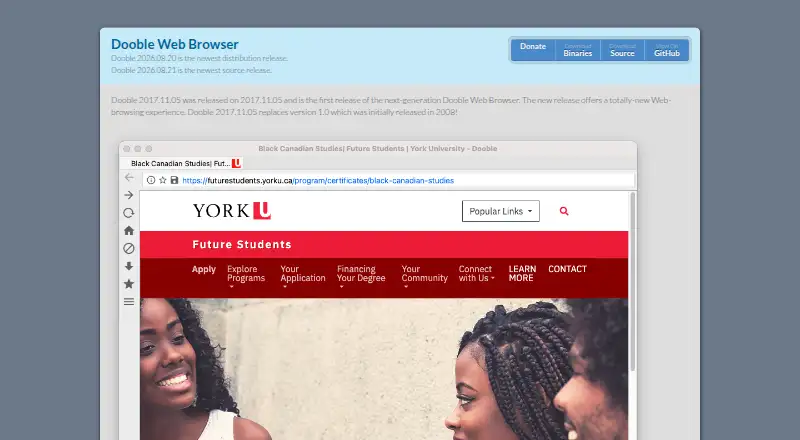
Dooble is a no-cost, open-source browser for desktop Linux, macOS, and Windows. Qt WebEngine supplies its Chromium-based page rendering, while ad and content filters, proxy and cookie controls, encrypted containers, spell checking, and interface settings are included. Extensions and cross-device synchronization are unavailable.
Review
In a line
Dooble is an open-source desktop web browser available at no charge on Linux, macOS, and Windows. Pages are rendered through Qt WebEngine’s Chromium-based engine.
What it does
Dooble provides web access with ad filtering and a built-in content-control system. The filter can accept material, reject it, or limit browsing to specified sites.
Proxy settings support private and public proxies. Cookie controls can periodically remove cookie data from browsing history, and private browsing is available.
Optional database containers can be encrypted with AES and Threefish, using SHA-3 digests. Dictionaries for several languages support spell checking, while settings cover the interface and web features.
How it connects
Dooble runs on desktop Linux, macOS, and Windows systems that support Qt and Qt WebEngine. The project is open source under a BSD license, and GitHub tickets are used to report and track issues.
Extensions are not supported, and browser data is not synchronized between devices. Content filtering is built into Dooble instead of being supplied by add-ons.
Good fit
Dooble is aimed at people wanting a configurable desktop browser with integrated blocking, proxy options, cookie handling, and private browsing. It can also fit school settings where access should be limited to specified sites.
The maker’s 2026 long-term-support bundles list Kubuntu 26.04, macOS 15, PiOS 13, and Windows 11.
Watch for
You need a system supported by both Qt and Qt WebEngine. Browser add-ons and cross-device data sharing are absent, which can make Dooble unsuitable for workflows built around those capabilities.
The Dooble Awesome Shell works only on Unix systems, and its interactive commands are not functional. Check those limits before choosing that part of the software.
Pricing
Dooble Web Browser is offered at no cost. It is open-source software under a BSD license, with no free trial because the plan itself costs nothing.
Verdict
Choose Dooble if you want a no-cost desktop browser with visible configuration options, built-in blocking, proxy choices, and local privacy controls. Its open-source BSD licensing may appeal to readers who prefer inspectable software.
Look elsewhere if browser extensions, device-to-device synchronization, or a working Unix command shell are essential. For broader privacy-browser options, see privacy browsers.
Our take
Dooble is a practical choice for desktop users who want an open-source browser that costs nothing and puts blocking, proxy, cookie, and private-browsing controls in one application. Its configurable design and encrypted containers add local control without requiring paid features. The trade-offs are clear: there are no extensions, no cross-device sync, and the Awesome Shell has limited Unix-only usefulness. Confirm that your operating system supports Qt and Qt WebEngine before installing.
- Free plan with no purchase cost
- Open-source BSD-licensed code
- Built-in ad and site content blocking
- Proxy, cookie, and private-browsing controls
- Available for Linux, macOS, and Windows
- No browser extension support
- No cross-device synchronization
- The Awesome Shell works only on Unix
- Interactive Awesome Shell commands are nonfunctional
- Qt and Qt WebEngine are required
- Pick it ifPeople seeking a free, open-source desktop browser; People needing built-in blocking and proxy controls; School setups limiting access to approved sites
- Skip it ifYou rely on browser extensions or cross-device sync; You need a functional interactive Unix command shell; Your system does not support Qt and Qt WebEngine
Pricing
Dooble is free, with an open-source BSD-licensed plan and no separate trial period.
- Dooble Web BrowserOpen-source browser · BSD licenseFree
As textbrowser.github.io lists them, checked 8 Oct 2026.
Questions
Is Dooble free?
Yes. The Dooble Web Browser plan costs nothing, and the software is open source under a BSD license.
Which computers can run Dooble?
Desktop Linux, macOS, and Windows systems can run Dooble when they support both Qt and Qt WebEngine.
Does Dooble block ads?
Yes. A built-in blocker offers accept and block modes, including one intended to restrict access to specified sites.
Does Dooble support extensions or sync?
No. Dooble offers neither browser extensions nor synchronization across devices.
What privacy controls does Dooble include?
It offers private and public proxies, private browsing, automatic cookie removal from browsing history, and optional encrypted database containers.
Can schools use Dooble to limit websites?
The maker says its content blocker can support school settings where only specified sites are accessible.