dskDitto: Duplicate-File Finder for Linux and macOS
github.com · checked 5 Oct 2026
Free duplicate-file finder with terminal and optional graphical interfaces for Linux and macOS.
How it plugs in
Signal on Duplicate File Finders5.9#17 of 38
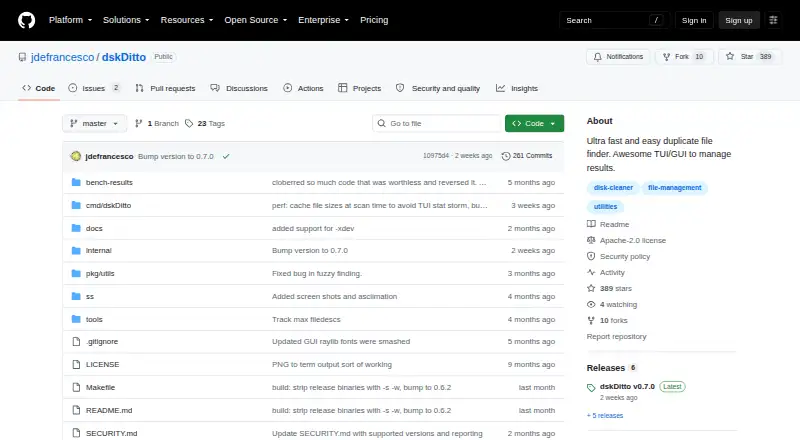
dskDitto scans local disks and directories for duplicate or near-duplicate files. Its usual workflow is terminal-based, while an experimental Raylib GUI is available as an option. SHA-256 checks content by default, while BLAKE3 and fuzzy matching offer other choices. Duplicate findings can be written in CSV, JSON, or plain-text form, and removal or link actions require an explicit command.
Review
In a line
For Linux and macOS, dskDitto provides a free way to detect duplicate files. The program opens in a terminal by default, with an experimental graphical option available.
What it does
Parallel processing lets the tool examine filesystem paths, directories, and, optionally, virtual filesystem directories. It can find exact duplicates with SHA-256 or BLAKE3, match identical filenames, and search for near matches with fuzzy content similarity.
Scan controls include file size, directory depth, hidden files, symlinks, virtual filesystems, and filesystem boundaries. File previews, folder exclusions, and automatic selection are also available.
Using the explicit remove option, you can delete surplus copies or substitute symlinks or reflinks. Fuzzy mode defaults to a 75% similarity cutoff and does not perform automatic removal or link actions.
How it connects
dskDitto scans the filesystem locations you provide and can write duplicate findings in CSV, JSON, or plain-text formats.
The command-line and terminal interface come with the standard build. A Raylib graphical build is optional and experimental, and compiling it requires Raylib and CGo. Building from source is documented for Go 1.22 or newer.
Released under the Apache license, the project says files are not deleted or rewritten unless you explicitly request that with --remove.
Good fit
dskDitto is aimed at people who want terminal-based duplicate inspection, parallel scans across several disks, or saved results for later review.
It is also useful when exact matching is not enough: fuzzy mode looks for content-based near matches, while filters help limit where and what it scans. People seeking other duplicate-file utilities can browse duplicate file finders.
Watch for
The Raylib graphical option is experimental and omitted from the standard installation. Reflink replacement works only with a supported copy-on-write filesystem; the README names APFS, Btrfs, and XFS with reflink enabled.
Go 1.22 or later is needed for a source build, while the graphical variant additionally depends on Raylib and CGo. Check those requirements and your filesystem before choosing link or reflink actions.
The project’s security policy lists version 0.5.x as supported and accepts vulnerability reports by email or GitHub issue.
Pricing
dskDitto is free. There is a free plan, with no paid tier listed in the supplied details.
Verdict
Choose dskDitto if you want a no-cost scanner that combines exact duplicate detection, near-match search, detailed filters, previews, and export formats. Its explicit safety switch is useful when deletion or linking could be risky.
Consider another option if you require a mature graphical application installed by default; dskDitto's GUI is optional and experimental. It may also be a poor fit if you cannot install Go or use a supported filesystem for reflinks.
Our take
dskDitto is a practical free option for Linux and macOS users comfortable with terminal software. It supports exact and near-duplicate searches, lets you define scan scope, and places destructive actions behind an explicit option. Export formats make the results usable elsewhere. The main trade-offs are source-based installation, an experimental GUI, and filesystem requirements for reflinks.
- Free to use with terminal and optional GUI interfaces
- Parallel scans across local disks and directories
- SHA-256, BLAKE3, filename, and fuzzy matching methods
- Filters, previews, automatic selection, and folder exclusions
- Results can be saved in CSV, JSON, or plain-text formats
- The Raylib graphical interface remains optional and experimental
- The standard installation provides only CLI/TUI interfaces
- Building from source calls for Go 1.22 or newer
- Reflink operations depend on a compatible copy-on-write filesystem
- Fuzzy searches do not trigger automatic remove or link actions
- Pick it ifLinux or macOS users managing duplicate files locally; Terminal users who need filters and exportable scan results; People checking exact and near-duplicate content
- Skip it ifYou need a mature graphical interface installed by default; You cannot install Go or meet the GUI build requirements; Your filesystem does not support the reflink operation you need
Pricing
The software is free, and the listed free plan is the only plan provided.
Questions
Is dskDitto free?
Yes. dskDitto has a free plan, and no paid plan is listed.
Which systems does dskDitto support?
The supplied details list Linux and macOS, and describe the project as cross-platform.
Does dskDitto delete files automatically?
No. The README says files are not deleted or rewritten unless you explicitly request the --remove option.
Can dskDitto find near-duplicates?
Yes. Its fuzzy search compares content at a default 75% similarity threshold and turns off automatic removal and linking.
What output formats can it export?
You can save duplicate findings as CSV, JSON, or plain text.
Does it have a graphical interface?
Yes. A Raylib GUI is available, but it is experimental and optional; the standard installation builds the CLI/TUI.
What is needed for installation?
Source installation is documented for Go 1.22 or later, and graphical builds additionally need Raylib and CGo.
Near it
All alternatives →- DD
 Dup Detector#16 on this board
- Ffdupes#18 on this board
- DPDuplicate Photos Fixer Pro#15 on this board
- Rrmlint#19 on this board
- DC
 Duplicate Cleaner#14 on this board
- ED
 Easy Duplicate Finder#20 on this board
- CCloneSpy#13 on this board
- DFDuplicate Files Search & Link#21 on this board
- ADAshisoft Duplicate File Finder#12 on this board
- DF
 Duplicate File Detective#22 on this board