DVDStyler: Free DVD Authoring for Custom Menus
dvdstyler.org · checked 15 Oct 2026
Free, open-source DVD authoring software for custom menus, slideshows, subtitles, and standalone-player discs.
How it plugs in
Signal on DVD Authoring Software7.6#1 of 26
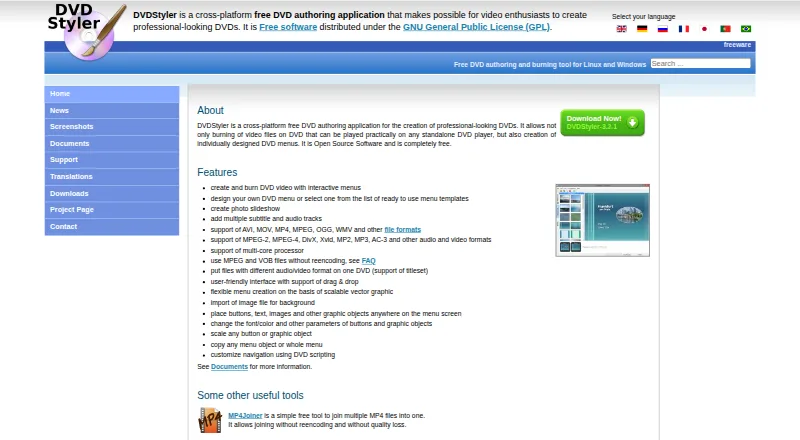
DVDStyler creates and burns video DVDs with interactive menus. You can use templates or build menus with movable buttons, text, images, and other objects. It supports photo slideshows, multiple audio and subtitle tracks, several common media formats, and Windows, macOS, and Linux. The software is free and open source.
Review
In a line
DVDStyler is free software for authoring and burning video DVDs that play in standalone DVD players. It lets you add interactive menus and design their layout.
What it does
Start with a ready-made menu template or create your own. You can place and adjust buttons, text, images, and other menu objects, then change fonts, colors, sizes, and positions.
DVDStyler also creates photo slideshows and supports multiple audio and subtitle tracks. It offers basic trimming and cropping, plus custom DVD navigation through scripting commands.
How it connects
The application imports video and image files and supports formats such as AVI, MOV, and MP4. Its listed inputs also include MPEG, OGG, and WMV. Codec support includes MPEG-2, MPEG-4, DivX, Xvid, MP2, MP3, and AC-3.
DVDStyler is open source under the GNU General Public License. It runs on Linux, macOS, and Windows, with drag-and-drop project editing.
For related options, see DVD Authoring Software.
Good fit
DVDStyler suits people who need custom DVD menus for home video, photo slideshows, or mixed media projects. It can place files with different audio or video formats on one DVD and can use MPEG or VOB files without re-encoding.
Watch for
A single-layer 4.7 GB DVD holds about 126 minutes at good quality; Auto quality can lower the bitrate to fit more video. Check your running time and disc type before authoring.
The listed macOS installer requires OS X 10.15 Catalina or later. Downloads include stable 3.2.1 installers and source, plus a Windows 64-bit 3.3b3 beta build. Support questions are directed to the DVDStyler forum.
Pricing
DVDStyler is free software with no paid plan and no free trial. Its GPL license allows the open-source program to be used without a purchase.
Verdict
Choose DVDStyler if you want a no-cost desktop tool for making playable DVDs with your own menu designs, slideshows, subtitles, and audio tracks. Its broad format list and support for Windows, macOS, and Linux make it practical for mixed computer setups.
Also check the macOS requirement, available disc capacity, and whether a beta Windows build is acceptable before installing.
Our take
DVDStyler is a sensible pick for anyone making physical DVDs with personalized menus rather than sharing video online. It covers the main authoring jobs, including slideshows, subtitles, multiple audio tracks, and menu navigation, without a license fee. Its open-source code and three-platform support add flexibility. The main checks are practical: confirm your operating system, estimate how much video fits on the disc, and decide whether stable installers meet your needs.
- Free and open-source under the GPL
- Runs on Windows, macOS, and Linux
- Custom menus with templates or fully manual layouts
- Supports photo slideshows and multiple subtitle and audio tracks
- Imports many video and audio formats
- A 4.7 GB single-layer disc holds about 126 minutes at good quality
- macOS installer requires OS X 10.15 Catalina or later
- No named third-party service integrations are listed
- Windows 3.3b3 download is a beta build
- Pick it ifPeople authoring playable DVDs with custom menus; Home videos and photo slideshows; Users on Linux, macOS, or Windows
- Skip it ifYou need named third-party service integrations; Your project does not fit the capacity of a standard DVD; You require only stable releases and reject beta downloads
Pricing
DVDStyler costs nothing: the plan is free software, with no paid tier and no free trial.
- DVDStylerFree software · DVD authoring and burning · interactive menus · photo slideshows · Windows, macOS and LinuxFree
As dvdstyler.org lists them, checked 15 Oct 2026.
Questions
What is DVDStyler used for?
It authors and burns video DVDs with interactive menus for playback on standalone DVD players.
Which systems can run DVDStyler?
DVDStyler is available for Linux, macOS, and Windows. The listed macOS installer requires OS X 10.15 Catalina or later.
Can I design my own DVD menu?
Yes. You can use templates or build a menu with movable buttons, text, images, and other objects, then adjust fonts, colors, and sizes.
Does DVDStyler support subtitles and several audio tracks?
Yes. A project can include multiple subtitle tracks and multiple audio tracks.
What video files can DVDStyler import?
The listed formats include AVI, MOV, MP4, MPEG, OGG, and WMV. The site also lists MPEG-2, MPEG-4, DivX, Xvid, MP2, MP3, and AC-3 support.
How much video fits on a standard DVD?
The guide says a single-layer 4.7 GB DVD holds up to about 126 minutes at good quality. Auto quality can lower the bitrate to fit more.
Is DVDStyler free?
Yes. It is free, open-source software distributed under the GNU General Public License, with no free trial because there is no paid plan.
Near it
All alternatives →- OBOpen Burning Suite#2 on this board
- AAvidemux#3 on this board
- PSPyBurn Studio#4 on this board
- AVAVS Video Editor#5 on this board
- QDQ DVD-Author#6 on this board
- DSDVDBuilder SDK#7 on this board
- WDWinX DVD Author#8 on this board
- DNDeVeDe NG#9 on this board
- PS
 Pinnacle Studio#10 on this board
- TDTipard DVD Creator#11 on this board