EarMaster: Ear Training and Sight-Singing Software
earmaster.com · checked 14 Oct 2026
EarMaster brings ear training, sight-singing, rhythm work, music theory and vocal practice to multiple platforms.
How it plugs in
Signal on Music Learning Apps6.7#1 of 40
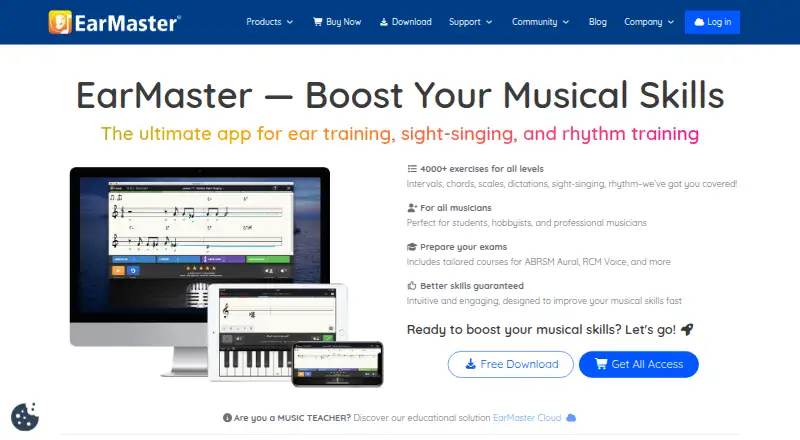
One app brings together EarMaster's ear, sight-singing, rhythm, theory and vocal activities. Android, iOS, macOS, Windows and web access cover 4,000 exercises, microphone feedback and EarMaster Cloud teaching tools. Users can start with free content, while paid options provide the full curriculum, syncing and school administration.
Review
In a line
EarMaster trains listening, sight singing and rhythm through music-learning software. Its curriculum also includes theory and vocal activities for students, teachers and groups.
What it does
The app offers 4,000 exercises and workshops. Its beginner course builds skills in rhythm, notation, pitch, chords and scales through progressive lessons.
Practice covers interval comparison, identification and singing, along with chords, scales, harmonic progressions, melodic dictation, melody sing-back, sight singing and rhythm reading. Jazz workshops add extended chords, swing rhythms and exercises based on jazz standards.
Responses can use voice recognition, claps or MIDI. Microphone work reports pitch and timing immediately, while custom drills let users select keys, pitch ranges, voicings, cadence types, time limits and answer interfaces.
How it connects
EarMaster runs on Android, iOS, macOS, Windows and the web. EarMaster Cloud links accounts across Windows, Mac, Chromebook, iPhone, iPad and Android apps, with assignments, settings and results syncing between devices.
Teachers get Student Results, Assignment Manager, Workbook Editor and Music Library tools. The library offers over 200 jazz lead sheets and 400 classical scores. Cloud results can be exported as CSV, while MusicXML score import supports rhythmic and melodic exercises.
No public REST API, SDK or developer platform is documented. EarMaster is proprietary, and its licence prohibits reverse engineering, modification and redistribution. Cloud users may continue offline for up to seven days, after which local results upload when connectivity returns.
Good fit
EarMaster is made for music students, professional musicians, hobbyists, teachers, schools and choirs. It supports structured work on intervals, chords, scales, melodies, rhythm, sight singing and vocal practice.
Schools and teachers can administer users, classes and credits through a web dashboard, then assign exercises and follow student results in the supported apps.
Watch for
A personal subscription covers one person's own devices, with an online check required at least every seven days. There is no free trial, but a free version is offered.
Cloud administration is vendor hosted. EarMaster says its data procedures follow EU GDPR and uses authentication and authorization, but it cannot guarantee that internet transmissions are completely secure.
Pricing
The free edition costs nothing indefinitely on iOS, Android, Windows and Mac. Included material covers interval and chord identification, Call of the Notes, Greensleeves and more than 20 introductory Beginner's Course lessons.
Personal access has an annual-billing rate of $3.65 per month (US$43.80 yearly) and a $5.99 monthly option that renews automatically. Both provide all lessons and courses, supported-device access, cloud sync, updates, upgrades and email support.
EarMaster Cloud is billed annually per user: $10.50 for 20–99 users, $14.50 for 10–19 users and $21.50 for 5–9 users. These plans include student and teacher access, teacher tools, an admin dashboard, and assignment and result syncing.
Other listed choices are a One-Year All-Access Pass at $49.95 one-time, EarMaster Pro 7 at $59.95 one-time, a Family Pack at $99.95 one-time, and a 10-credit Cloud pack at $170 one-time.
Verdict
EarMaster suits people seeking one multi-device app for ear training, sight singing, rhythm and related theory. Configurable drills, microphone feedback and its broad exercise collection serve both solo practice and organized teaching.
Free content lets users sample core activities; paid personal plans open the complete curriculum and syncing. Schools should review Cloud user tiers and credit rules before buying. Buyers seeking open-source software, a public developer API or unrestricted offline personal use should look elsewhere.
Our take
EarMaster is a practical choice for learners and teachers who want ear, rhythm, sight-singing and theory work in one place. The free edition covers a limited starter set, while subscriptions add every lesson, cloud synchronization and ongoing updates. Schools get assignment, results and user-management tools through EarMaster Cloud. Check the single-user personal licence, seven-day online requirement and lack of a public API before committing. Its proprietary licence and hosted cloud model also make it less suitable for buyers seeking open software or self-managed infrastructure.
- 4,000 exercises across ear, sight-singing and rhythm training
- Voice, clap and MIDI input with immediate pitch and timing feedback
- Runs on Android, iOS, macOS, Windows and the web
- Cloud tools support assignments, results and class administration
- Free version available with core beginner content
- No free trial beyond the free version
- Personal plans are limited to one user on personal devices
- Internet access is required at least once every seven days
- No documented public REST API, SDK or developer platform
- Proprietary licence blocks modification and redistribution
- Pick it ifMusic students and hobbyists building structured practice; Teachers, schools and choirs managing assignments; Musicians training intervals, chords, melody and rhythm
- Skip it ifYou need open-source software or a public developer API; You require unrestricted offline use; You need a personal licence for multiple users
Pricing
A free-forever edition covers selected lessons and exercises. Personal access is listed at $3.65 a month billed US$43.80 yearly, or $5.99 a month.
- Free versionfree forever · iOS, Android, Windows and Mac · interval and chord identification · Call of the Notes · Greensleeves · first 20+ Beginner’s Course lessonsFree
- Personal subscription yearlyUS$43.80 yearly · all lessons and courses · iOS, Android, Windows and Mac · cloud sync · updates and upgrades · email support$3.65/mo
- Personal subscription monthlyauto-renewing monthly · all lessons and courses · iOS, Android, Windows and Mac · cloud sync · updates and upgrades · email support$5.99/mo
- Monthly Subscriptionno binding · one user · personal devices · internet required$5.99/mo
- EarMaster Cloud 20–99 usersannual per user · student and teacher access on all platforms · teacher tools · admin dashboard · assignment and result sync$10.50/yr
- EarMaster Cloud 10–19 usersannual per user · student and teacher access on all platforms · teacher tools · admin dashboard · assignment and result sync$14.50/yr
- EarMaster Cloud 5–9 usersannual per user · student and teacher access on all platforms · teacher tools · admin dashboard · assignment and result sync$21.50/yr
- Yearly SubscriptionUS$43.80 yearly · one user · personal devices · internet required$43.80/yr
As earmaster.com lists them, checked 14 Oct 2026.
Questions
Is EarMaster free?
Yes. Its free edition remains available indefinitely and includes selected interval, chord, melody and beginner-course material on iOS, Android, Windows and Mac.
What devices does EarMaster support?
It supports Android, iOS, macOS, Windows and the web. EarMaster Cloud connects accounts across Windows, Mac, Chromebook, iPhone, iPad and Android apps.
Does EarMaster work offline?
Cloud users can continue without connectivity for up to seven days. Personal subscriptions require internet access at least once every seven days.
Can teachers track students?
Yes. EarMaster Cloud includes Student Results, Assignment Manager, Workbook Editor, a Music Library and a dashboard for users, classes and credits.
Does EarMaster have an API?
Its public product and support documentation describes no public REST API, SDK or developer platform.
What can I import or export?
MusicXML scores can be imported for rhythmic and melodic exercises. Cloud results can be exported to CSV.
Who is EarMaster for?
It is made for music students, professional musicians, hobbyists, teachers, schools and choirs.