EGM Downloader Review
github.com · checked 11 Oct 2026
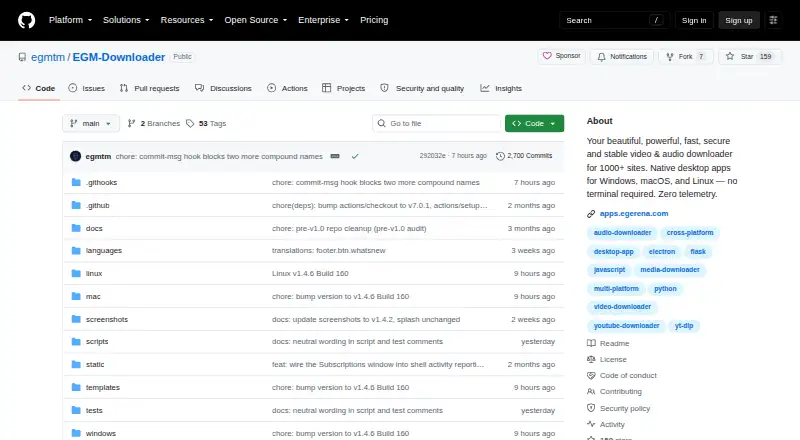
A desktop app that saves online video and extracts audio from YouTube, social networks, and more than 1,000 other sites.
How it plugs in
Signal on Video Downloaders6.9#18 of 135
Windows, macOS, and Linux users can get EGM Downloader free of charge. It fetches video or audio from more than 1,000 sites and handles playlists, subtitles, batches, and video up to 8K. Processing stays on the computer without accounts or tracking. Requirements and update procedures depend on the operating system.
Review
In a line
This desktop program saves online video and can pull out audio from supported sites. Windows, macOS, and Linux users can run it without an account.
What it does
Paste a supported site's link to retrieve content; the list covers over 1,000 services. Examples include YouTube, TikTok, Instagram, Twitter, Facebook, and Vimeo.
Video output reaches 8K, and audio may be exported as MP3, M4A, OPUS, or FLAC. Video formats include MP4, MKV, and MP4 H.264.
Playlist, batch, and subtitle downloads are available. You can follow YouTube channels or playlists so newly posted videos are fetched automatically. HDR retrieval, metadata and subtitle embedding, history, optional upscaling, and GPU-assisted conversion are included too.
How it connects
The downloader relies on yt-dlp for fetching and FFmpeg for handling video and audio. Files are handled on the local computer; the app does not use accounts, cloud processing, analytics, or usage tracking. Cookies imported from sites stay on your machine.
Settings can be exported and imported. Downloaded video files may include metadata such as thumbnails, chapters, title, artist, and date.
The software uses the AGPL-3.0 license. Modified or redistributed versions must follow its source-sharing requirements.
Good fit
The maker describes it for desktop users who want downloading without a terminal or technical setup. Single items, playlists, and batches are covered across many sites.
Local handling may appeal when privacy is important, and the feature set includes subtitle and metadata embedding, HDR, high-resolution video, and audio extraction.
Watch for
Platform prerequisites vary. Windows runs on 64-bit Windows 10 or 11 with Python 3.10 or later. The macOS build runs on macOS 13.0 or later with Apple Silicon. Linux is supplied as an AppImage for 64-bit distributions and needs FUSE.
Windows and macOS perform update checks using SHA256 verification, while Linux updates must be done manually. Bug reports and feature requests go through GitHub Issues. The security policy says vulnerability reports are acknowledged within 48 hours and initially assessed within one week of acknowledgment.
Confirm that your target site is supported and that your computer meets the relevant platform requirements before using it.
Pricing
EGM Downloader is free and includes a free plan.
Verdict
Choose EGM Downloader for a no-cost desktop way to retrieve content from many sites, manage playlist or batch work, and keep processing on your computer.
Its range of formats and quality settings, subscriptions, and local cookie storage provide flexibility. Platform prerequisites and manual Linux updates require attention, and the software is designed for desktop use rather than a hosted service.
For category comparisons, see video downloaders.
Our take
EGM Downloader suits people seeking a free, locally run way to save video and audio on Windows, macOS, or Linux. Support for numerous sites, playlists, batches, subtitles, and high-resolution output accommodates varied workflows. Users who prefer no accounts or tracking may appreciate its local design. Check the platform prerequisites, including Apple Silicon for macOS and FUSE for Linux, and note that Linux updates are manual. It is less suitable for hosted workflows or use without desktop installation.
- Free plan with no account required
- Supports over 1,000 websites
- Video output reaches 8K and audio supports FLAC
- Playlist, batch, subtitle, and channel subscription support
- Local operation without analytics or usage tracking
- macOS needs version 13.0 or later and Apple Silicon
- Windows needs 64-bit Windows 10 or 11 plus Python 3.10
- Linux updates are manual and require FUSE
- AGPL-3.0 redistribution requires source-sharing compliance
- Pick it ifDesktop users downloading from many supported websites; People seeking local processing without usage tracking; Playlist, batch, subtitle, or high-resolution downloads
- Skip it ifYou need a hosted downloader instead of desktop software; Your Mac uses Intel or cannot run macOS 13.0 or later; You cannot meet the Windows Python or Linux FUSE requirements
Pricing
The software is free, with a free plan and no trial.
Questions
How much does EGM Downloader cost?
EGM Downloader costs nothing; it has a free plan and no free trial.
Which systems can run EGM Downloader?
The app supports Windows, macOS, and Linux. Windows needs 64-bit Windows 10 or 11 with Python 3.10 or later; macOS needs 13.0 or later and Apple Silicon; Linux uses a 64-bit AppImage with FUSE.
Which websites does it support?
Its supported-source list exceeds 1,000 sites, including YouTube, TikTok, Instagram, Twitter, Facebook, and Vimeo.
Can it download playlists and subtitles?
Yes. It handles playlists, batches, and subtitles, and can follow YouTube channels or playlists to retrieve new videos automatically.
What file formats and quality are available?
Video choices include MP4, MKV, and MP4 H.264 at up to 8K. Audio can be MP3, M4A, OPUS, or FLAC, including 320 kbps MP3.
Does it require an account or send files to the cloud?
No. The app processes content locally, without accounts, cloud processing, analytics, or usage tracking. Imported site cookies remain on your machine.
How are updates handled?
Windows and macOS provide update checks with SHA256 verification. Linux updates are manual.