Elden Ring SaveForge Review
github.com · checked 5 Oct 2026
Free Windows utility for Elden Ring PC Steam and PS4 saves, offering format conversion, inventory management, and repair checks.
How it plugs in
Signal on Game Save Editors6.3#7 of 26
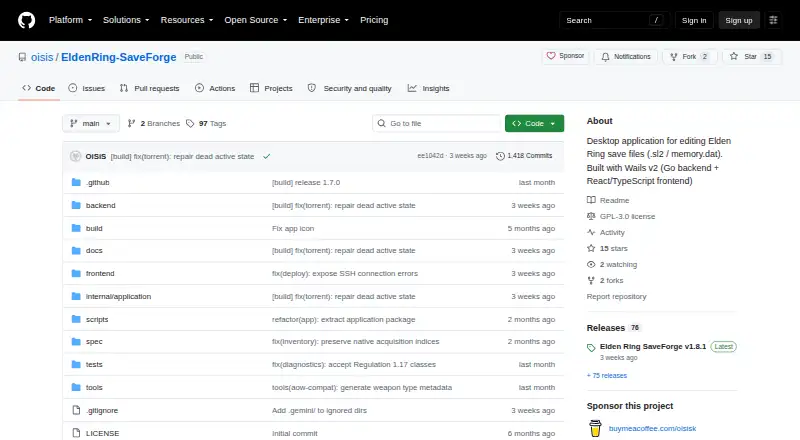
As a no-cost Windows desktop program, Elden Ring SaveForge edits Elden Ring save files. It reads PC Steam .sl2 and PS4 memory.dat data, translates between those formats, adjusts character and progression values, handles inventory, checks certain save issues, and creates backups. The project is in early development, remains unstable, and cautions that saves may suffer permanent damage.
Review
In a line
Elden Ring SaveForge is a Windows desktop tool for changing Elden Ring save files. It supports PC Steam .sl2 and PS4 memory.dat saves and can translate one format into the other.
What it does
You can change character level, attributes, runes, New Game Plus cycle, class, body type, talisman slots, and memory stones. Progression and character-stat editing are included.
Its item database offers category searches, favorites, item details, and placement of items into inventory or storage. Capacity checks run before items are added.
The app scans saves for inventory problems and offers repairs for supported cases, such as quantity limits and duplicate or index issues. Safety profiles set item limits and warn or require confirmation for risky or cut-content items.
How it connects
SaveForge runs on Windows and supports Elden Ring on PC Steam and PS4. It can read, write, and convert the supported save formats.
Deploy targets can use SSH or the local file system. Appearance presets connect with Mirror Favorites. Build templates can be imported or exported through a file or HTTPS address, with a preview before applying them.
The project is licensed under GPL-3.0 and lists Discord for contact. Its roadmap describes SSH deployment and remote game control for a Steam Deck workflow.
Good fit
It suits Elden Ring players who need to adjust character data, manage items, move saves between the supported PC and PS4 formats, or check selected inventory problems.
Automatic backups run when saves are written. A separate backup confirmation is required before Chaos Mode, which allows the riskiest actions.
Watch for
The project describes itself as early and unstable. It warns that the app can irreversibly corrupt saves, so work on copies rather than a primary save or main account.
Safety profiles identify ban risk and gate dangerous actions, but the project warns against using the tool on a main account. It is not affiliated with FromSoftware or Bandai Namco.
Pricing
SaveForge is free.
Verdict
Choose SaveForge if you need a no-cost Windows utility for Elden Ring save editing across Steam and PS4 formats, especially for inventory work, character changes, or supported repairs.
Do not choose it for a risk-free save workflow. Its unstable early-development status, corruption warning, and online account risks call for copies, careful profile choices, and a willingness to recover if something goes wrong.
Our take
SaveForge covers a wide set of Elden Ring save tasks without a purchase: character values, progression, inventory changes, diagnostics, backups, and PC-to-PS4 format conversion. Its Windows-only desktop design narrows where you can use it. More importantly, the project is still early and unstable, and it says a bad operation can permanently damage a save. The ban-risk warnings and advice to avoid main accounts make caution essential. It is a reasonable option for careful users working from duplicate saves, but not for anyone who needs dependable protection for a primary game file.
- Free with no paid plans listed
- Supports editing of PC Steam and PS4 save formats
- Moves saves between PC and PS4 formats
- Inventory search, storage tools, and capacity checks
- Automatic backups for save writes
- Early development and described as unstable
- Can irreversibly corrupt save files
- Ban-risk warnings for dangerous actions
- Windows desktop app only
- Not intended for a main account or primary save
- Pick it ifElden Ring players editing character, progression, or inventory data; Users converting supported Steam and PS4 saves; Careful users who can work from backup copies
- Skip it ifYou need a stable tool for a primary save; You cannot accept possible corruption or online ban risk; You need support beyond Windows, Steam, or PS4
Pricing
The app is free, with no paid plans listed. The facts also say there is no free trial, so there is no separate trial period to compare.
- FreeNo paid plans or pricing listedFree
As github.com lists them, checked 5 Oct 2026.
Questions
What platforms does Elden Ring SaveForge support?
It runs on Windows and supports Elden Ring saves from PC Steam and PS4.
Which save files can it edit?
It reads, edits, and writes PC Steam .sl2 files and PS4 memory.dat files, and can translate files between those formats.
Can it change character stats and progression?
Yes. It can edit level, attributes, runes, New Game Plus cycle, class, body type, talisman slots, and memory stones.
Does it include inventory tools?
Yes. The item database supports searching, categories, favorites, item details, and placing items in inventory or storage with capacity checks.
Does SaveForge back up saves?
It automatically backs up save writes and requires a separate backup confirmation before Chaos Mode.
Is Elden Ring SaveForge safe to use?
The project warns that it is early and unstable and can irreversibly corrupt saves. It advises using copies, not a main account or primary save.
Near it
All alternatives →- SNSaveEditor.net#6 on this board
- OOpenPRF#8 on this board
- G1Gothic 1 Remake Savegame Editor#5 on this board
- STSaveEditor.top#9 on this board
- NN
 NMSE (No Man's Save Editor)#4 on this board
- ASACNH Save Editor#10 on this board
- FS
 Fallout Shelter Save Editor#3 on this board
- RRepoDitor#11 on this board
- PM
 Pokémon SRM Editor#2 on this board
- KSKingdom Save Editor#12 on this board