
ExpenseBot: Receipt and Expense Tracking Review
expensebot.ai · checked 15 Oct 2026
Receipt and expense software that turns Gmail, photos, bank feeds and files into tax-ready reports.
How it plugs in
Signal on Receipt Management Software6.6#3 of 27
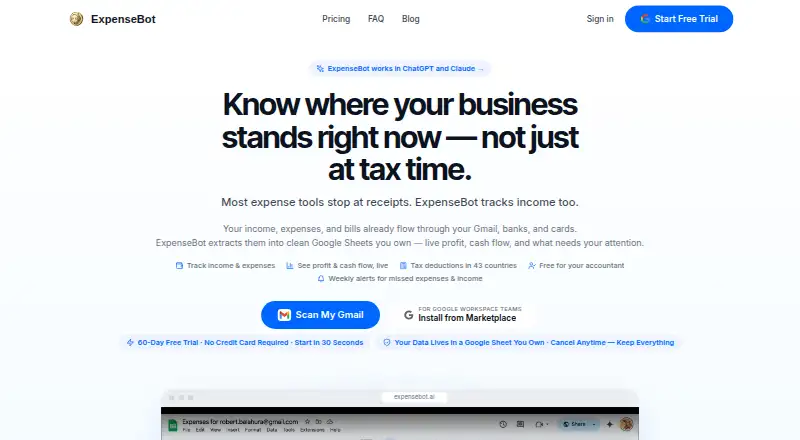
ExpenseBot gathers receipts, transactions and income, then organizes the details into reports and spreadsheets. Its AI reads amounts, dates, vendors and tax fields, checks duplicates and deductibility, and matches records with bank or card lines. It runs on the web, iOS and Android, offers accounting exports, and has free and paid plans.
Review
In a line
ExpenseBot is an expense and receipt organizer for freelancers, employees, businesses, accountants and bookkeepers. It collects financial records from email, images, banks and files, then prepares reports for tax and bookkeeping work.
What it does
The service scans Gmail history, forwarded emails, PDFs, screenshots, camera photos, Google Photos and Google Drive for receipts, invoices, payables and income. Its AI pulls out the vendor, amount, date, tax and category, flags uncertain results, checks whether costs may be deductible, and removes duplicates.
You can record income from sources such as Stripe, PayPal, invoices and cash. When income and expenses are available, ExpenseBot can show profit and cash flow by client and month and build a profit-and-loss report. It also matches receipts with bank and credit-card statement lines to find missing or repeated records.
Reports cover profit and loss, spending, mileage and year-end summaries. Exports include QuickBooks, Xero and a ZIP file of receipts. ExpenseBot prepares deduction guidance for 43 countries and Schedule C or T2125 material, but it does not file returns or close books in a general ledger.
How it connects
ExpenseBot lists connections for Gmail, Plaid, Google Photos, Google Drive, Google Maps, QuickBooks and Xero. Its accounting workflows also include Sage, FreshBooks, Wave, NetSuite, Business Central and Zoho Books. Bank credentials are handled by Plaid, while ExpenseBot receives transaction data used for expense tracking.
An MCP server lets users connect assistants and tools such as ChatGPT, Claude, Gemini, GitHub Copilot, VS Code and Zapier. Access uses a scoped, revocable token. A hosted MCP endpoint supports OAuth discovery, client registration and PKCE; its read-only npm package is MIT-licensed.
Source documents and spreadsheets stay in your Google Drive. Email content and receipt files are processed temporarily rather than kept as permanent copies on ExpenseBot's servers. Google permissions include Gmail reading and label changes, Google Photos reading and adding, and limited Drive access. It does not offer UK-only or EEA-only data residency. See Receipt Management Software for similar tools.
Good fit
ExpenseBot suits people who want one place for receipt capture, income tracking, reconciliation and exports. It supports freelancers, employees seeking reimbursement, incorporated businesses, team administrators and accounting professionals.
Accountants can invite clients, use an act-as mode without client passwords and view several clients from one dashboard. Browser access works on iPhone, iPad, Android devices and computers without a download.
Watch for
Automation handles data entry, not professional judgment. ExpenseBot marks uncertain extraction for review, so users still need to check records and deductions. It does not issue corporate cards or set bank spending limits.
Check regional tax needs before relying on the prepared material: forms for some countries are beta worksheets, and the service does not file tax returns. Also review the Google permissions and the lack of UK-only or EEA-only storage if those matter to you.
Pricing
ExpenseBot has a free plan and a 60-day trial. The Accountant plan is free forever with unlimited clients.
The Monthly plan is $10 a month, per seat, with up to three Gmail accounts, six forwarding addresses and unlimited receipt processing. The Annual plan is $100 a year, billed yearly, with the Monthly features and 12 months priced as 10.
A selected completed past year costs $79 one-time. The Last completed calendar year scan is also $79 one-time and includes years through 2025. Any Past Year access costs $199 one-time, covering one available past calendar year per scan.
Verdict
Choose ExpenseBot if you want automated receipt capture tied to Google services, bank reconciliation, income-and-profit tracking and direct accounting exports. Its accountant workspace and browser-based access help people managing several clients or working across devices.
Look elsewhere if you need the software to file returns, close books, provide UK or EEA data residency, or issue company cards. Buyers should also budget time to review flagged extractions and confirm that the available country worksheets fit their tax process.
Our take
ExpenseBot is a practical match for freelancers, small companies and accounting practices that want receipts, income and bank activity gathered into one reporting workflow. The free accountant options and browser access may help client managers, while paid options include one-time scans for selected past years. It is less suitable for organizations needing formal tax filing, general-ledger closing, corporate-card controls or UK/EEA-only data storage. Anyone choosing it should plan for human checks when the AI flags uncertain extraction and should review the Google and banking permissions first.
- Captures receipts from Gmail, photos, PDFs, Drive and forwarded emails.
- Matches receipts with bank or card lines and detects duplicates.
- Exports reports to QuickBooks, Xero and a ZIP of receipts.
- Tracks income, profit and cash flow by client and month.
- Free accountant plan with unlimited clients.
- Does not file tax returns or close books in a general ledger.
- No UK-only or EEA-only data residency option.
- Uncertain AI extraction still needs human review.
- Does not issue corporate cards or set spending limits.
- Pick it ifFreelancers and businesses organizing receipts, income and deductions; Accountants managing multiple clients; Users already working with Google Drive and accounting software
- Skip it ifYou need built-in tax filing or general-ledger year-end closing.; Your organization requires UK or EEA-only data residency.; You need company cards or bank spending controls.
Pricing
A free plan and 60-day trial are available. Accountant plans are free under their stated conditions.
- Accountant / bookkeeper client managementManaging clients is free · Client scanning requires the client’s own subscription or accountant sponsorshipFree
- Accountantforever · free for accountants · unlimited clientsFree
- Monthlymonthly · per seat · up to 3 Gmail accounts · up to 6 forwarding addresses · unlimited receipt processing$10/mo
- One selected completed year$79 for one selected completed year · Optional unlock for one completed past year$79 one-time
- Last completed calendar year scanone-time · one selected completed year · includes years through 2025$79 one-time
- Annualonce yearly · everything in Monthly · 12 months priced as 10$100/yr
- Any Past Year accessone-time · any available past calendar year · one year per scan$199 one-time
As expensebot.ai lists them, checked 2 Oct 2026.
Questions
Does ExpenseBot have a free plan?
Yes. It offers a free plan and a 60-day trial. The Accountant plan is free forever with unlimited clients.
Where does ExpenseBot store my receipts?
Created spreadsheets, reports and durable receipt files remain in your Google Drive. Email content and receipt files are processed temporarily rather than stored permanently on ExpenseBot's servers.
Can it connect to my bank?
Yes. Plaid handles bank credentials, and ExpenseBot uses relevant transaction data to match bank or card lines with recorded receipts.
Which accounting tools can receive exports?
Reports can export to QuickBooks or Xero. Listed workflows also cover Sage, FreshBooks, Wave, NetSuite, Business Central and Zoho Books.
Can ExpenseBot file my tax return?
No. It prepares deduction guidance for 43 countries and Schedule C or T2125 material, but it does not file returns or close books in a general ledger.
How can I use ExpenseBot with AI assistants?
Its MCP server connects with ChatGPT, Claude, Gemini, GitHub Copilot, VS Code, Zapier and other MCP clients through a scoped token you can revoke.
Near it
All alternatives →- VI
 Veryfi Invoices OCR API#2 on this board
- RR
 Receipt Reader AI#4 on this board
- OOpenReceipts#1 on this board
- OR
 OCR Receipt#5 on this board
- H
 Hubdoc#6 on this board
- DPDext Prepare#7 on this board
- FE
 Finago eTasku#8 on this board
- RW
 Receipt Wrangler#9 on this board
- SR
 Saldo Receipt Scanner#10 on this board
- KKeepR#11 on this board