ForgeRock Authenticator review
docs.pingidentity.com · checked 12 Oct 2026
Free mobile authenticator for Android and iOS with push prompts and one-time codes.
How it plugs in
Signal on Authenticator apps6.4#32 of 111
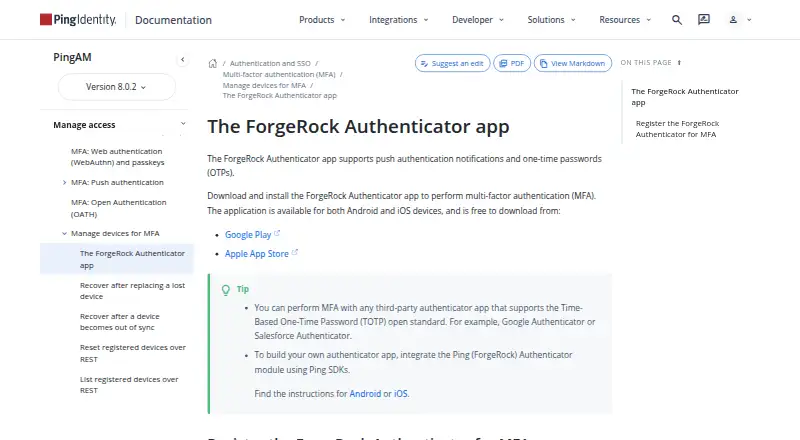
ForgeRock Authenticator provides multi-factor sign-ins on Android and iOS at no cost. It handles push approvals and OATH HOTP or TOTP passwords, supports several accounts, and allows QR-code registration. Push enrollment needs internet access, whereas OTP setup can be completed offline. Ping recommends moving to PingID for MFA.
Review
In a line
ForgeRock Authenticator is a no-cost mobile tool for multi-factor authentication. On Android and iOS, it delivers approval prompts and generates one-time passwords.
What it does
For every authentication method, users enroll the app with an identity provider; QR-code scanning is one available registration route. The app handles OATH HOTP and TOTP codes together with push alerts.
A single installation can register multiple accounts, each with several authentication methods. Internet access is unnecessary for OTP enrollment but required for push enrollment.
How it connects
PingOne Advanced Identity Cloud and PingAM authentication journeys support the app. The product’s server list also names PingOne and PingFederate.
Developers can use the Ping Authenticator module to put TOTP, HOTP, and push capabilities into Android or iOS applications. The module lists Android, iOS, and JavaScript SDKs.
Other authenticator apps implementing the TOTP open standard, including Google Authenticator and Salesforce Authenticator, can also work with PingAM.
Good fit
It suits organizations using Ping identity services that need push sign-ins or one-time passwords on Android and iOS.
It may also suit teams creating mobile applications with the Ping Authenticator module, or people managing several accounts in one app.
Watch for
After a push device is enrolled, store the recovery codes separately: they are displayed a single time and may be needed when the device is lost, stolen, or damaged.
Review connectivity before beginning: push enrollment needs internet access, whereas OTP enrollment does not. Administrators may apply policies that block rooted devices.
Ping advises users to move to the PingID mobile app for MFA. PingAM leaves stored device settings unencrypted by default, though administrators can turn on encryption.
Pricing
The Android and iOS download and use are free, and ForgeRock Authenticator is listed with a free plan.
Verdict
Choose it when your sign-in system uses PingOne, PingAM, PingOne Advanced Identity Cloud, or PingFederate and you want a no-cost mobile authenticator.
Consider PingID instead if you want to follow Ping’s current MFA direction.
Our take
ForgeRock Authenticator fits Ping environments seeking a free mobile second factor with both push prompts and standard one-time codes. Its support for multiple accounts and methods helps manage more than one sign-in. Setup requires attention to connectivity, safe storage of one-time recovery codes, encryption settings, and rooted-device policies. Since Ping directs users toward PingID, confirm its place in your roadmap before standardizing on ForgeRock Authenticator.
- No-cost Android and iOS download
- Push approvals plus HOTP and TOTP support
- Multiple accounts and authentication methods in one app
- OTP enrollment works without internet
- SDK module for Android, iOS, and JavaScript
- Internet is needed for push enrollment
- Recovery codes appear a single time
- Ping advises moving to PingID for MFA
- Device settings are unencrypted by default
- Policies may block rooted devices
- Pick it ifOrganizations using Ping identity services; People needing both push and one-time-password options; Teams adding authenticator capabilities to mobile apps
- Skip it ifYou need a product outside the Ping ecosystem; You want Ping’s currently recommended MFA app; You cannot manage one-time recovery codes safely
Pricing
ForgeRock Authenticator is free to download on Android and iOS, and its listed plan is free.
- ForgeRock AuthenticatorFree to download · Android and iOSFree
As docs.pingidentity.com lists them, checked 12 Oct 2026.
Questions
Is ForgeRock Authenticator free?
Yes. Android and iOS downloads are free, and the listed ForgeRock Authenticator plan costs nothing.
Which codes does it support?
It handles OATH HOTP and TOTP one-time passwords, as well as push approval notifications.
Does it work offline?
An internet connection is not needed for OTP enrollment, but push-notification enrollment requires internet access.
Which Ping services work with it?
The app can be used in PingOne Advanced Identity Cloud and PingAM journeys; PingOne and PingFederate also appear in the supported-server list.
Can one app hold several accounts?
Yes. Multiple accounts can be registered, with multiple authentication methods inside each account.
What happens if a push phone is lost?
Keep the recovery codes in a separate place after push enrollment. They appear only once and may help when the device is lost, stolen, or broken.
Can another authenticator app be used with PingAM?
Yes. PingAM supports third-party authenticators that implement the TOTP open standard, including Google Authenticator and Salesforce Authenticator.
Near it
All alternatives →- MIMonofor Identity#31 on this board
- JPJumpCloud Protect#33 on this board
- TMTOTP Manager#30 on this board
- SASAP Authenticator#34 on this board
- OA
 Open Authenticator#29 on this board
- SASafeID Authenticator#35 on this board
- TTwoFac#28 on this board
- GA
 Ghost Auth#36 on this board
- D
 deskOTP#27 on this board
- OA
 OpenOTP Authentication Server#37 on this board