Fruition PDF Accessibility
fruition.net · checked 15 Oct 2026
Hosted PDF remediation service that adds accessible structure, tags, alt text, and WCAG 2.2 AA fixes.
How it plugs in
Signal on PDF Accessibility Software6.3#3 of 26
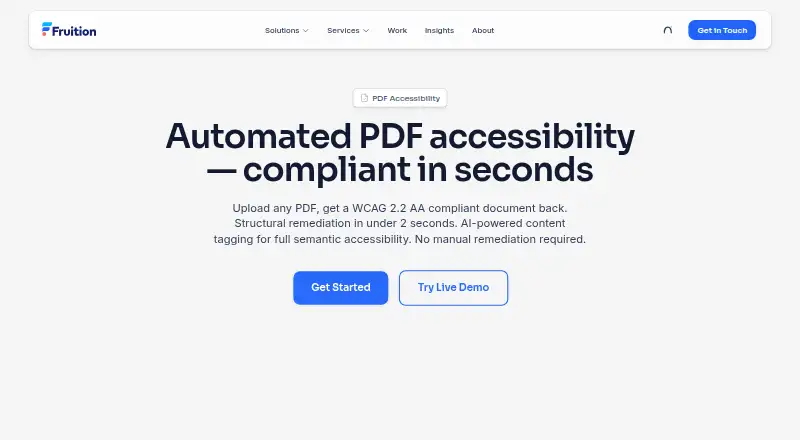
Fruition PDF Accessibility is a hosted web and REST API service for repairing PDF accessibility. It can apply structural fixes in under two seconds per document, while AI tagging takes 30–60 seconds. The service recognizes document structure, creates image descriptions, checks contrast, and returns a remediated PDF. A free allowance covers 10 basic pages each month.
Review
In a line
Fruition PDF Accessibility is a hosted service that turns uploaded PDFs into documents targeting WCAG 2.2 AA, PDF/UA-1, Section 508, and ADA requirements.
You can use its browser interface or send files through its API.
What it does
Structural remediation adds metadata, marks the PDF as tagged, sets tab order, builds structure and parent trees, preserves page resources, and creates bookmarks. It also adds a PDF/UA-1 identifier.
Its AI phase identifies headings, paragraphs, lists, and tables; adds semantic tags; builds a structure tree; writes image alt text; and checks color contrast. Structural work is listed at under two seconds per document, while AI tagging takes 30–60 seconds.
How it connects
The documented connection is a REST API at ada.fru.io. Send a valid PDF with POST /api/v1/remediate using multipart/form-data and an X-API-Key header. The response contains the remediated PDF and compliance metrics in response headers.
Requests support PDFs up to 100 pages. No native connectors, self-hosting package, open-source license, or downloadable source code are listed. For more options, see PDF Accessibility Software.
Good fit
The service is aimed at government, higher education, healthcare, legal, enterprise, and financial-services groups handling PDFs at scale.
It suits teams that need structural tagging, reading-order fixes, alternative text, PDF/UA metadata, contrast correction, and an API workflow.
Watch for
AI tagging is much slower than structural remediation, taking 30–60 seconds per document. Each API request is limited to 100 pages.
Native business-app integrations and a self-hosting option are not described.
Pricing
The Free plan allows 10 basic pages each month with no credit card, structural fixes, and processing listed at under two seconds per page. A free trial is also offered.
Basic costs $0.50 one-time per page after the free allowance and covers structural remediation, metadata, tags, bookmarks, tab order, and PDF/UA metadata. Full AI costs $2 one-time per page and adds WCAG 2.2 AA remediation, AI alt text, semantic tagging, tables, contrast and reading-order fixes, and a validation report. Volume pricing is available for government and enterprise customers.
Verdict
Choose Fruition PDF Accessibility if your organization needs an API-driven way to process many PDFs and wants both structural repairs and AI-assisted tagging. The 10-page monthly free allowance lets you start without payment details.
Check the 100-page request cap and the longer AI processing time before planning batch work. Buyers needing native app connectors, downloadable source, or self-hosting should look elsewhere.
Our take
Fruition PDF Accessibility fits organizations that process PDFs regularly and need a hosted API alongside browser access. Its free monthly allowance is useful for small workloads, while per-page Basic and Full AI plans cover deeper repairs. The service targets several accessibility standards and can return compliance metrics with each API response. However, AI work takes considerably longer than structural fixes, and requests cannot exceed 100 pages. It is not a match for teams requiring native business-app connectors, self-hosting, or open-source code.
- Free plan covers 10 basic pages per month
- REST API accepts valid PDFs up to 100 pages
- AI adds alt text, semantic tags, and contrast checks
- Structural fixes include bookmarks and tab order
- Full AI plan includes a validation report
- AI tagging takes 30–60 seconds per document
- API requests are limited to 100 pages
- No native business-app connectors are listed
- No self-hosting package or source code is provided
- Pick it ifOrganizations processing accessible PDFs at scale; Teams needing browser access and a REST API; Government and enterprise buyers eligible for volume pricing
- Skip it ifYou need native connectors for business applications; You require self-hosting or open-source code; Your PDFs exceed the 100-page API limit
Pricing
Free covers 10 basic pages monthly. Basic is $0.50 one-time per page after the allowance; Full AI is $2 one-time per page. Volume pricing is available for government and enterprise customers.
- Free10 basic pages/month · no credit card · structural fixes · under 2 seconds/pageFree
- Free — Get Started10 pages/mo · basic structural remediation · no credit card required · under 2 seconds per pageFree
- Basicper page after free allowance · structural remediation · metadata · tags · bookmarks · tab order · PDF/UA metadata$0.50 one-time
- Basic — Structural Remediationafter 10 free pages per month · metadata · tags · bookmarks · tab order · color space$0.50 one-time
- Full AIper page · WCAG 2.2 AA remediation · AI alt text · semantic tagging · tables · contrast correction · reading-order fixes · validation report$2 one-time
- Full AI — Complete WCAG 2.2 AAincludes all structural fixes · AI alt text · semantic tagging · tables · color contrast correction · reading order · validation report$2 one-time
As fruition.net lists them, checked 15 Oct 2026.
Questions
Is there a free plan?
Yes. The Free plan includes 10 basic pages per month, structural fixes, no credit card, and processing listed at under two seconds per page.
What file types can the API process?
The API accepts any valid PDF document.
How large can an API request be?
Each request supports a PDF of up to 100 pages.
What does Full AI include?
Full AI costs $2 one-time per page and includes WCAG 2.2 AA remediation, AI alt text, semantic tagging, tables, contrast and reading-order fixes, and a validation report.
Does it offer integrations?
The documented integration is a REST API. No native connectors for other business applications are listed.
Is the software open source?
No open-source license or downloadable source code is published for the reviewed product pages.
Near it
All alternatives →- V
 veraPDF#2 on this board
- EP
 EqualWeb PDF Tools#4 on this board
- PD
 PDFix Desktop#1 on this board
- PAPDFAccessibility.ai#5 on this board
- CPCommonLook PDF#6 on this board
- A
 AccessiblePDF#7 on this board
- NNormfluss#8 on this board
- NDNutrient DWS Accessibility API#9 on this board
- D
 DocAccessible#10 on this board
- P2PAVE 2.0#11 on this board