Fulgur open-source text editor review
fulgur.app · checked 10 Oct 2026
A GPU-powered, open-source editor with optional encrypted synchronization.
How it plugs in
Signal on Text Editors6.3#44 of 82
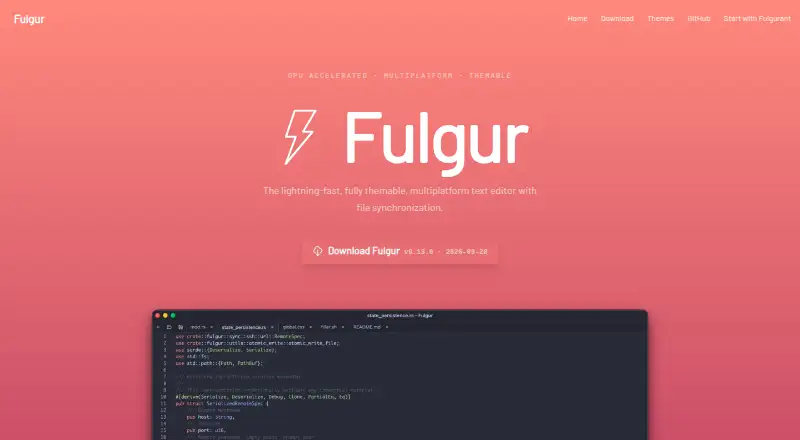
Fulgur is an open-source text editor available for Windows, macOS, and Linux. It handles common text files, highlights over 50 languages, and includes Markdown tools. Through Fulgurant, files can move between devices with end-to-end protection. Editing remains available offline, and remote files can be opened over SSH.
Review
In a line
Fulgur is a GPU-accelerated text editor with customizable themes and file synchronization. It is free and released under the Apache License 2.0.
What it does
Markdown, CSV, log files, and other text formats are supported. More than 50 languages receive syntax highlighting, while multi-cursor, column, and large-file workflows are available.
A Markdown toolbar and live preview are included. You can select a curated theme or make your own. Remote machines can also be edited through SSH.
How it connects
Windows, macOS, and Linux are supported, with downloads for Apple Silicon Macs, Windows x86-64, and Linux x86-64 or aarch64. Self-hosted setups are supported as well.
Fulgurant handles synchronization. Every device creates its own API key for a Fulgurant server, while end-to-end encryption protects shared files. A Fulgurant server can be hosted by you, and it cannot read the files' plaintext.
Synchronization is optional. Other Fulgur features run standalone and offline. On Linux, saving sync encryption keys requires a Secret Service provider such as GNOME Keyring or KWallet.
Good fit
Fulgur suits people who want one text editor across Windows, macOS, and Linux, with multi-cursor and column editing for larger files.
It is also a fit for users who need Markdown preview, SSH-based remote editing, or encrypted file sharing between devices. Its open-source license and self-hosting option suit people who want control over the synchronization server.
Watch for
Fulgur is in active development, so check whether its current behavior fits your work before relying on it.
Synchronization needs Fulgurant, a server, and a device API key. Linux users also need a running Secret Service provider to store encryption keys. The editor itself works offline, but synced files do not update without the synchronization setup.
Pricing
The software is free to use and includes a free plan. There is no free trial because the product is already free.
Verdict
Choose Fulgur if you want a no-cost, open-source editor with broad text-file support, Markdown tools, remote SSH editing, and optional encrypted synchronization.
Look elsewhere if you need a mature product rather than software in active development, or if setting up a Fulgurant server and Linux key storage is not suitable for your workflow.
Our take
Fulgur is a sensible choice for people who want a free editor that works on the three major desktop systems and can keep text files encrypted across devices. Its offline operation, SSH editing, Markdown preview, and support for large files cover varied everyday work. The main commitment is the synchronization setup: shared files require Fulgurant, a server, and device API keys. Linux users have an extra key-storage requirement. Because development is ongoing, review current behavior before making it central to a critical workflow.
- No-cost, open-source software
- Available for Windows, macOS, and Linux
- End-to-end protection for synchronized files
- Built-in Markdown toolbar and live preview
- Multi-cursor, column, and large-file editing are supported
- Synchronization requires a Fulgurant server
- Linux sync keys need GNOME Keyring, KWallet, or another Secret Service
- Development is still active
- No free trial is offered
- Pick it ifPeople wanting a free cross-platform text editor; Users needing encrypted sync or SSH remote editing; People who prefer self-hosted synchronization
- Skip it ifYou do not want to configure a synchronization server; You need software outside an actively developing project; You cannot provide Linux Secret Service key storage
Pricing
Fulgur costs nothing: the plan is free, and there is no separate trial period. Optional synchronization still requires a Fulgurant server, which can be self-hosted.
Questions
Is Fulgur free?
Yes. Fulgur is free to use, has a free plan, and is licensed under Apache License 2.0.
Which systems run Fulgur?
Fulgur supports Windows, macOS, and Linux. Listed downloads include macOS Apple Silicon, Windows x86-64, and Linux x86-64 or aarch64 packages.
Does Fulgur work offline?
Yes. Features other than file synchronization work standalone and offline. Synchronization needs Fulgurant.
How does Fulgur sync files?
Fulgur uses Fulgurant to share text files between devices. Each device connects with a unique API key, and files are end-to-end encrypted.
Can I host the sync server myself?
Yes. You can set up your own Fulgurant server for synchronization.
What files and languages does it support?
It handles text formats including Markdown, CSV, and logs, with syntax highlighting for more than 50 languages.
Does it support SSH file editing?
Yes. It can edit files on remote machines over SSH.
What does Linux need for sync?
Linux needs a running Secret Service provider, such as GNOME Keyring or KWallet, to store synchronization encryption keys.
Near it
All alternatives →- TTextMate#43 on this board
- GT
 GNU TeXmacs#45 on this board
- C4
 CKEditor 4#42 on this board
- NNextpad++#46 on this board
- VRVisual Regression Tracker#41 on this board
- TEText Editor Pro#47 on this board
- JSJoe's Own Editor#40 on this board
- NNotepad2#48 on this board
- MEMicrosoft Edit#39 on this board
- WWriteMonkey#49 on this board