Game Time Manager: Free Windows Game Timer
github.com · checked 15 Oct 2026
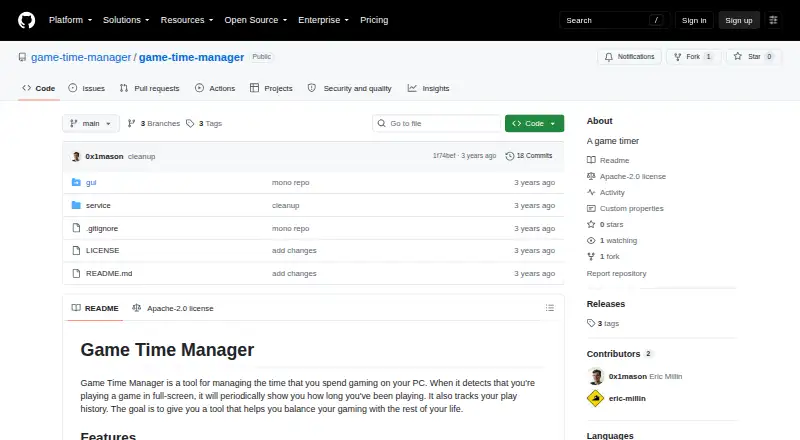
A no-cost Windows utility that logs PC gaming time and periodically reminds you how long you have been playing.
How it plugs in
Signal on Game Playtime Trackers7.3#1 of 20
Game Time Manager is a free desktop utility for Windows PCs. It detects fullscreen games, records what you played and when, and places a play-time overlay on screen at intervals. After login, it runs in the background; the published builds are alpha releases, and some planned tracking functions are still unfinished.
Review
In a line
For Windows PCs, Game Time Manager logs time spent in games, keeps a play history, and reminds you how long a fullscreen session has lasted.
What it does
Once installed, the program stays active in the background and launches when you sign in. It recognizes fullscreen gameplay and then puts a timer overlay over the game at intervals.
Normally, the overlay remains on screen for 10 seconds, with another display every 10 minutes. Its overlay options can be edited in config.toml without restarting. The program also records which games you played and when.
How it connects
The project is distributed as open-source software under the Apache License 2.0. It runs on Windows PCs and is documented as tested on Windows 10 and Windows 11.
To install it, download a release, extract the archive, and run install.ps1 in PowerShell. The maker does not list third-party integrations, a public API, SDKs, plugins, or integration endpoints.
Good fit
Windows players seeking automatic session records and an in-game elapsed-time prompt may find it useful. According to the maker, it supports most PC games, including the vast majority of them.
Watch for
The releases currently listed are alpha builds. Windows is the only documented platform; macOS, Linux, web, mobile, and browser extensions are outside the stated scope.
Analysis of play over time and game-specific rules remain TODO items. Make sure a basic timer and history are sufficient before installing.
Pricing
Game Time Manager costs nothing, with no paid plan or free trial listed. Its Free plan provides the core timer and overlay on Windows, tested on Windows 10 and 11.
Verdict
Consider Game Time Manager if you use Windows and want a free, open-source way to view session length and retain play history. Automatic tracking and a configurable overlay handle basic time awareness.
Look elsewhere if you need trend metrics, game-specific limits, integrations, or another operating system. For more options, compare game playtime trackers.
Our take
Consider Game Time Manager if you use Windows and want a free, open-source way to view session length and retain play history. Automatic tracking and a configurable overlay handle basic time awareness. Look elsewhere if you need trend metrics, game-specific limits, integrations, or another operating system. For more options, compare game playtime trackers.
- Free on Windows with no trial requirement
- Distributed under the Apache License 2.0
- Automatically detects fullscreen games
- Records what you played and when
- In-game overlay options are configurable
- The listed builds are alpha releases
- Windows is the only documented platform
- Play-over-time analysis is still unfinished
- Game-specific rules remain incomplete
- No stated integrations or public API
- Pick it ifWindows players wanting automatic session reminders; People who need a straightforward gaming history; Users comfortable installing an alpha build
- Skip it ifYou need macOS, Linux, mobile, web, or browser support; You require trend metrics or game-specific limits; Your setup depends on integrations or a public API
Pricing
The only listed plan is Free: $0 on Windows, including the core timer and overlay. No paid tier or free trial is listed.
- FreeWindows only · tested on Windows 10 and 11 · core timer and overlayFree
- Free and open sourceWindows only · tested on Windows 10 and 11Free
As github.com lists them, checked 15 Oct 2026.
Questions
What does Game Time Manager do?
It is a Windows desktop utility that logs PC gaming time, keeps play history, and displays reminders during fullscreen gameplay.
What is the overlay schedule?
The default display lasts 10 seconds and returns every 10 minutes. Overlay options can be edited in config.toml without restarting the program.
Can I use it without paying?
Yes. The listed Free plan costs nothing and includes the core timer and overlay. No free trial is offered because no paid plan is listed.
Will it recognize my games?
The maker describes compatibility with most PC games, saying the app works with the vast majority. Detection uses fullscreen mode.
What license does it use?
The repository is released under the Apache License 2.0.
Are integrations or an API provided?
The maker does not state that it provides third-party integrations, a public API, SDK, plugin system, or integration endpoints.
Which capabilities are unfinished?
Play-over-time metrics and game-specific rules are marked as TODO items, and the listed releases are alpha versions.
Near it
All alternatives →- APActually Played#2 on this board
- GGameDiary#3 on this board
- P
 PlayTracker#4 on this board
- G
 GamePal#5 on this board
- GGamingGaiden#6 on this board
- AEArknights: Endfield Playtime Tracker#7 on this board
- SWSteam Wrapped#8 on this board
- P
 Pyroblast#9 on this board
- SGSteam Game Playtime Tracker#10 on this board
- P
 PlayCounter#11 on this board