GameChat review
nintendo.com · checked 7 Oct 2026
Nintendo Switch 2 includes GameChat for talking by voice, showing game screens, and meeting friends on video.
How it plugs in
Signal on Game Voice Chat Software5.3#22 of 22
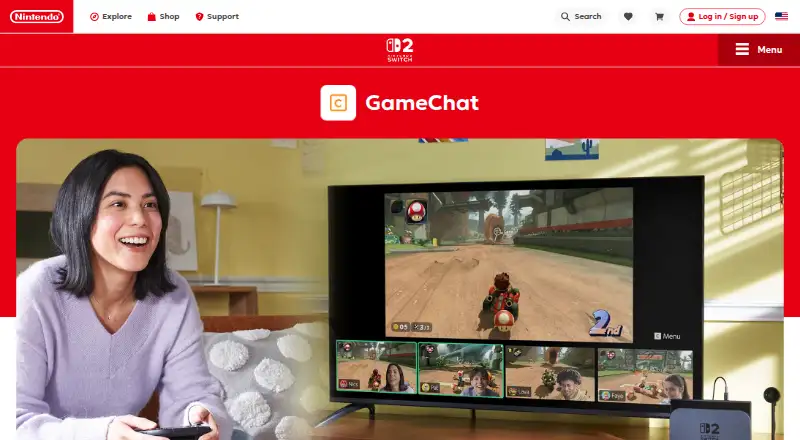
GameChat on Nintendo Switch 2 brings together voice conversations, live screen sharing, and video calls. Voice rooms hold up to 12 participants, whereas screen or video sharing is limited to four people at once. Using it online calls for internet access, a Nintendo Account, and Nintendo Switch Online. A compatible USB-C camera, sold separately, is needed for video calls.
Review
In a line
GameChat lets Nintendo Switch 2 players talk with friends, share game screens, and join video chat while they play.
What it does
Voice rooms support as many as 12 participants, and no more than four can share screens or appear on video simultaneously.
Players can open GameChat, reply to invitations, or mute themselves with the C Button on the right Joy-Con 2 controller. The Switch 2 microphone filters sounds such as game audio and adjusts its volume to the surroundings.
Supported games can use GameShare to let chat friends play selected modes without owning the game.
How it connects
GameChat runs exclusively on Nintendo Switch 2. To use its online features, players need internet access, a Nintendo Account, and Nintendo Switch Online; Nintendo says availability varies by country.
Video participation calls for a separately purchased compatible USB-C camera. Players can change the video backdrop, even choosing the game currently being played.
Only approved friends on the player's friends list can join a session. Setting up GameChat also involves text-message verification through the phone number registered to the Nintendo Account.
Good fit
GameChat suits Switch 2 owners who want voice communication and shared game views without leaving the console. It also fits groups using supported GameShare games.
Voice groups can reach 12 people, but screen sharing and video each accommodate four at once.
Watch for
Nintendo Switch 2 is the sole platform for online GameChat, and access depends on a Nintendo Switch Online membership. Availability may vary by country.
Video chat requires purchasing and setting up a compatible USB-C camera. Players younger than 16 must receive parent or guardian permission in the Nintendo Switch Parental Controls app, and that adult determines whom they may chat with.
Phone verification is part of setup. Users can report uncomfortable or harassing behavior, and confirmed violations may lead to account suspension.
Pricing
GameChat comes with Nintendo Switch Online instead of having its own separate free plan. Nintendo Switch Online Individual costs $19.99 a year for one Nintendo Account; the Family plan costs $34.99 a year for up to eight accounts.
Nintendo Switch Online + Expansion Pack costs $49.99 a year for one account or $79.99 a year for up to eight accounts. These plans add Expansion Pack content alongside Nintendo Switch Online benefits.
Nintendo offers a 7-day free trial for Nintendo Switch Online membership. The comparison describes this as a membership trial, not a GameChat-specific trial.
Verdict
Choose GameChat if your group already plays on Switch 2 and wants console-based voice chat, screen sharing, or supported GameShare sessions. The built-in microphone and controller shortcut keep basic use on the console.
Check the membership requirement, country availability, phone verification, and parental approval rules first. Video callers also need a separate USB-C camera. If your friends use other platforms, a service such as [[sw|discord|Discord]] may be a better fit.
Our take
GameChat makes the most sense for Nintendo Switch 2 households that already plan to keep Nintendo Switch Online. It covers large voice groups and adds shared screens, video, and selected GameShare play in one console feature. The tradeoffs are clear: no support beyond Switch 2, a separate camera for video, required phone verification, and approval rules for younger players. Families should compare the individual and family memberships, while mixed-device groups should consider a cross-platform voice service instead.
- A voice session can hold up to 12 participants.
- Up to four people can share screens or join video at the same time.
- The built-in microphone filters unwanted sound.
- GameShare can support selected modes for friends without the game.
- GameChat is confined to Nintendo Switch 2.
- Nintendo Switch Online is needed for online use.
- Video chat needs a separately sold compatible USB-C camera.
- Setup includes text-message phone verification.
- Pick it ifSwitch 2 groups wanting built-in voice and screen sharing; Families using Nintendo Switch Online memberships
- Skip it ifYou need mobile or non-Switch platforms.; You want video chat without buying a separate USB-C camera.
Pricing
GameChat access comes with Nintendo Switch Online. Individual membership is $19.99 a year, Family is $34.99 a year, and Expansion Pack plans cost $49.99 or $79.99 a year. Nintendo also lists a 7-day membership trial, not a GameChat-only trial.
- GameChatIncluded with Nintendo Switch Online; Nintendo Switch 2 only; up to 12 voice-chat participantsFree
- Nintendo Switch Online Individual$19.99 USD/year · 1 Nintendo Account$19.99/yr
- Nintendo Switch Online Individual$19.99 USD / year · 1 Nintendo Account; GameChat access on Nintendo Switch 2$19.99/yr
- Nintendo Switch Online Family$34.99 USD/year · Up to 8 Nintendo Accounts$34.99/yr
- Nintendo Switch Online + Expansion Pack Individual$49.99 USD / year · 1 Nintendo Account; includes Nintendo Switch Online benefits and additional content$49.99/yr
- Nintendo Switch Online + Expansion Pack Individual$49.99 USD/year · 1 Nintendo Account$49.99/yr
- Nintendo Switch Online + Expansion Pack Family$79.99 USD/year · Up to 8 Nintendo Accounts$79.99/yr
As nintendo.com lists them, checked 7 Oct 2026.
Questions
How many people can join GameChat voice chat?
One GameChat voice session accommodates as many as 12 participants.
How many people can share screens or use video?
At most four people can share screens or appear in video chat simultaneously.
Do I need a camera for GameChat?
Only video chat uses a camera; a compatible USB-C model must be purchased separately.
What does GameChat cost?
GameChat is included with Nintendo Switch Online. Individual membership costs $19.99 a year, and Family membership costs $34.99 a year.
Can children use GameChat?
Those under 16 require parent or guardian approval in the Nintendo Switch Parental Controls app, and may chat only with contacts that adult approves.
Does GameChat work on phones or other consoles?
No. GameChat is available only on Nintendo Switch 2.