
Platform
Godlike Launcher: Minecraft Launcher for Mods and Servers
Godlike Digital Solutions · checked 3 Nov 2026
A free Windows desktop launcher for Minecraft that keeps separate game setups, mods, modpacks and servers in one app.
How it plugs in
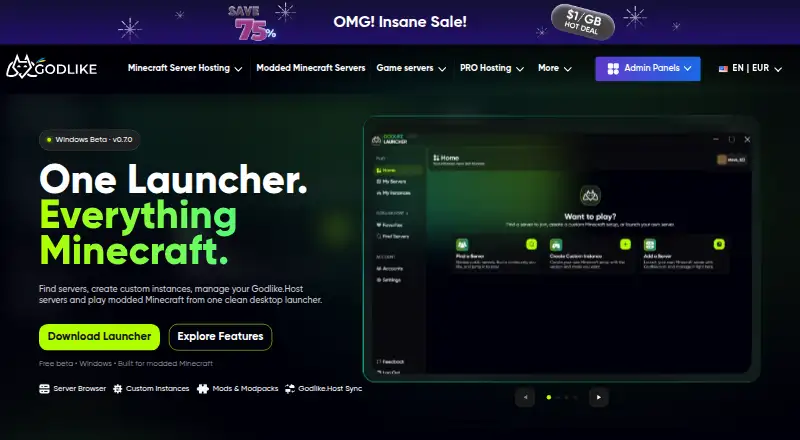
Godlike Launcher is a desktop Minecraft launcher for Windows, offered as a free beta. It creates separate Minecraft installations, called instances, for different game versions and mod loaders, installs mods and modpacks from CurseForge and Modrinth, finds community servers, and lets Godlike.Host customers reach their own servers from the same app.
Review
In a line
Godlike Launcher is a free Windows desktop launcher for Minecraft that keeps game versions, mods, modpacks and servers together in one app.
What it does
The launcher creates instances, which are separate Minecraft installations, each with its own game version, mod loader, mods and settings. Changing one instance does not break another, and there is no limit on how many you create. The supported loaders, the add-on frameworks that mods run on, are Vanilla, Fabric, Forge, NeoForge and Quilt.
Mods and modpacks come from CurseForge and Modrinth. You can install a ready-made modpack and add or update mods later, keep resource packs and shaders with the instance they belong to, and hold a modpack on a fixed version so a server setup stays stable.
How it connects
A built-in server browser searches community servers by name, modpack and tags, filters them by Minecraft version, loader, category and game mode, and shows loader, tags, votes and player status. Joining a server sets up the right Minecraft version, loader and client for you.
Godlike.Host customers can sign in with their Godlike account, see their servers under My servers, and manage and connect to them without leaving the launcher.
Good fit
It fits Windows players who switch between modded setups, install modpacks often or look for new community servers, and players who host with Godlike.Host and want hosting and play in one place.
Each instance has its own settings for memory (RAM), installation path, the Java version the game runs on, fullscreen, resolution, logs and updates.
Watch for
The launcher is a beta for Windows, so check the current version on the Godlike page before relying on it.
Managing your own server from the launcher needs a Godlike.Host server; finding and joining community servers does not.
Pricing
The Windows beta is free to download and use. A Godlike.Host server is only needed if you want to manage your own hosting from the launcher.
Verdict
Godlike Launcher suits Windows players who want several modded Minecraft setups kept apart, with modpacks and server discovery in one app.
It is less suited to players outside Windows or to anyone who needs a finished release rather than a beta.
Our take
Godlike Launcher suits Windows players who run several modded Minecraft setups and want them kept apart, with mods, modpacks and server discovery in one app, and Godlike.Host customers who want their servers in the same place. It is a Windows beta, so check the current version on the Godlike page before relying on it.
- Free to download and use
- No limit on the number of separate Minecraft instances
- Supports the Vanilla, Fabric, Forge, NeoForge and Quilt loaders
- Installs mods and modpacks from CurseForge and Modrinth
- Built-in server browser with filters for version, loader, category and game mode
- Available as a Windows beta
- Managing your own hosting from the launcher needs a Godlike.Host server
- FocusWindows players who run several modded Minecraft setups; Players who install modpacks from CurseForge or Modrinth; Godlike.Host customers who want their servers in the same app
- Skip it ifYou play on a computer that does not run Windows; You need a finished release rather than a beta
Plans
| Plan | Includes | Price |
|---|---|---|
| Free | — | Free |
| Windows beta | Windows · v0.7.0 · no limit on instances | Free |
As godlike.host lists them, checked 3 Nov 2026; the plan page has the final word.
Questions
What is Godlike Launcher?
A desktop Minecraft launcher for Windows that creates and manages Minecraft instances, installs mods and modpacks, finds community servers and gives access to Godlike.Host servers.
Is Godlike Launcher free?
Yes. The Windows beta is free to download and use; a Godlike.Host server is only needed to manage your own hosting from the launcher.
Which mod loaders does Godlike Launcher support?
Vanilla, Fabric, Forge, NeoForge and Quilt.
Can Godlike Launcher install CurseForge and Modrinth modpacks?
Yes. Both are content sources, and you can add or update mods in a modpack after installing it.
How many instances can I create?
There is no limit. Each instance is kept separate and can use its own Minecraft version, loader and mods.
Can Godlike Launcher find Minecraft servers?
Yes. Its server browser searches community servers by name, modpack and tags and filters them by version, loader, category and game mode.